


GitHub in its annual State of the Octoverse for 2019 announced the top open-source packages with the most dependent projects.
Lodash
Lodash is a JavaScript utility library and a very popular NPM package.
It provides utility functions for common programming tasks that make JavaScript easier by taking the hassle out of working with arrays, numbers, objects, strings, dates, etc.
lodash v4.18.1
Site | Docs | FP Guide | Contributing | Wiki | Code of Conduct | Governance | Twitter | Chat
Important
As announced on the OpenJS Foundation blog, Lodash has received support from the Sovereign Tech Agency and will transition to the Feature-Complete maturity stage so that it remains stable, secure, and sustainable long-term. As part of this effort, Lodash is rebooting its governance. A draft charter will be published shortly. The upcoming Technical Steering Committee (TSC) is already at work. For transparency, its members are listed in GOVERNANCE.md.
The Lodash library exported as a UMD module.
Generated using lodash-cli:
$ npm run build
$ lodash -o ./dist/lodash.js
$ lodash core -o ./dist/lodash.core.js
Download
Lodash is released under the MIT license & supports modern environments.
Review the build differences…
It has a ton of helper functions which help you to be more productive and save a lot of time.
The library is very light (~24kB gzipped), efficient, popular and loved (more than 42K stars on Github).
It is used by more than 5.4m repositories on Github.
Express
Express is a minimal and flexible Node.js web application framework based on MVC architecture that provides a robust set of features for web and mobile applications.
MongoDB = database
Express.js = back-end web framework
Angular = front-end framework
Node.js = back-end platform / web framework

Fast, unopinionated, minimalist web framework for Node.js.
Table of contents
- Installation
- Features
- Docs & Community
- Quick Start
- Philosophy
- Examples
- Contributing
- Current project team members
- License




import express from 'express'

const app = express()

app.get('/', (req, res) => {
  res.send('Hello World')
})

app.listen(3000, () => {
  console.log('Server is running on http://localhost:3000')
})
Installation
This is a Node.js module available through the npm registry.
Before installing, download and install Node.js. Node.js 18 or higher is required.
If this is a brand new project, make sure to create a package.json first with
the npm init command.
Installation is done using the
npm install command:
npm install express
…
Express is inspired by the popular Ruby framework, Sinatra. It provides a number of robust features for building single and multi-page web applications.
It has more than 46K stars on Github.
It is used by more than 5.2m repositories on Github.
Vision Media Debug
A JavaScript debugging utility after Node.js core's debugging technique. Works in Node.js and web browsers.
The tool aims at both libraries and applications. Besides Node.js, Debug is also suitable for working in browsers.
 debug-js
/
debug
debug-js
/
debug
A tiny JavaScript debugging utility modelled after Node.js core's debugging technique. Works in Node.js and web browsers
debug


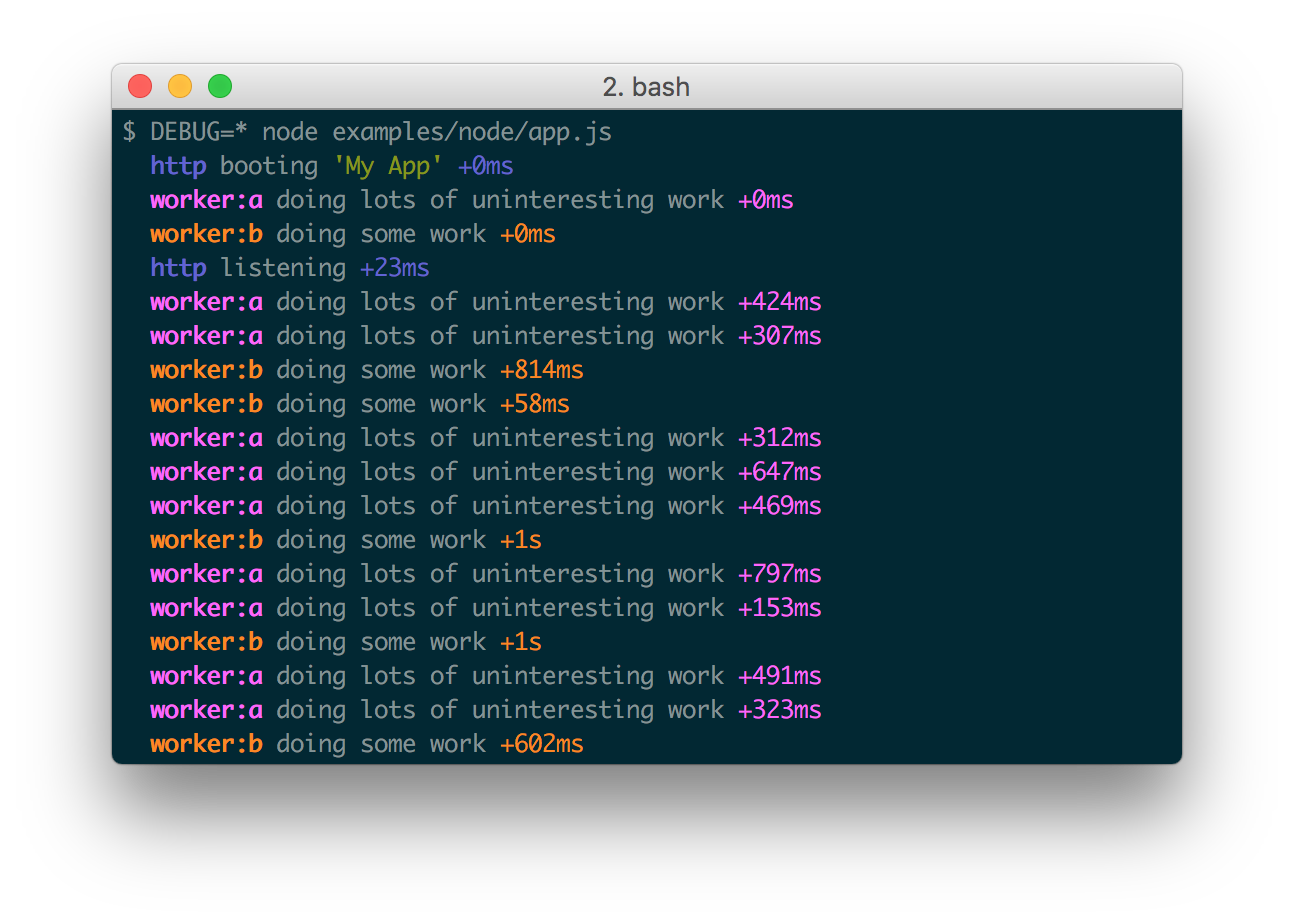
A tiny JavaScript debugging utility modelled after Node.js core's debugging technique. Works in Node.js and web browsers.
Installation
$ npm install debug
Usage
debug exposes a function; simply pass this function the name of your module, and it will return a decorated version of console.error for you to pass debug statements to. This will allow you to toggle the debug output for different parts of your module as well as the module as a whole.
Example app.js:
var debug = require('debug')('http')
  , http = require('http')
  , name = 'My App';
// fake app

debug('booting %o', name);

http.createServer(function(req, res){
  debug(req.method + ' ' + req.url);
  res.end('hello\n');
}).listen(…It has more than 8K stars on Github.
It is used by more than 5.3m repositories on Github.
Inherits
Easy simple tiny inheritance in JavaScript.
This package exports standard inherits from node.js util module in a node environment. It also provides alternative browser-friendly implementation through browser field.
Browser-friendly inheritance fully compatible with standard node.js inherits.
This package exports standard inherits from node.js util module in
node environment, but also provides alternative browser-friendly
implementation through browser
field. Alternative
implementation is a literal copy of standard one located in standalone
module to avoid requiring of util. It also has a shim for old
browsers with no Object.create support.
While keeping you sure you are using standard inherits
implementation in node.js environment, it allows bundlers such as
browserify to not
include full util package to your client code if all you need is
just inherits function. It worth, because browser shim for util
package is large and inherits is often the single function you need
from it.
It's recommended to use this package instead of
require('util').inherits for any code that has chances to be used
not only in node.js but in browser too.
usage
var inherits =…It is used by more than 5.1m repositories on Github.
Zeit MS
This package is used to easily convert various time formats to milliseconds.
Works both in Node.js and in the browser

ms


Use this package to easily convert various time formats to milliseconds.
Examples
ms('2 days')  // 172800000
ms('1d')      // 86400000
ms('10h')     // 36000000
ms('2.5 hrs') // 9000000
ms('2h')      // 7200000
ms('1m')      // 60000
ms('5s')      // 5000
ms('1y')      // 31557600000
ms('100')     // 100
ms('-3 days') // -259200000
ms('-1h')     // -3600000
ms('-200')    // -200
Convert from Milliseconds
ms(60000)             // "1m"
ms(2 * 60000)         // "2m"
ms(-3 * 60000)        // "-3m"
ms(ms('10 hours'))    // "10h"
Time Format Written-Out
ms(60000, { long: true })             // "1 minute"
ms(2 * 60000, { long: true…It is used by more than 5m repositories on Github.
Safe Buffer
The goal of this package is to provide a safe replacement for the node.js Buffer.
feross
/
safe-buffer
Safer Node.js Buffer API
safe-buffer 







Safer Node.js Buffer API
Use the new Node.js Buffer APIs (Buffer.from, Buffer.alloc
Buffer.allocUnsafe, Buffer.allocUnsafeSlow) in all versions of Node.js.
Uses the built-in implementation when available.
install
npm install safe-buffer
usage
The goal of this package is to provide a safe replacement for the node.js Buffer.
It's a drop-in replacement for Buffer. You can use it by adding one require line to
the top of your node.js modules:
var Buffer = require('safe-buffer').Buffer
// Existing buffer code will continue to work without issues:

new Buffer('hey', 'utf8')
new Buffer([1, 2, 3], 'utf8')
new Buffer(obj)
new Buffer(16) // create an uninitialized buffer (potentially unsafe)

// But you can use these new explicit APIs to make clear what you want:

Buffer.from(…Node semver
The semantic version parser for Node used by npm
npm
/
node-semver
The semver parser for node (the one npm uses)
semver(1) -- The semantic versioner for npm
Install
npm install semver
Usage
As a node module:
const semver = require('semver')

semver.valid('1.2.3') // '1.2.3'
semver.valid('a.b.c') // null
semver.clean('  =v1.2.3   ') // '1.2.3'
semver.satisfies('1.2.3', '1.x || >=2.5.0 || 5.0.0 - 7.2.3') // true
semver.gt('1.2.3', '9.8.7') // false
semver.lt('1.2.3', '9.8.7') // true
semver.minVersion('>=1.0.0') // '1.0.0'
semver.valid(semver.coerce('v2')) // '2.0.0'
semver.valid(semver.coerce('42.6.7.9.3-alpha')) // '42.6.7'
You can also just load the module for the function that you care about if you'd like to minimize your footprint.
// load the whole API at once in a single…It is used by more than 4.8m repositories on Github.
Mime Db
A database of all mime types. It consists of only a single, public JSON file which does not include any logic.
It aggregates data from the following sources:
- http://www.iana.org/assignments/media-types/media-types.xhtml
- http://svn.apache.org/repos/asf/httpd/httpd/trunk/docs/conf/mime.types
- http://hg.nginx.org/nginx/raw-file/default/conf/mime.types
mime-db
This is a large database of mime types and information about them It consists of a single, public JSON file and does not include any logic allowing it to remain as un-opinionated as possible with an API. It aggregates data from the following sources:
- https://www.iana.org/assignments/media-types/media-types.xhtml
- https://svn.apache.org/repos/asf/httpd/httpd/trunk/docs/conf/mime.types
- https://hg.nginx.org/nginx/raw-file/default/conf/mime.types
Installation
npm install mime-db
Database Download
If you intend to use this in a web browser, you can conveniently access the JSON file via jsDelivr, a popular CDN (Content Delivery Network). To ensure stability and compatibility, it is advisable to specify a release tag instead of using the 'master' branch. This is because the JSON file's format might change in future updates, and relying on a specific release tag will prevent potential issues arising from these changes.
https://cdn.jsdelivr.net/gh/jshttp/mime-db@master/db.json
Usage
var db = require('mime-db')

// grab data on .js files
var data = db['application/javascript']
Data Structure
…It is used by more than 4.8m repositories on Github.
QS
A query string parsing and stringifying library with nesting support.

qs 






A querystring parsing and stringifying library with some added security.
Lead Maintainer: Jordan Harband
The qs module was originally created and maintained by TJ Holowaychuk.
Usage
var qs = require('qs');
var assert = require('assert');

var obj = qs.parse('a=c');
assert.deepEqual(obj, { a: 'c' });

var str = qs.stringify(obj);
assert.equal(str, 'a=c');
Parsing Objects
qs.parse(string, [options]);
qs allows you to create nested objects within your query strings, by surrounding the name of sub-keys with square brackets [].
For example, the string 'foo[bar]=baz' converts to:
assert.deepEqual(qs.parse('foo[bar]=baz'), {
    foo: {
        bar: 'baz'
    }
});
…
It is used by more than 4.7m repositories on Github.
Image Credit:
GitHub Blog


Top comments (1)
Micromatch is used by 7.5 million github.com/micromatch/micromatch/