


tl;dr
- RAG stands for: Retrieval-Augmented Generation.
- became massively popular in 2023.
- The core concept? Making LLMs appear more knowledgeable by shoving extra info into the prompt.
Context Injection
So the idea behind RAG is straightforward:
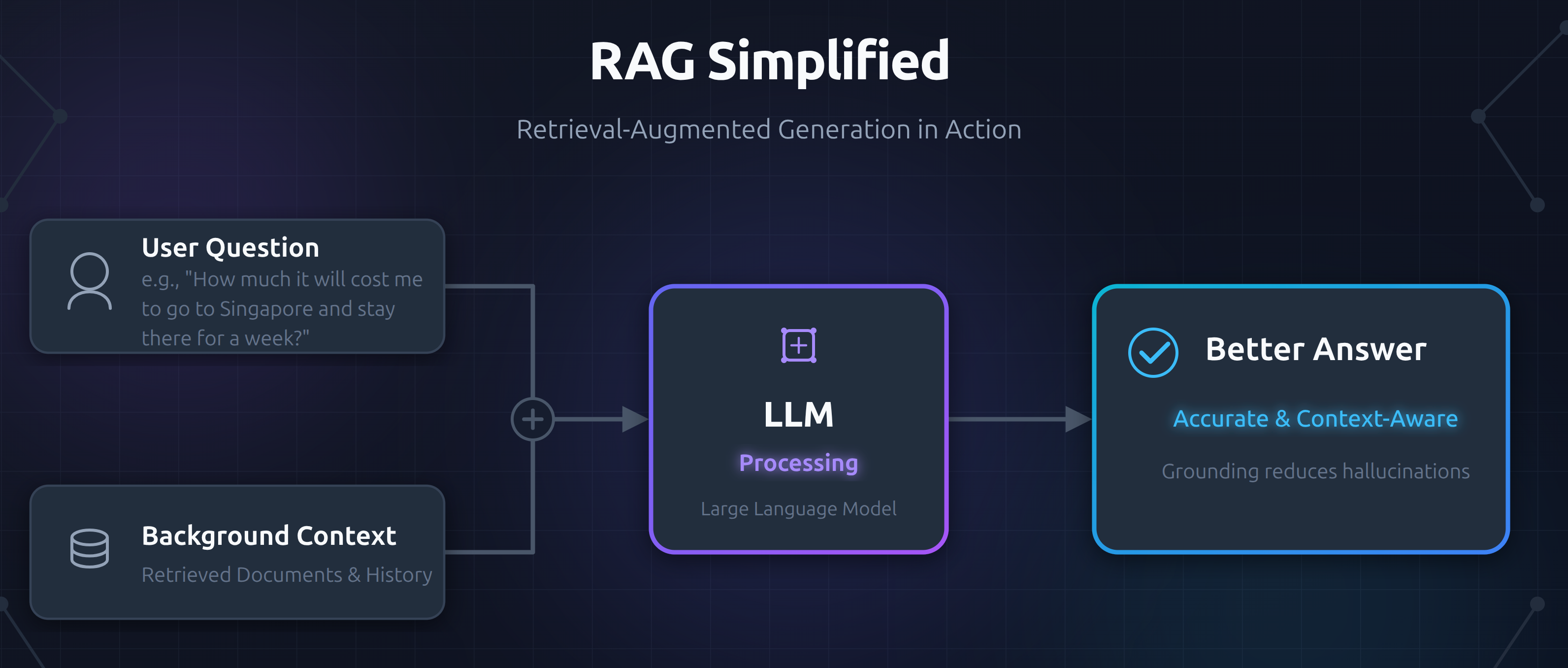
If you're a travel consultant trying to answer questions about travel costs, you could just shove all the relevant information into the prompt, things like:
- Cab prices.
- Train prices.
- Hotel/motel prices.
- ...
The LLM, when predicting the next tokens, will generate responses consistent with that context.
This works! You can try it yourself with deepseek, give it some extra information alongside your question, and it'll incorporate that context into its answer.
💡 Pro Tip
LLMs are notorious at being nondeterministic, so if we are going to give a financial advice it is always a good idea to mention this 😅. For example in this example the application must tell their clients that they need to treat the numbers as ballpark figures.
Overloaded LLM 😉
The obvious issue is that this approach doesn't scale. If you're a consultant agency for traveling, you will be answering all sort of questions for different destinations. You cannot cram all that information into a prompt. Issues with this approach:
- It exceed context limits.
- You are setting up LLM up to fail with an overwhelming amount of irrelevant information.
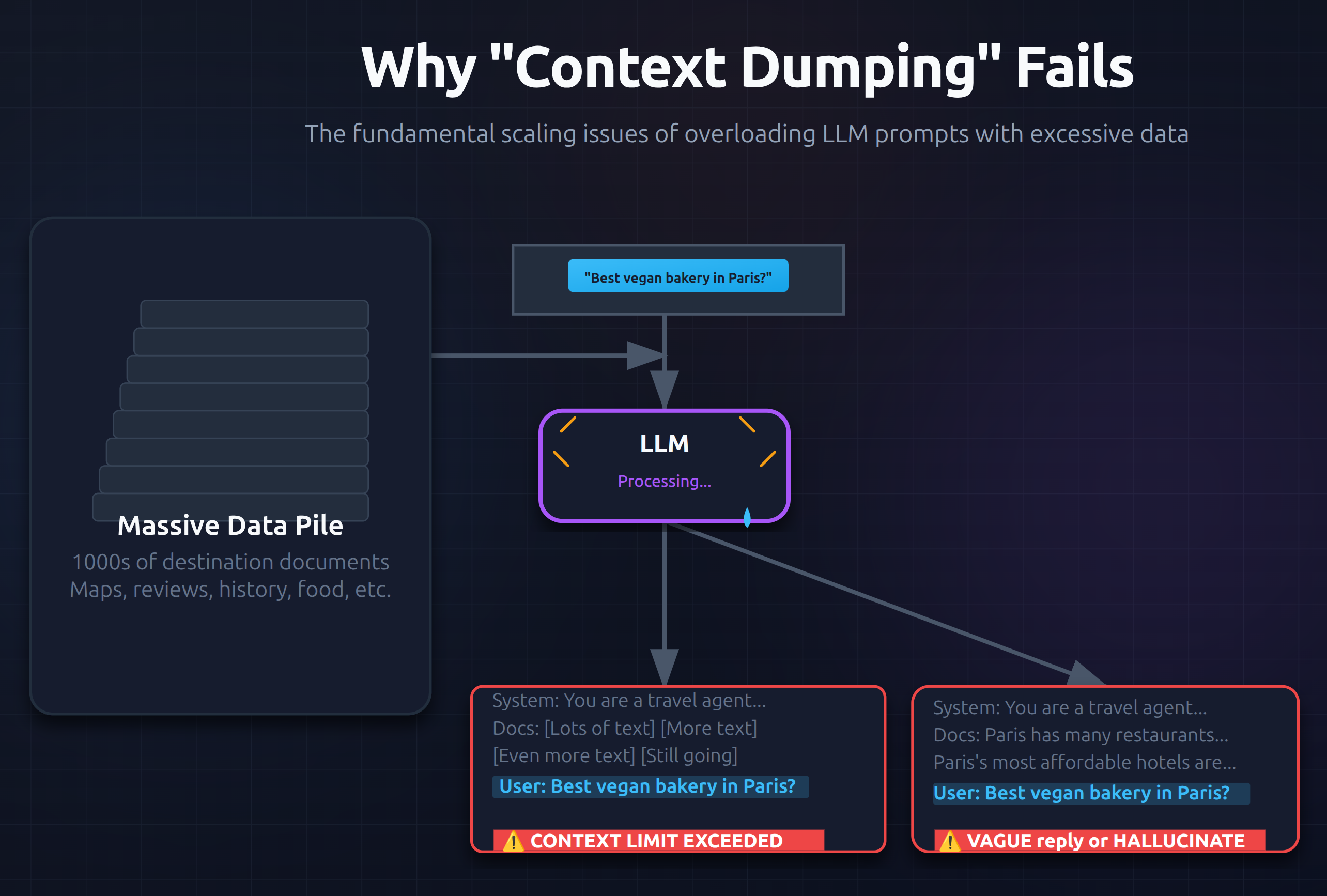
Solution -- Semantic Search & Embedded Models
Rather than sending all data, select a relevant subset that's most likely to answer the question. This requires what's called a fuzzy search or semantic search, finding information based on meaning rather than just keywords.
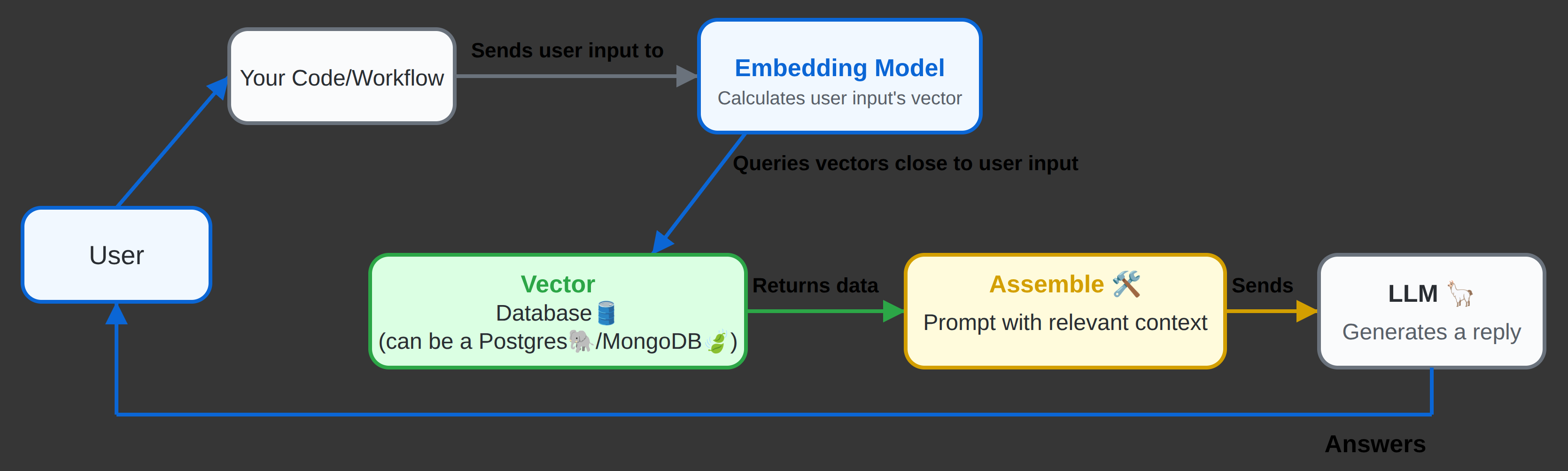
So now that we know about semantic search it is time to look at embedding models, also called an encoder. It is a special type of LLM. :
Take text as input -> Output a list of numbers (a vector) that represents the meaning of that text
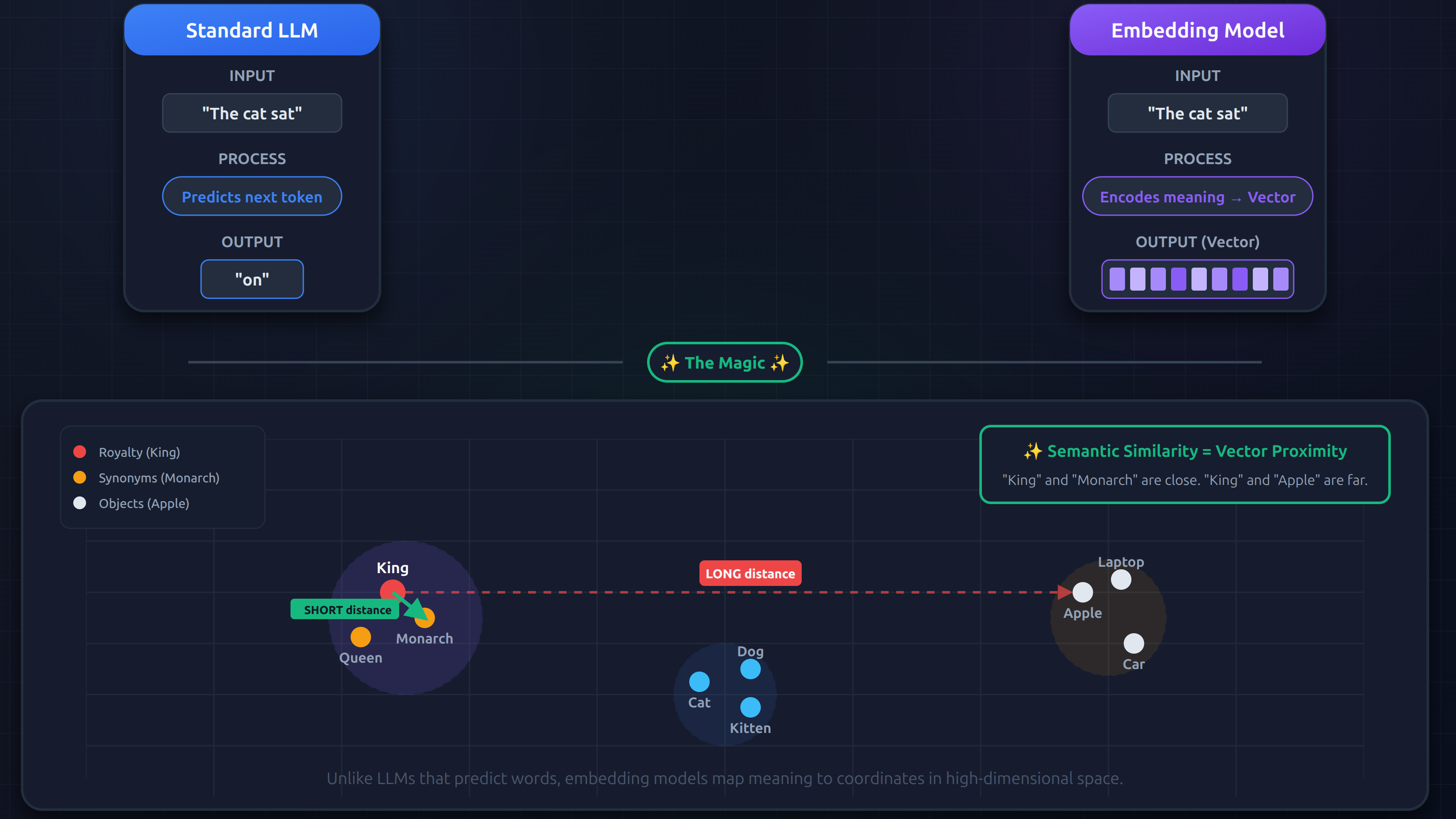
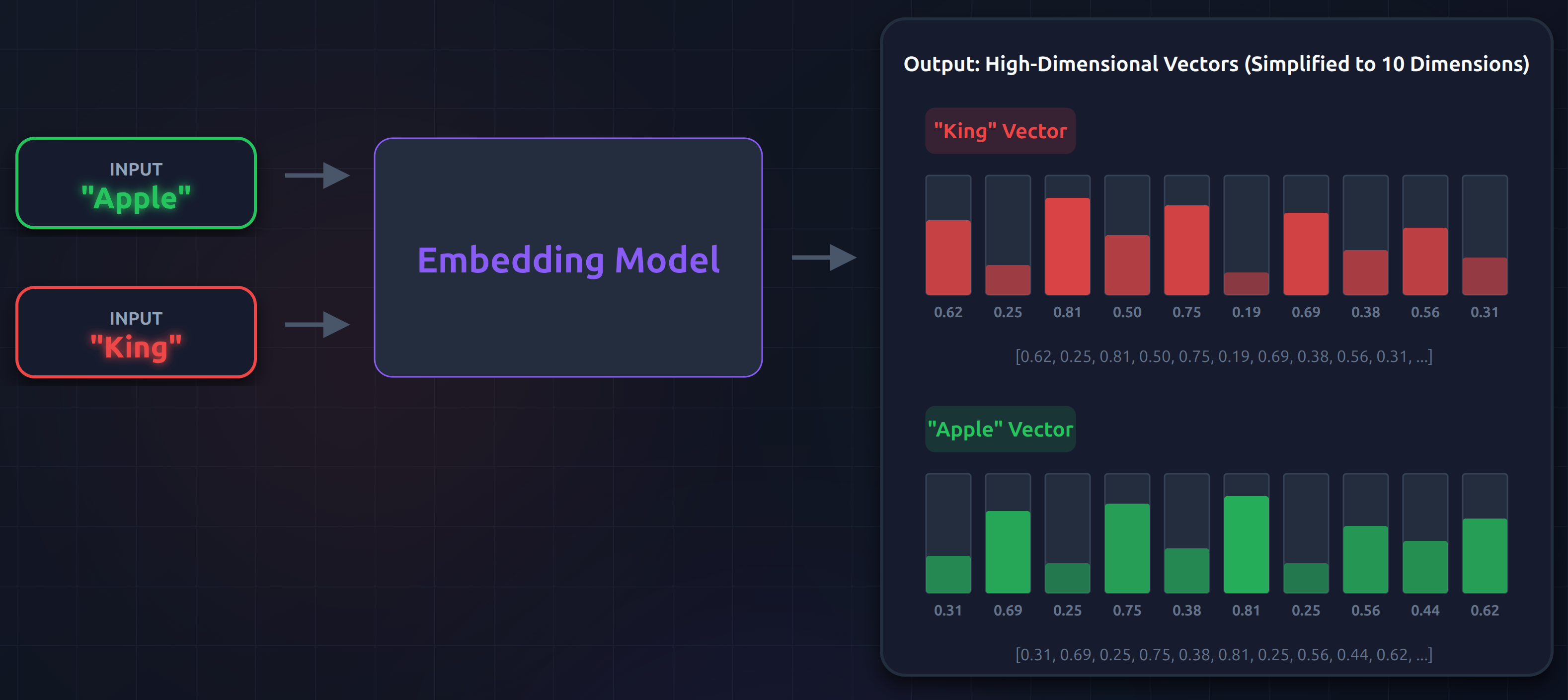
So "How much does it cost to rent a hotel in Songapore?" and "What's the ticket price Singapore?" would produce similar vectors—even though the words are completely different!
BTW you can see one example of this here: Building AI-Powered Search and RAG with PostgreSQL and Vector Embeddings
It's important to understand that the LLM doesn't know anything about embeddings or vectors. It just receives a prompt with relevant context and predicts the most likely next tokens based on that context.
Chunking
When vectorizing data, you need to decide how to break up your documents/data:
- Whole document as one vector?
- Paragraphs?
- Sentences?
This way you won't be returning irrelevant data.
Cheating 😅
I was a bit confused as to how should we do this chunking and how should we transform a database record/document to chunks. But then I came across what we have in n8n. There we have "Edit Fields (Set)" node:
And as you can see I am converting a
{
  "nodes": [
    {
      "parameters": {
        "assignments": {
          "assignments": [
            {
              "id": "e29af996-8009-498c-800a-94ee4f27d585",
              "name": "content",
              "value": "=Product name is {{ $json.name }}\nThis is {{ $json.description }}\nIt is categorized as a {{ $json.category }}\nIts SKU is {{ $json.sku }}\nAnd it costs {{ $json.price }} {{ $json.priceUnit }}",
              "type": "string"
            }
          ]
        },
        "options": {}
      },
      "type": "n8n-nodes-base.set",
      "typeVersion": 3.5,
      "position": [
        416,
        0
      ],
      "id": "59cf446b-ff04-4467-98b2-202b9d6260ec",
      "name": "Edit Fields"
    }
  ],
  "connections": {
    "Edit Fields": {
      "main": [
        []
      ]
    }
  },
  "pinData": {},
  "meta": {
    "templateCredsSetupCompleted": true,
    "instanceId": "d7f40ac67c918c6b77c1db2f31baa37e504a493b4a22e372f2a513b7bf0ca5a9"
  }
}
And I imagined the table which I am getting the data from would look like this:
CREATE TABLE IF NOT EXISTS products (
    id UUID PRIMARY KEY DEFAULT gen_random_uuid(),
    name VARCHAR(255) NOT NULL CHECK (LENGTH(name) >= 1),
    description VARCHAR(2000) NOT NULL CHECK (LENGTH(description) BETWEEN 100 AND 2000),
    sku VARCHAR(255) NOT NULL CHECK (LENGTH(sku) >= 1),
    price DOUBLE PRECISION NOT NULL,
    price_unit VARCHAR(50) NOT NULL,
    category VARCHAR(255) NOT NULL,
    created_at TIMESTAMPTZ NOT NULL DEFAULT NOW(),
    updated_at TIMESTAMPTZ NOT NULL DEFAULT NOW()
);
Then it is time for us to chunk it before sending it to an embedding model. For this you can use "Default Data Loader" which has a default chunking logic:
- It works on the
{{ $json.content }}returned by the "Edit Fields (Set)" node.- Splits every 1000 characters with a 200 character overlap.
{
  "nodes": [
    {
      "parameters": {
        "jsonMode": "expressionData",
        "jsonData": "={{ $json.content }}",
        "options": {}
      },
      "type": "@n8n/n8n-nodes-langchain.documentDefaultDataLoader",
      "typeVersion": 1.1,
      "position": [
        720,
        176
      ],
      "id": "00a5f3ea-4f9e-45f1-b7a0-db7138cbf015",
      "name": "Default Data Loader"
    }
  ],
  "connections": {
    "Default Data Loader": {
      "ai_document": [
        []
      ]
    }
  },
  "pinData": {},
  "meta": {
    "templateCredsSetupCompleted": true,
    "instanceId": "d7f40ac67c918c6b77c1db2f31baa37e504a493b4a22e372f2a513b7bf0ca5a9"
  }
}

Chunking Logic -- Open Question
One aspect I take issue with regarding the "Default Data Loader" is its rudimentary chunking strategy. Specifically, how can we be sure that blindly dividing text at fixed 1000-character intervals even with a 200-character overlap won't cause us to lose semantic meaning or contextual flow within each chunk?
- Consider segmenting based on natural breaks in the content.
- As you work with LLMs, you may find that certain types of data respond better to specific chunking methods. Continuously learning from the outcomes will help you improve both your chunking strategy and your understanding of how the LLM processes the information.
Why We Need the Embedding Model?
At this point you should be clear as to why and where we use the mbedding model. But since the first time I was reading about RAGs and embedding models I was confused I am gonna explain it here.
A vector Database (like Pinecone, Milvus, or pgvector) is just a storage and indexing engine.
It stores lists of numbers (vectors) and organizes them using special math (like HNSW or IVF indexes) so it can find nearest neighbors really fast.
It does not contain a natural language processing model. It has no idea what words mean. If you feed it raw text ("Ticket to London costs $500"), it will throw an error because it only accepts numerical arrays.
To store data, you MUST pre-compute the vector.
RAG is the go-to Technique for
- Expert knowledge workers with expertise about company products.
- HR systems that need to know all company policies.
- Customer support agents with access to product documentation
- Internal knowledge bases for employee questions.
Traditional RAG vs Agentic RAG
| Traditional RAG | Agentic RAG |
|---|---|
| Linear workflow | Iterative, autonomous workflow |
| Code controls retrieval | LLM decides retrieval strategy |
| Single vector retrieval tool | Multiple tools (vector, SQL, etc.) |
| Fixed retrieval parameters | Dynamic, can retry with different params |
Huge Context Windows
You might ask yourself with 1M+ token context windows, why not just put everything in the prompt? But that's not gonna scale. You can easily have gigabytes of documents. Plus, cramming irrelevant content wastes compute and can actually harm performance.
Building RAGs
-
Data Ingest (ETL + Chunking + Vectorizing).
Source Data → Extract → Transform → Chunk → Vectorize → Load to Vector DBETL stands for Extract, Transform, and Load.
-
Question Answering (The RAG Pipeline).
User Question → Vectorize → Query Vector DB → Retrieve Relevant Chunks → Generate Response
If you want to build RAG yourself:
- You need to setup a vector database (Supabase, Pinecone, Weaviate, or PostgreSQL with pgvector).
- Choose an embedding model (OpenAI's text-embedding-3, Cohere, or Qwen3 Embedding)
- Build data ingest pipelines to load and vectorize your documents.
- Implement the retrieval workflow (can be code-controlled or agentic).
- Measure, measure, measure and iterate!
Fun Fact
The first time I tried to implement it I was unsure as to whether I should add a vector field to the
productstable or any other table or should I just have a separate table. As it turned out the better choice was to go with a separate database for several reasons:
- Performance: separate tables keep metadata queries fast. Vector search runs on the smaller chunks table.
- Asynchronous: background worker regenerates vectors without blocking the API.
- Separation of concerns:
productstable is all about products info and its constraints, whereas theproducts_knowledge_baseis all about RAG and LLMs.-- Enable the vector extension (if not already present) CREATE EXTENSION IF NOT EXISTS vector; -- Create the table CREATE TABLE IF NOT EXISTS products_knowledge_base ( id UUID PRIMARY KEY DEFAULT gen_random_uuid(), content TEXT, metadata JSONB, embedding VECTOR(1536) ); -- Create the similarity search function CREATE OR REPLACE FUNCTION match_documents ( query_embedding VECTOR(1536), match_count INT DEFAULT 5, filter JSONB DEFAULT '{}' ) RETURNS TABLE ( id UUID, content TEXT, metadata JSONB, similarity FLOAT ) LANGUAGE SQL STABLE AS $$ SELECT id, content, metadata, 1 - (embedding <=> query_embedding) AS similarity FROM products_knowledge_base WHERE metadata @> filter ORDER BY embedding <=> query_embedding LIMIT match_count; $$;Important:
- "1536" is used since here I imagined we wanna use OpenAI Embedding Small.
- metadata field enables us to construct a string that does cover most cases and still we can have room for storing metadata which might not be useful always, but we might need them at some point. Imagine you could store data such as IDK seller info there, or maybe a date for when the product was created, etc.
- n8n by default searches for a function named
match_documentsas you can see it here which can be changed here in the UI:


Top comments (0)