


Hello, I'm Maneshwar. I'm building git-lrc, an AI code reviewer that runs on every commit. It is free, unlimited, and source-available on Github. Star Us to help devs discover the project. Do give it a try and share your feedback for improving the product.
Hello, I'm Maneshwar. I'm working on FreeDevTools online currently building **one place for all dev tools, cheat codes, and TLDRs* — a free, open-source hub where developers can quickly find and use tools without any hassle of searching all over the internet.
Setting up logging inside containers can be annoying — especially when logs vanish with the container or you have to mess with volume mounts just to see what's going on.
Here's how I made it super simple using Grafana Alloy to send logs from a Flask server running inside a Docker container to Grafana Cloud, without touching host volumes.
Quick Demo App: Flask Logger
Let's start w
ith a super basic Flask app that just logs requests:
# app.py
from flask import Flask
import logging

app = Flask(__name__)

logging.basicConfig(filename="liveapi.log", level=logging.INFO)

@app.route("/")
def hello():
    app.logger.info("GET / was hit")
    return "Hello, World!"

if __name__ == "__main__":
    app.run(host="0.0.0.0", port=5000)
This will create a liveapi.log file in the current working directory.

☁️ Set Up Grafana Cloud + Loki
- Go to Grafana Cloud.
- Sign up or log in.
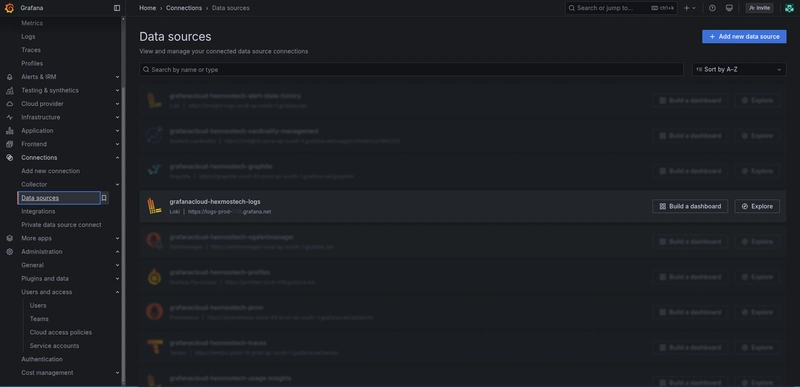
- In the sidebar, go to Connections → Data sources.
- Search for Loki and set it up.
- Copy the Loki Push URL from the connection config. It'll look like:
https://<username>:<api-key>@logs-prod-000.grafana.net/api/prom/push
You'll use this in Alloy later.
🐳 Dockerfile: Flask + Alloy Without Volume Mounts
Here's the Dockerfile that installs everything, writes logs, and sends them to Grafana Loki using Alloy:
FROM debian:bookworm-slim

RUN apt-get update && apt-get install -y \
    python3 python3-pip gpg wget curl gnupg ca-certificates systemctl \
    && rm -rf /var/lib/apt/lists/*

WORKDIR /app

COPY requirements.txt .
RUN pip3 install --no-cache-dir --break-system-packages -r requirements.txt

# Install Alloy
RUN mkdir -p /etc/apt/keyrings/ && \
    wget -q -O - https://apt.grafana.com/gpg.key | gpg --dearmor | tee /etc/apt/keyrings/grafana.gpg > /dev/null && \
    echo "deb [signed-by=/etc/apt/keyrings/grafana.gpg] https://apt.grafana.com stable main" > /etc/apt/sources.list.d/grafana.list && \
    apt-get update && apt-get install -y alloy && \
    rm -rf /var/lib/apt/lists/*

COPY . .

RUN mkdir -p /etc/alloy/ && cp config.alloy /etc/alloy/config.alloy

EXPOSE 5000

CMD systemctl restart alloy && python3 app.py
No volume mounts. No host bind paths. Everything is self-contained inside the container.
⚙️ config.alloy (Log Pipeline for Alloy)
Create config.alloy in your repo:
local.file_match "local_files" {
  path_targets = [{ "__path__" = "/app/liveapi.log" }]
  sync_period = "5s"
}

loki.source.file "log_scrape" {
  targets       = local.file_match.local_files.targets
  forward_to    = [loki.process.filter_logs.receiver]
  tail_from_end = true
}

loki.process "filter_logs" {
  forward_to = [loki.write.grafana_loki.receiver]

  stage.static_labels {
    values = {
      job          = "liveapi"
      service_name = "liveapi"
    }
  }
}

loki.write "grafana_loki" {
  endpoint {
    url = "https://<your-username>:<your-api-key>@logs-prod-000.grafana.net/api/prom/push"
  }
}
Change the endpoint to match your Grafana Loki Push URL.
Build & Run
Build the Docker image:
docker build -t flask-alloy .
Run it:
docker run -p 5000:5000 flask-alloy
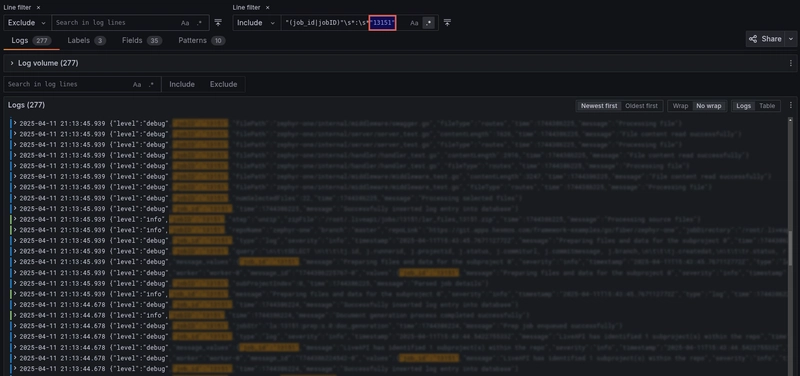
Now visit http://localhost:5000 to trigger logs. Check Grafana Cloud’s Explore tab and query:
{job="liveapi"}
Boom — your logs are in the cloud. 🎉
Any Better Way?
Let me know in the comments — is there a simpler or cooler way you’re pushing logs to Grafana Loki from containers? Would love to steal it.
I’ve been building
A collection of UI/UX-focused tools crafted to simplify workflows, save time, and reduce friction in searching tools/materials.
Any feedback or contributors are welcome!
It’s online, open-source, and ready for anyone to use.
👉 Check it out:
⭐ Star it on GitHub:
Let’s make it even better together.

*AI agents write code fast. They also silently remove logic, change behavior, and introduce bugs -- without telling you. You often find out in production.
git-lrc fixes this. It hooks into git commit and reviews every diff before it lands. 60-second setup. Completely free.*
Any feedback or contributors are welcome! It's online, source-available, and ready for anyone to use.
⭐ Star it on GitHub:
 HexmosTech
/
git-lrc
HexmosTech
/
git-lrc
Free, Micro AI Code Reviews That Run on Git Commit
| 🇩🇰 Dansk | 🇪🇸 Español | 🇮🇷 Farsi | 🇫🇮 Suomi | 🇯🇵 日本語 | 🇳🇴 Norsk | 🇵🇹 Português | 🇷🇺 Русский | 🇦🇱 Shqip | 🇨🇳 中文 | 🇮🇳 हिन्दी |

git-lrc
Free, Micro AI Code Reviews That Run on Commit




GenAI today is a race car without brakes. It accelerates fast -- you describe something, and large blocks of code appear instantly. But AI agents silently break things: they remove logic, relax constraints, introduce expensive cloud calls, leak credentials, and change behavior -- without telling you. You often find out in production.
git-lrc is your braking system. It hooks into git commit and runs an AI review on every diff before it lands. 60-second setup. Completely free.
In short, git-lrc helps Prevent Outages, Breaches, and Technical Debt Before They Happen
At a glance: 10 risk categories · 100+ failure patterns tracked · every commit…


Top comments (2)
Amazing guide, and it's super simple to follow!
Thanks @nevodavid :)