


Hey Devs! 👋🚀
We all love GitHub for its incredible open-source projects and amazing community. Here’s a curated list of super helpful repositories (tools & resources) that I found incredibly useful! Do visit these repos, give them a 🌟 if you like them, and huge kudos to the awesome developers behind them! 🙌🔥
🔥 Must-Check GitHub Repos
1️⃣ DevOps Interview Questions 💻🛠️
A fantastic collection of 550+ DevOps interview questions with detailed answers on CI/CD, Cloud (AWS, Azure, GCP), Kubernetes, Terraform, Ansible, Git, Jenkins, Docker, and more. Perfect for both beginners and experienced professionals! 🌟
🌟 Star this repo: Welcome to DevOps Interview Questions & Answers – your one-stop destination for mastering DevOps, Cloud, and SRE interviews! 🚀 This repository contains 1100+ carefully curated interview questions with detailed answers, covering all major DevOps tools, cloud platforms, and best practices. Whether you're a beginner preparing for your first DevOps job or an experienced engineer aiming for top-tier roles, this resource will help you understand core concepts, ace technical interviews, and build confidence. We cover:

 NotHarshhaa
/
DevOps-Interview-Questions
NotHarshhaa
/
DevOps-Interview-Questions
Collection of 1100+ DevOps interview questions with detailed answers covering CI/CD, Cloud (AWS, Azure, GCP), Kubernetes, Terraform, Ansible, Git, Jenkins, Docker, Monitoring, and more. Perfect for beginners and experienced professionals preparing for DevOps roles. Stay ahead in your interviews with real-world scenarios and best practices! 🌟
🚀 DevOps Interview Questions & Answers
📌 About This Repository
✅ DevOps Fundamentals – CI/CD, Automation, Infrastructure as Code (IaC)
✅ Cloud Providers – AWS, Azure, GCP, OpenStack
✅ Containers & Orchestration – Docker, Kubernetes, Helm
✅ CI/CD & Automation – Jenkins, ArgoCD, GitHub Actions
✅ Monitoring & Logging – Prometheus, Grafana, ELK Stack
✅ Networking & Security – DNS, Load Balancing, SSL, Firewalls
✅ Scripting & Configuration Management – Ansible, Terraform…
👤 Author: @notharshhaa


2️⃣ Machine Learning & Deep Learning Projects 🤖📊
A collection of 36+ Machine Learning & Deep Learning projects, free to download, from Engineers Planet! Great for beginners to advanced learners.
Since the original repo didn’t have a README, I created one in my fork: 🌟 Star this repo: 

madhurimarawat
/
Machine-Learning_Deep-learning_Free-Download
This repository contains a collection of various Machine Learning and Deep Learning projects for free download. These projects are hosted on Engineers Planet.
Machine Learning and Deep Learning Projects 📊
This repository contains a collection of various Machine Learning and Deep Learning projects for free download. These projects are hosted on Engineers Planet.



Table of Contents
- A Learner's Guide to Model Selection and Tuning
- AB Testing for Mobile Games
- AI Room Booking Chatbot IBM WATSON
- Analyzing Baby Names Trends in Gender and Name Popularity Using Data Science
- Analyzing Breath Alcohol Test Data in Ames, Iowa Trends and Insights from 2013 to 2017
- Classifying Hip-Hop and Rock Music Using Machine Learning
- Colorize Black & White Images
- Comparative Analysis of Home Run Tendencies
- Cosmetic Product Analysis
- Credit Card Approval Prediction
- Cryptocurrency Market Analysis Classifying Coins by Market Capitalization
- Detecting Distracted Drivers Enhancing Road Safety with Deep Learning
- Dimensionality Reduction with PCA
- Dog vs Cat Classification
- Exploring Trends in LEGO Sets
- Exploring the Myth of Shorter Lifespans for Left-Handed People Using Age Distribution
- Google Play…
3️⃣ GitHub Profile Achievements 🏆🎖️
Ever wondered about all the GitHub profile achievements you can unlock? This repo lists them all! 🐙🐱 🌟 Star this repo:
Schweinepriester
/
github-profile-achievements
A collection listing all Achievements available on the GitHub profile 🏆
GitHub Profile Achievements 🏆
A collection listing all Achievements available on the GitHub profile.
Following the launch of the first Mars Helicopter, Ingenuity, GitHub announced the new Achievements section:
We are also using this opportunity to introduce a new Achievements section to the GitHub profile. Right now, Achievements include the Mars 2020 Helicopter Mission badge, the Arctic Code Vault badge, and a badge for sponsoring open source work via GitHub Sponsors.
This repository attempts to list them all.
2022-06-09: GitHub announced more Achievements, but without specific criteria. If you see something not listed here or is incorrect, please open an issue :)
2024-02-06: Achievements will no longer be available in GitHub's Community Discussions to counter spam, see the announcement.
Don't like the Achievements? Here is how to disable them. Direct link to the setting for your convenience.
Achievements
| Title | Badge | Earnable? | Earned by |
|---|---|---|---|
| Heart On |
4️⃣ Linux Inside a PDF 🐧📄
Yes, you read that right! Linux running inside a PDF file via a RISC-V emulator. Insanely cool project! 🔗 Try it:
  🌟 Star this repo:
LinuxPDF
This is Linux running inside a PDF file via a RISC-V emulator, which is based on TinyEMU.
Try it here: linux.pdf
linuxpdf.mp4
See also: DoomPDF
Explanation
This works in a very similar way to my previous DoomPDF project.
You might expect PDF files to only be comprised of static documents, but surprisingly, the PDF file format supports Javascript with its own separate standard library. Modern browsers (Chromium, Firefox) implement this as part of their PDF engines. However, the APIs that are available in the browser are much more limited.
The full specfication for the JS in PDFs was only ever implemented by Adobe Acrobat, and it contains some ridiculous things like the ability to do 3D rendering, make HTTP requests, and detect every monitor connected to the user's system. However, on Chromium and other browsers, only a tiny subset of this API was ever implemented…
5️⃣ Diagram as Code 📜📌
A tutorial on creating documentation using the "Doc as Diagram" methodology – a must for tech writers and developers!🌟 Star this repo:
RominaElenaMendezEscobar
/
diagram-as-code
A tutorial on how to create a documentation project using the 'Doc as diagram' methodology

🎨 Diagram-as-Code: Creating Dynamic and Interactive Documentation for Visual Content
Diagram as Code is an approach that allows you to create diagrams through code instead of traditional graphic tools. Instead of manually building diagrams, you can write code in a text file to define the structure, components, and connections of your diagrams.

This code is then translated into graphical images, making it easier to integrate and document in software projects, where it is especially useful for creating and updating architectural and flow diagrams programmatically.
What is Diagrams?
Diagrams is a 🐍Python library that implements the Diagram as Code approach, enabling you to create architectural infrastructure diagrams and other types of diagrams through code. With Diagrams, you can easily define cloud infrastructure components (such as AWS, Azure, and GCP), network elements, software services, and more, all with just a few lines of code.
🎉 Benefits of Diagram-as-Code
- 📝…
👤 Author: @r0mymendez
![[deleted user] image](https://media2.dev.to/dynamic/image/width=800%2Cheight=%2Cfit=scale-down%2Cgravity=auto%2Cformat=auto/https%3A%2F%2Fthepracticaldev.s3.amazonaws.com%2Fi%2F99mvlsfu5tfj9m7ku25d.png)
[Deleted User]
6️⃣ Resume Generator from GitHub 📄🔧
Automatically generate a resume from your GitHub profile – super handy for developers!  🔗 Try it: 🌟 Star this repo:
resume
/
resume.github.com
Resumes generated using the GitHub informations
A service that creates a résumé based on your GitHub repos/activity.
GitHub Résumé is opt-in. To make your resume visible, just star this project. To view your résumé, go to https://resume.github.io/?yourusername or follow the instructions on the home page.
Great for all the tech-savy bosses who want to have a quick view of person's git/github activity, before the interview.
Development
To run the app in development mode:
$ rackup config.ru
(You must have Ruby and the rack gem installed.)
7️⃣ Markdown to PDF (Online & Offline) ✍️📂
One of my favorite repos! A fantastic tool to convert Markdown to PDF, available both online and offline, with easy editing and transformation. Free to use! 🥂 🔗 Try it: 🌟 Star this repo:
realdennis
/
md2pdf
Offline markdown to pdf, choose -> edit -> transform 🥂

Markdown2PDF
English | 简体中文(Simplified Chinese) | 繁體中文(Traditional Chinese)
https://realdennis.github.io/md2pdf/
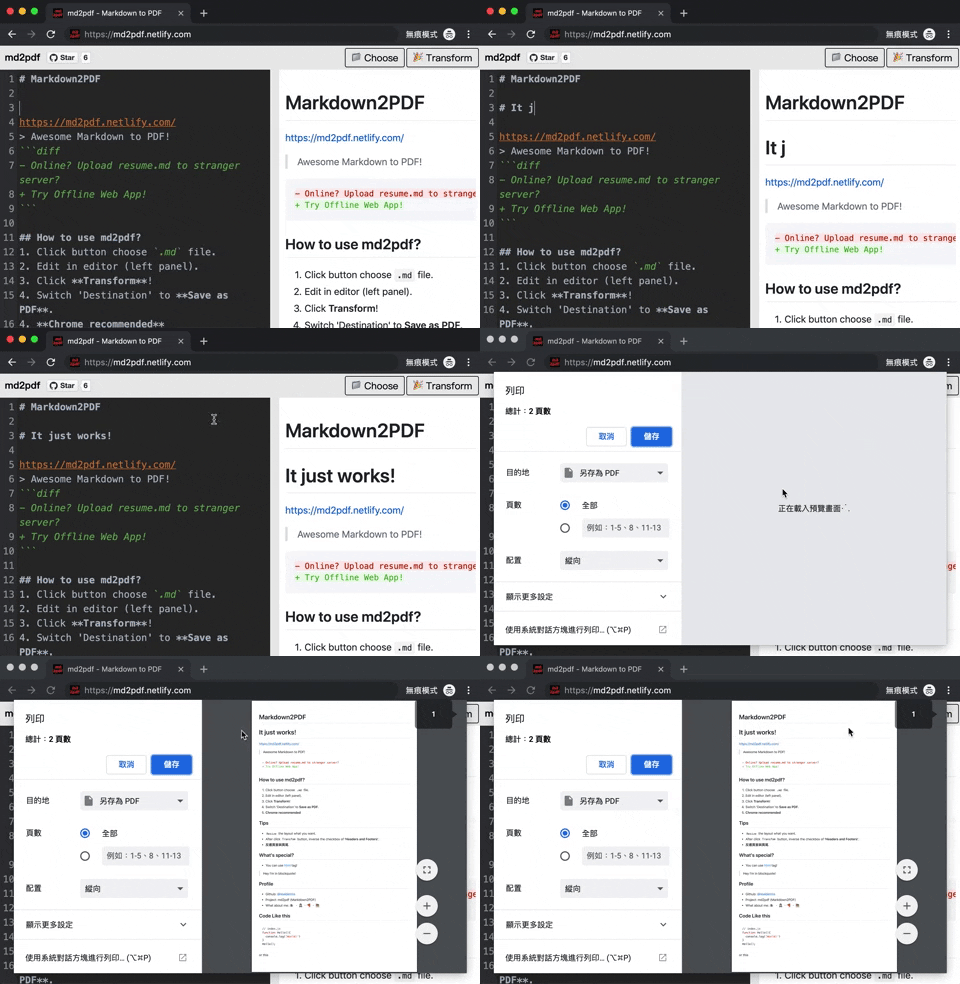
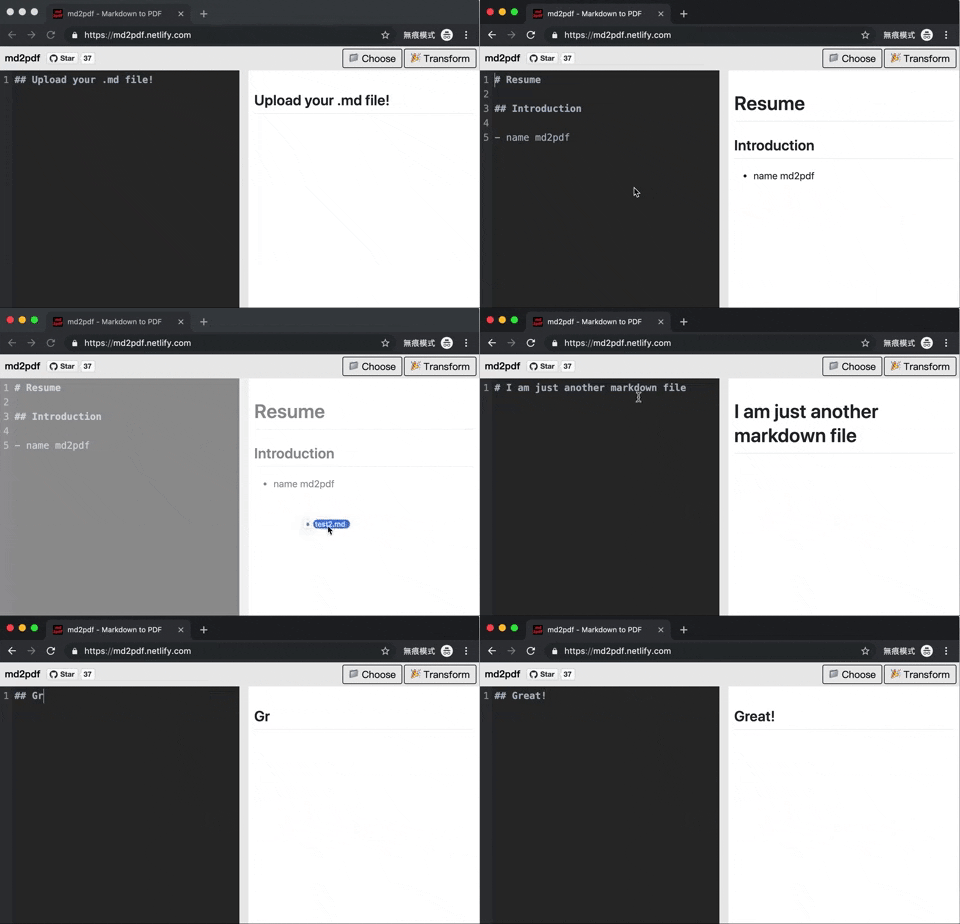
Awesome Markdown to PDF!
- Online? Upload resume.md to stranger server?
+ Try Offline Web App!
How to use md2pdf?
- Click button choose
.mdfile. - Edit in editor (left panel).
- Click Transform!
- Switch 'Destination' to Save as PDF.
- Chrome recommended
Using Docker
- Install docker on your platform
- Clone the repository
-
cdintomd2pdf - Run
docker compose up -dinside the directory
The docker compose binds the web server to localhost:8080 by default. You can change this by finding the ports line in docker-compose.yaml.
Note: This docker compose uses the build directive, so your system will go build and optimize the code itself. The application is hosted locally through nginx which is what binds to port 8080.
Tips
-
Resizethe layout what you want. - After click
Transformbutton, inverse the checkbox of 'Headers and Footers'. - 反選頁首與頁尾.
8️⃣ The Ultimate Cheat Sheet Collection 📚⚡
Looking for a complete reference for everything? 🧠💡 This is the ultimate collection of cheat sheets for Markdown, ChatGPT, programming languages, frameworks, and tools—helping you boost productivity instantly. 🚀
📌 This is the original repo with the most extensive cheat sheets!
🔗 Try it: 🌟 Star this repo:

📖 Reference - Cheat Sheets for Developers

Reference is a collection of cheat sheets contributed by open source angels. It shares a quick reference cheat sheet for developers in a nice layout. [ 中文版 | ... ]
We encourage you to share your own cheat sheets with the community and make Reference even better. If you notice a cheat sheet that could be improved, feel free to submit a pull request.
👀 Live Demonstration
Note: The original domain for this project was quickref.me, which was acquired by a US-based company. Since then cheatsheets.zip is the primary and maintained domain (All within the bounds of the agreements).
You can view the most up-to-date cheat sheets live at https://cheatsheets.zip.
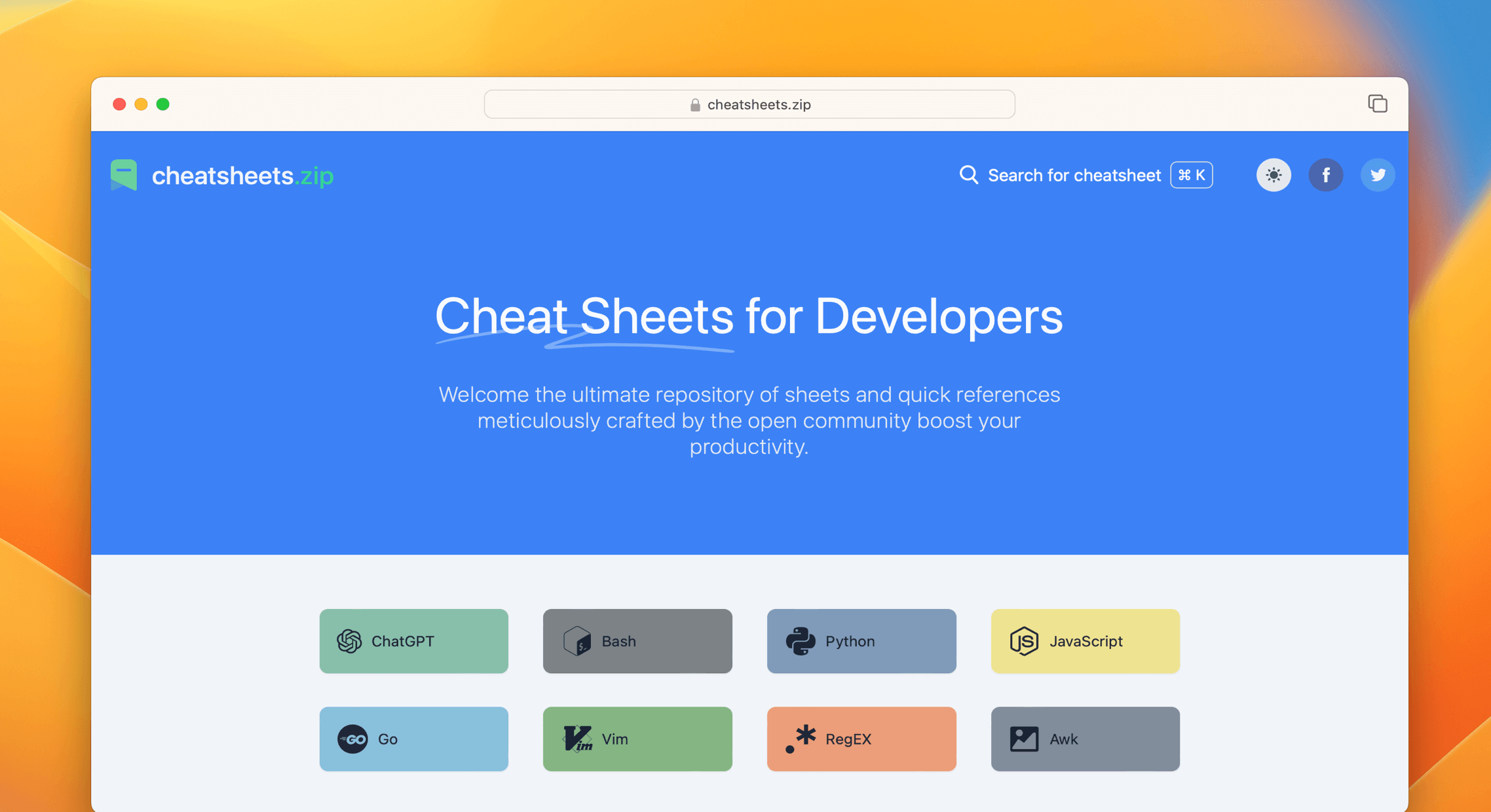
📚 Cheat Sheets List
Reference provides cheat sheets for the following:
📌 It also led to another great repo that offers a Play Store app for these cheat sheets:
Cheat Sheets 📜⚡
A must-have collection of quick reference guides for various programming languages, frameworks, and tools! 📖
📱 Also available as an app! Get it on Google Play:
 🌟 Star this repo:

ivansaul
/
cheat-sheets
Cheat-Sheets: Your go-to quick reference developer guide for learning Python, Rust, Swift, JavaScript, Kotlin, Go, Git, and more!

Cheat-Sheets Your go-to reference developer guide for learning Python, Rust, Swift, JavaScript, Kotlin, Go, Git, and more!







Releases
This application is available on the Google Play and GitHub.
Screenshots


Building from Source
-
If you don't have Flutter SDK installed, please visit official Flutter site.
-
Fetch latest source code from master branch.
git clone https://github.com/ivansaul/cheat-sheets.git
-
Run the app with Android Studio or VS Code. Or the command line.
flutter pub get
flutter run
Facing any Issue?
Feel free to open an Issue :)
Contact
If you want to contact me you can reach me at Discord.
Thanks
This project is based on Fechin/reference. The main focus of this project is adding new features and make it accessible to everyone.
License
This project uses GPLv3. See LICENSE for details.
💬 Which of these did you find helpful? 🤔👇 Let me know in the comments! If you know any must-share repositories, drop them below—I’d love to explore and expand this list. 🔽
📌 An easy way to support these amazing projects? Just visit the repos and hit 🌟 Star on GitHub! 💙🐙🐱
I wrote this article to show appreciation for these fantastic projects. If you have any great repositories to recommend, feel free to mention them in the comments. And if you’ve built something awesome yourself, let me know—I’d be happy to add it to the list! 🚀


Top comments (1)
Thank you for sharing my repository !