


Privyet 👋!
You know that moment when you paste a <pre><code> block into your app and it looks like it was styled in 2003 by someone who had just discovered color: green? No theme. No copy button. No language badge. Just raw, uncolored text sitting in a box that someone called "good enough"?
Yeah. We fixed that. Today we're shipping Code RS.

What Is Code RS?
Code RS is a production-ready, fully-themed, accessible code display component for Yew, Dioxus, and Leptos. It does everything the ecosystem was missing:
-
Inline
<Code>: colored, sized, variant-aware, with ARIA semantics. -
<Block>: a composable container with header, title, language badge, copy trigger, and scrollable content area. - Pure-Rust syntax highlighting: zero CDN, zero JavaScript, compiles to clean WASM, 20+ languages.
-
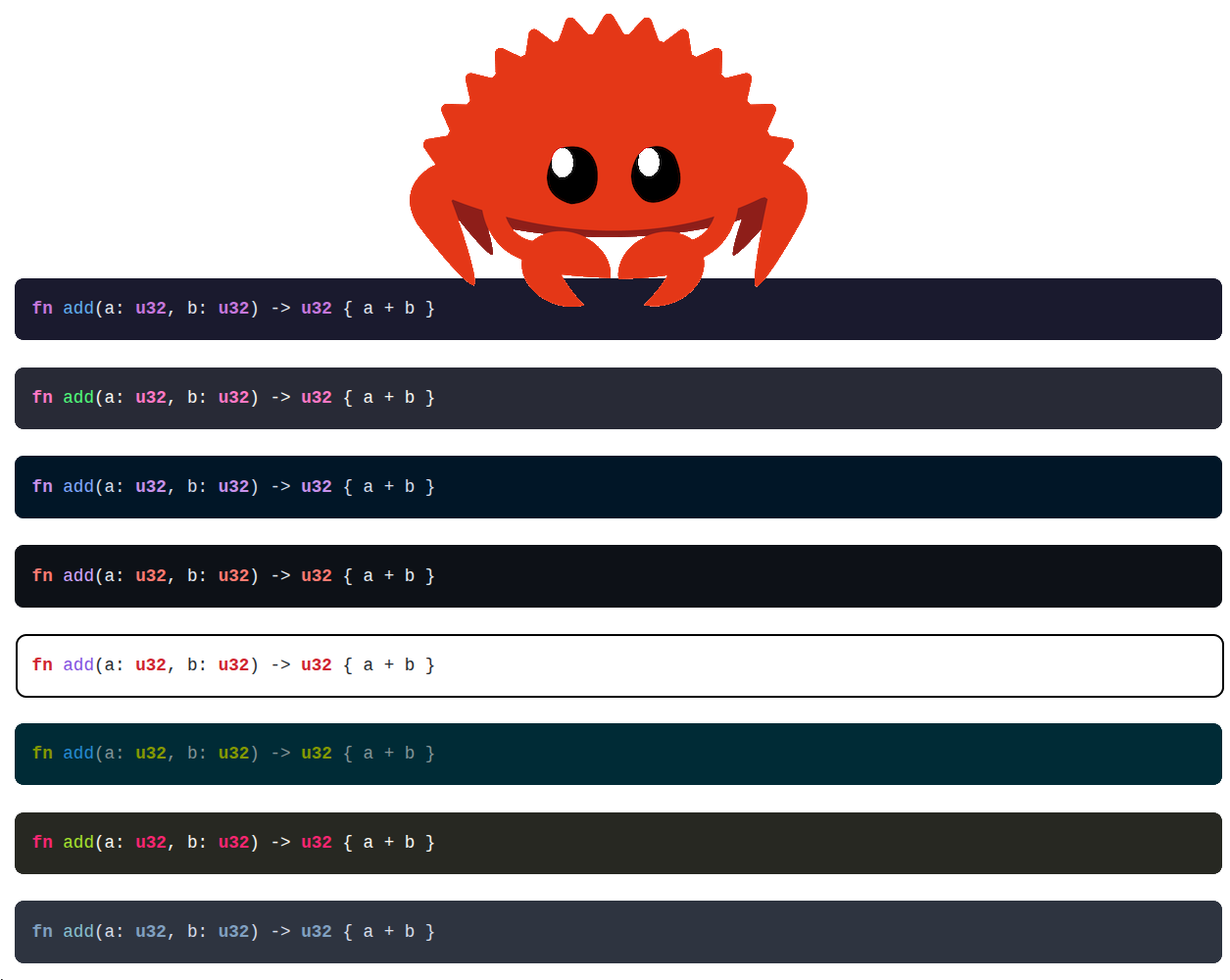
8 built-in themes: OneDark, Dracula, NightOwl, GitHub Dark/Light, Solarized, Monokai, Nord, all switchable via a single
themeprop.
No Prism.js. No highlight.js. No 10MB script tag loaded from a CDN you definitely trust completely. Just Rust, bytes, and inline style= spans.
The Big Idea
Here's the thing about syntax highlighting in WASM apps: every existing solution assumes JavaScript. Prism.js needs a DOM. highlight.js needs a runtime. Shiki needs Node. Tree-sitter is great, but it weighs as much as a sedan.
So we wrote our own.

The highlight_code(code, lang, theme) function in common.rs is a hand-rolled, char-by-char tokenizer that handles:
- Block comments (
/* */), single-line comments (//,#,--) - Double/single-quoted strings and JS template literals
- Hex and float number literals with suffixes (
0xFF,1.0f32) - Rust macros (
println!,vec!) - Python/CSS decorators (
@dataclass,@media) - HTML tag names (
<div>,</span>) - PascalCase → type, ALL_CAPS → constant,
ident(→ function call - Language-specific keyword sets (Rust, Python, TypeScript, SQL, Bash, 16 more)
All token spans get inline style= attributes from the chosen theme. No CSS classes. No external stylesheet. Just <span style="color:#c678dd;font-weight:600">fn</span>, and it works everywhere, including iframes and shadow DOM.
use coders::{Language, Theme, highlight_code};

let html = highlight_code(
    "fn main() {\n    println!(\"Hello!\");\n}",
    Language::Rust,
    Theme::Dracula,
);
// → "<span style="color:#ff79c6;font-weight:600">fn</span> ..."
Components
Code
The simplest unit. A <code> element with color, variant, and size props.
// Yew
html! {
    <Code color={Color::Accent} variant={Variant::Subtle} size={Size::Sm}>
        {"console.log(\"Hello, world!\")"}
    </Code>
}
Variants work exactly as you'd expect from the rest of Open SASS Kit: Solid, Subtle, Outline, Surface, Plain. Colors are the full palette: Default, Red, Orange, Yellow, Green, Teal, Accent, Pink, Success, Warning, Danger, and Custom("your-inline-css").
Block
// Leptos
view! {
    <Block
        code="fn main() {\n    println!(\"Hello!\");\n}"
        language={Language::Rust}
        theme={Theme::NightOwl}
    >
        <Header>
            <Title>"main.rs"</Title>
            <LanguageBadge />
            <CopyTrigger />
        </Header>
        <Content />
    </Block>
}
The Block pushes a BlockContext containing code, language, and theme into a provider tree. All child components read from context. Content calls highlight_code and injects the result via inner_html / dangerous_inner_html / Html::from_html_unchecked, the framework-appropriate unsafe-but-correct escape hatch for pre-rendered HTML. No prop drilling. No callback chains. Just context.
8 Themes

| Theme | Background | Vibe |
|---|---|---|
OneDark |
#1a1a2e |
The classic. Atom's gift to the world. |
Dracula |
#282a36 |
Halloween every day. Pink keywords. |
NightOwl |
#011627 |
Deep blue, warm salmon numbers. |
GithubDark |
#0d1117 |
Feels like GitHub, because it is. |
GithubLight |
#ffffff |
For those who dare use light mode. |
Solarized |
#002b36 |
Ethan Schoonover's gift to the terminal. |
Monokai |
#272822 |
The Sublime Text nostalgia trip. |
Nord |
#2e3440 |
Arctic. Clean. Borderline peaceful. |
Switch themes at runtime by simply changing the theme prop. The ThemeColors struct drives inline style generation, every push_span() call pulls the exact CSS value from the active theme's fields.
Need your brand colors? Theme::Custom(ThemeColors { keyword: "color:#ff0099;font-weight:600", ... }) and you're done.
The Build Journey
We are not going to pretend this was a relaxing weekend project. Here is an honest accounting.

Chapter 1: The Rust 2024 Edition
Rust Edition 2024 changed how string-like identifiers in macro positions are parsed. The yew::html! macro started rejecting class names like text-black and whitespace-pre, specifically the hyphen-adjacent tokens that look like prefix expressions.
The error: prefix 'black' is unknown. The fix: add a trailing space after the class name. Simple, but it wasted an embarrassing amount of time because the error message looks nothing like what it actually is.
// Before (breaks in Edition 2024):
class="flex text-black"
// After:
class="flex text-black "  // ← single space, problem solved
Chapter 2: Dioxus RSX
The rsx! macro in Dioxus parses string prop values as format strings. So this:
code: "fn main() {\n println!(\"Hello!\");\n}"
Explodes with Failed to parse formatted segment: Expected Ident or Exp. Because { inside a string prop is format syntax to Dioxus, not a literal curly brace.
The fix: extract all code strings to const:
const HELLO_WORLD: &str = "fn main() {\n    println!(\"Hello!\");\n}";

rsx! {
    Block { code: HELLO_WORLD }
}
Unglamorous? Yes. But it compiles.
Chapter 3: The dangerous_inner_html
In Dioxus, dangerous_inner_html takes ownership of a String. In Leptos, inner_html takes a &str. In Yew, Html::from_html_unchecked takes an AttrValue. Three frameworks, three signatures, three slightly different ways to inject a pre-rendered HTML string.
Each one worked fine once you knew the exact type expected. Getting there required reading the framework source, not the docs, because the docs had helpfully omitted the borrow semantics.

Chapter 4: Non-Exhaustive Variant::Custom
Adding Custom(&'static str) to the Variant enum immediately broke every match in all three Code component implementations. Expected. Annoying. The fix is the following:
Variant::Custom(_) => "",
But finding all three match sites across three files while also trying to fix four other things simultaneously is exactly the kind of thing that makes you wish Rust had #[non_exhaustive] as an opt-in marker you could flip during development.
Accessibility
Code RS ships accessible markup out of the box:
-
Blockrenders as<figure role="region">witharia-label. - The inner
<pre>getstabindex="0"so keyboard users can scroll it. -
CopyTriggercarriesaria-label="Copy code to clipboard"andaria-liveregion feedback via the copied label swap. -
Codeacceptsaria_labelfor use in contexts where<code>alone doesn't carry enough meaning. -
LanguageBadgereads the language from context and rendersaria-label="Language: rust".
Screen readers don't need to guess what anything is.
Quick Setup
# Yew
cargo add coders --features=yew

# Dioxus
cargo add coders --features=dio

# Leptos
cargo add coders --features=lep
That's it. The syntax highlighting, theming, clipboard, and accessibility, all included. No config files. No CSS imports. No npm install @something/highlighter-peer-dependency.
Final Thoughts
Writing a CDN-free, pure-WASM syntax highlighter from scratch to ship alongside a composable code block component is not the most efficient path. But it's the correct one for this ecosystem.
The web has enough <script src="https://cdn.example.com/dep.min.js"> tags. Rust WASM doesn't need to inherit that habit.
Code RS compiles to WASM, highlights code inline, and ships 8 themes without a single network request beyond your app bundle. That's the promise.



💻 Code RS






🎬 Demo
| Framework | Live Demo |
|---|---|
| Yew | |
| Dioxus | |
| Leptos |
📜 Intro
A highly customizable, accessible inline code and code-block component for WASM frameworks: Yew, Dioxus, and Leptos. Supports multiple colors, variants, sizes, copy-to-clipboard, and composable sub-components, all WCAG compliant.
🤔 Why Code RS?
- 🎨 Fully Customizable: Control every attribute, class, style, color, variant, size, ARIA labels, and more.
- 📋 Copy to Clipboard: Built-in copy button with a configurable confirmation label and reset timeout.
-
🧩 Composable: Compose
Header,Title,CopyTrigger,Content, andLanguageBadgeindependently. -
♿ Accessible by Default:
role="region",aria-label,aria-liveandtabindexwired up automatically. - 🔧 Framework Agnostic: Same API semantics across Yew, Dioxus, and Leptos.
Y Yew Usage
Refer to our guide to integrate this component into your Yew app.
🧬 Dioxus Usage
Refer to our guide to integrate this component into your Dioxus app.
🌱
…We are Open SASS, babe!
We're working tirelessly on making Rust web development extremely easy for everyone.
If you made it this far, it would be nice if you could join us on Discord.
Till next time 👋!


Top comments (0)