


Nǐ hǎo 👋!
You've seen the textbox. You've typed the number. You've waited three seconds for the SMS that never came, checked your spam folder, clicked "Resend", typed the number again, and finally admitted to yourself that 2FA is simultaneously the most important and most annoying invention of the modern web.
Today, we make it marginally less annoying, at least on the Rust side. We're shipping OTP RS.

What Even Is OTP RS?
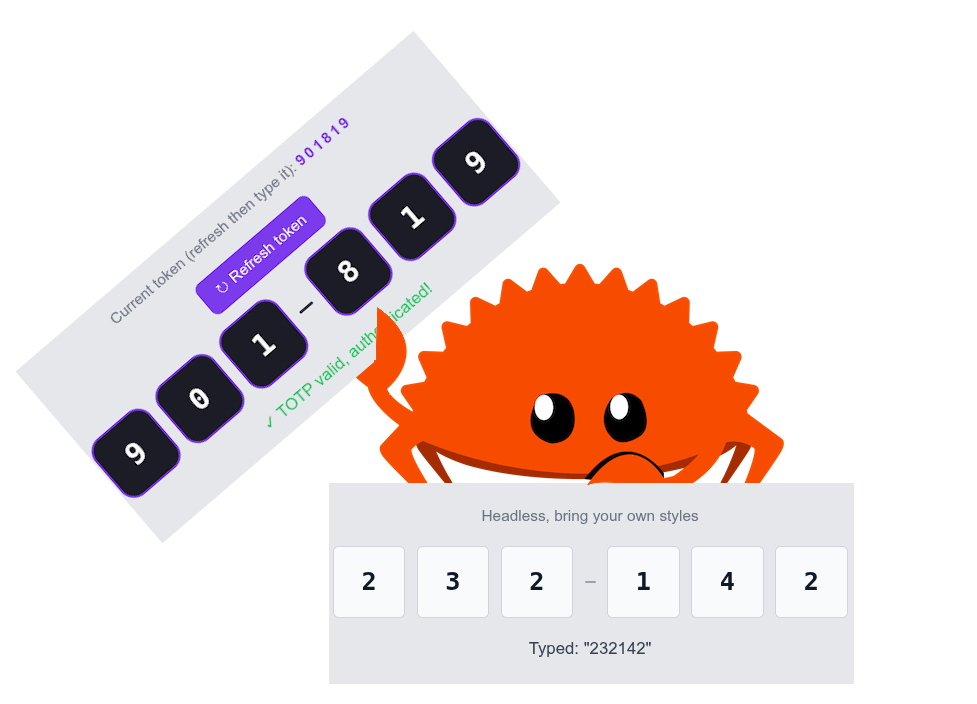
OTP RS is a composable, accessible, animated One-Time Password input component for Yew, Dioxus, and Leptos. It implements the full verifier flow: slot-by-slot input, keyboard navigation, active/filled/invalid/disabled states, animated caret blink, digit-entry pop animation, and RFC 4226 (HOTP) + RFC 6238 (TOTP) validation, all in Rust, all in WASM, all without touching a single line of JavaScript.

If you've ever tried to build a 6-box OTP input from scratch, you know the drill. It starts with "just six inputs". Two hours later you're debugging focus management, backspace propagation, keyboard event edge cases, browser autofill hijacking your state, and the invisible iOS number pad refusing to appear. That's the origin story of OTP RS.
Component Architecture
OTP RS follows the same composable anatomy as every other component in the Open SASS Kit. You compose what you need:
-
Otp: Root container. Owns the internal value state, focus coordination, and the RFC validation callbacks. -
Group: A visual cluster of slots (e.g., three digits, then a separator, then three more). -
Slot: Individual slot. Renders a visible character display on top of an invisible overlay<input>. -
Separator: The little dash in between groups.
use otprs::yew::{Otp, Group, Separator, Slot};
use yew::prelude::*;

#[function_component(VerificationInput)]
pub fn verification_input() -> Html {
    html! {
        <Otp max_length={6} aria_label="Enter your OTP">
            <Group>
                <Slot index={0} />
                <Slot index={1} />
                <Slot index={2} />
            </Group>
            <Separator />
            <Group>
                <Slot index={3} />
                <Slot index={4} />
                <Slot index={5} />
            </Group>
        </Otp>
    }
}
That's it. Focus management, digit propagation, state aggregation, and ARIA attributes are all handled. You just compose slots.
The Invisible Input Trick

Here's the most important design decision in all of OTP RS: the <input> element that receives keyboard events is completely invisible.
Each Slot renders two layers:
- An invisible
<input>(viainput-rswithotp_mode=true) that isposition: absolute; inset: 0; opacity: 0. It captures all keyboard focus and input events. - A visible
<span>that displays the digit character and the blinking caret.
This separates the input mechanics from the visual presentation, giving us full control over the slot's look without fighting browser defaults for <input> styling.
┌─────────────────────┐
│  Slot wrapper       │  ← position: relative; border; background; animation
│  ┌───────────────┐  │
│  │ <input>       │  │  ← absolute; opacity:0; captures keyboard events
│  └───────────────┘  │
│  <span>3</span>     │  ← visible character display
│  <span class=caret/>│  ← blinking caret (when active & empty)
└─────────────────────┘
The Invisible Input That Wasn't Actually Invisible
Here's a fun bug that bit us early on, hard.
The slot design described above only works if the CSS for the invisible input is applied as an inline style attribute, not as a CSS class attribute. The component originally passed the overlay CSS string to input_class, a prop that sets the HTML class="" attribute.
Browsers don't style elements based on CSS property strings stuck in the class attribute. They look up class names in stylesheets. So what we got instead of an invisible overlay was a white rectangle aggressively covering the entire OTP component, like a censored emoji on live TV.

The fix was to add an input_style: &'static str prop to input-rs in all three framework implementations, and apply it as style="{props.input_style}" on the bare otp_mode <input>. One line per framework. Six characters (_style vs _class). Three frameworks. Three PRs worth of suffering.
The Compiler Is Your Enemy (And Also Your Best Friend)
Let us count the ways Rust fought us this time.
Episode 1: Hook in a Macro
error[E0277]: the trait bound `impl Hook<Output = ...>: IntoPropValue<...>` is not satisfied
We tried calling use_state(...) inside an html! macro attribute. Yew forbids calling hooks anywhere except directly inside function component bodies. The macro expands to a closure, and hook calls need to be at the top level. Extracting use_state calls to let bindings before html! fixed it.
Episode 2: Box::leak and the &'static str Obligation
Dioxus and Leptos's input-rs props require &'static str. But our slot-specific strings like "Digit 3" are computed at runtime. The only way to produce a &'static str from a runtime String without pulling in a string interner is to Box::leak:
let label: &'static str = Box::leak(
    format!("Digit {}", index + 1).into_boxed_str()
);
Yes, this leaks memory on every slot render. Each Slot render leaks ~15 bytes. Is this ideal? No. Does it compile? Yes. Is it the correct long-term solution? The correct long-term solution is a Signal<String> prop type in input-rs, which is a future PR. For now: Box::leak and move on.

Episode 3: The as Cast That Broke Leptos
The Leptos view! macro cannot parse Rust cast expressions inline:
// This fails to parse inside view!:
validate_function=(|_: String| -> bool { true }) as fn(String) -> bool
The macro sees the as keyword and gets confused about what's a prop name vs. a type expression. The fix: extract to a let binding before the view! call:
let always_valid: fn(String) -> bool = |_| true;
// then inside view!:
validate_function=always_valid
Three lines in, five compilation cycles later. We hope this saves you ten minutes.
Episode 4: String vs &str in Dioxus rsx!
Dioxus's rsx! macro is strict about attribute types. When slot_class was a String, the macro would refuse:
expected `&str`, found `String`
format!("...", ...) produces a String. Dioxus attributes want &str. The same Box::leak pattern solved this too:
let slot_class: &'static str = Box::leak(
    format!("{} {}", ctx.variant.to_slot_class(), props.class).into_boxed_str()
);
Episode 5: The Inter-Group Focus Traversal Collision
Here is a fun brain teaser: what happens when you put two OTP components on the exact same page, and you start typing in the second one?
Well, since our slots were originally assigned hardcoded IDs like otp-slot-0, otp-slot-1, the moment you typed a character in the second instance, document.getElementById("otp-slot-1") would aggressively hijack focus and yank your cursor all the way back up to the first OTP component on the page.
The fix? Prefixing every slot ID with a unique instance_id minted from a global atomic counter (OTP_INSTANCE_COUNTER.fetch_add(1, Ordering::Relaxed)). Now every widget lives in its own perfectly scoped focus namespace, free from neighborhood turf wars.
Episode 6: The "Sticky" Backspace (vDOM vs Physical DOM)
Across Leptos and Yew we noticed a bizarre issue: if you typed a character, erased it, and tried typing again, the <input> would refuse to update. Or if you filled the very last slot, the input component became "sticky" and refused to overwrite the final character.
The root cause was a classic Virtual DOM vs Physical DOM standoff. We were setting the internal state to "", but frameworks optimize their renders. Leptos input-rs used a one-way, read-once initialization for value=handle.0.get(). Yew assumed the string was already empty and ignored the reconciliation. Because the physical HTML <input> wasn't being forcefully synchronized, the raw DOM held onto the sticky character and choked out any new keystrokes.
We had to bypass the frameworks entirely and manually flush the physical DOM element inside the keyboard event handlers using raw Web APIs (input_ref.cast::<web_sys::HtmlInputElement>().unwrap().set_value("")). The lesson here? Sometimes the fastest way out of a reactive state desync is a direct, imperative smash to the physical DOM.

Keyboard Navigation
One of the more satisfying pieces: full keyboard navigation across slots.
- Any character key → fills current slot, auto-advances focus to the next
-
Backspace→ clears current slot; if already empty, goes to the previous slot -
ArrowLeft→ jumps to previous slot -
ArrowRight→ jumps to next slot -
Tab→ advances naturally (browser default, we don't intercept)
All of this is handled in the on_slot_keydown callback in the parent Otp component, which uses NodeRef (Yew) or the equivalent signal-based refs (Dioxus/Leptos) to imperatively .focus() the target input.
if key == "Backspace" && idx > 0 {
    // slot is already empty, go back
    if let Some(node) = slot_refs.get(idx - 1) {
        if let Some(input) = node.cast::<HtmlInputElement>() {
            let _ = input.focus();
        }
    }
}
No third-party focus-trap libraries. No jQuery. Pure DOM manipulation from Rust.
HOTP and TOTP Validation
OTP RS ships RFC 4226 (HOTP) and RFC 6238 (TOTP) implementations using totp-rs. The SHA-1 HMAC is hand-rolled using the standard iterative block compression algorithm:
pub fn validate_hotp(
    secret: &[u8],
    counter: u64,
    code: &str,
    digits: u32,
) -> Result<(), OtpValidationError> {
    let expected = hotp(secret, counter, digits);
    if expected == code { Ok(()) } else { Err(OtpValidationError::HotpMismatch) }
}
You can validate on complete:
let on_complete = Callback::from(move |code: String| {
    match validate_hotp(b"your-secret", 0, &code, 6) {
        Ok(()) => web_sys::console::log_1(&"Valid!".into()),
        Err(e) => web_sys::console::warn_1(&format!("{e:?}").into()),
    }
});
The hotp() function also lets you generate the expected code if you need to display a hint in development. For the HOTP example in the landing page, the valid code for secret JBSWY3DPEHPK3PXP at counter 0 is computed at runtime via hotp(b"JBSWY3DPEHPK3PXP", 0, 6), no hardcoding required.
Quick Setup
# Yew
cargo add otprs --features=yew

# Dioxus
cargo add otprs --features=dio

# Leptos
cargo add otprs --features=lep
# Cargo.toml
otprs = { version = "0.1", features = ["yew"] }
The component ships its own CSS as inline styles computed from Rust. No separate stylesheet needed.
Final Thoughts
Building OTP RS was a journey through the exact kind of subtle, cross-framework, cross-layer complexity that makes Rust Web development both rewarding and sometimes deeply frustrating. We fought the compiler more than once, discovered ways that browser defaults quietly break invisible design patterns, and shipped a Box::leak we're not entirely proud of.
But the result is solid: a composable, keyboard-navigable, RFC-compliant OTP input component that works identically across Yew, Dioxus, and Leptos, with zero JavaScript and enough ARIA to satisfy a WCAG auditor.
The next time you're building a login flow in Rust WASM and you reach for a six-box code input, you don't have to write it from scratch anymore.



🔐 OTP RS






🎬 Demo
| Framework | Live Demo |
|---|---|
| Yew | |
| Dioxus | |
| Leptos |
📜 Intro
A highly customizable, accessible OTP (One-Time Password) input component for WASM frameworks: Yew, Dioxus, and Leptos.
Supports animated per-slot digit entry with automatic focus traversal, primary and secondary visual variants, built-in HOTP/TOTP validation per RFC 4226 and RFC 6238, and full WCAG compliance.
🤔 Why OTP RS?
- 🎨 Fully Customizable: Control every attribute, class, style, variant, pattern, ARIA labels and more, on the outermost container, each group, each slot, and each separator.
- ⌨ Smart Focus Management: Typing a digit automatically advances focus. Backspace regresses focus. Arrow keys navigate left and right.
- ✨ Animated Entry: Each digit pops with a scale animation when entered, and a blinking caret is shown in the active empty slot.
- 🔐 Built-in Validation: Validate against HOTP (RFC 4226) or TOTP (RFC 6238) using a pure-Rust implementation, no C, no…
We are Open SASS, babe!
We're working tirelessly on making Rust web development extremely easy for everyone.
If you made it this far, it would be nice if you could join us on Discord.
Till next time 👋!


Top comments (0)