


About six months ago, I wrote an article about how to cut costs using Fargate and Fargate Spot.
At the time, I kept the GitHub Actions runner as the default x86 architecture (ubuntu-latest) and introduced a method to support ARM builds using QEMU-based cross-compilation.
However, once I put it into production, I faced a major issue: build times were noticeably longer—by several minutes. As a result, I gave up on ARM builds for the time being.
Maximizing Cost Efficiency on ECS Fargate: ARM Architecture and Fargate Spot Strategies
Take Two: "Why not just use an Arm runner?"
Six months later, while revisiting my CI/CD workflow, I had an incredibly simple realization:
"Wait... if I just switch the GitHub Actions runner itself to Arm, wouldn’t that eliminate the need for QEMU and cross-compilation altogether?"
(Still wondering why I didn’t think of that earlier...)
So, I began my second attempt at optimizing costs through ARM.
Option 1: Use GitHub-hosted ubuntu-xx.xx-arm runners (Public repos only)
Since January 2025, GitHub Actions has started offering Arm-based hosted runners (ubuntu-22.04-arm and ubuntu-24.04-arm) for free on public repositories—even on the Free plan.
All you need to do is update your workflow from:
runs-on: ubuntu-latest
to:
runs-on: ubuntu-24.04-arm
Sounds easy, right? It is—but there's a catch: they're not available for private repositories.
Sure enough, when I tried running it on a private repo, I got this error:
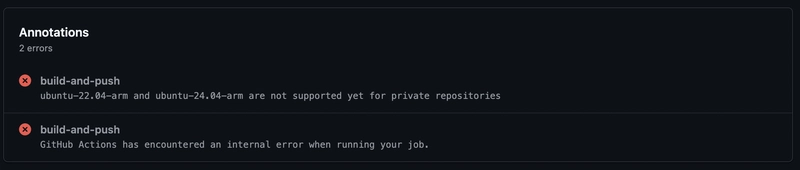
So if you’re using a public repository, this is hands-down the simplest and most cost-effective option.
Option 2: Create a custom Arm runner with Larger runners (Team or Enterprise Cloud only)
If you're on GitHub Team or Enterprise Cloud, you have access to Larger runners—which let you create GitHub-hosted runners with custom specs, including Arm architecture.
Luckily, my organization uses the Enterprise Cloud plan, so I gave this a try.
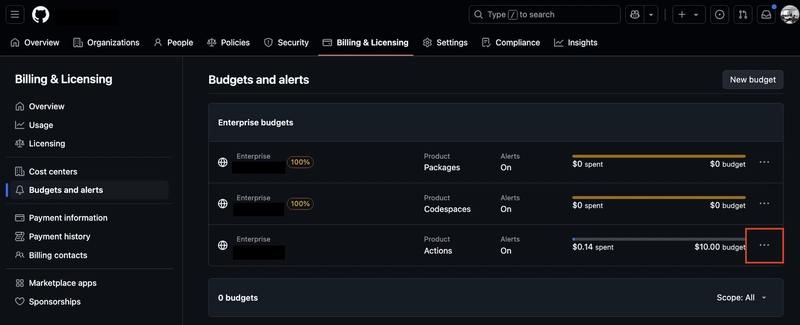
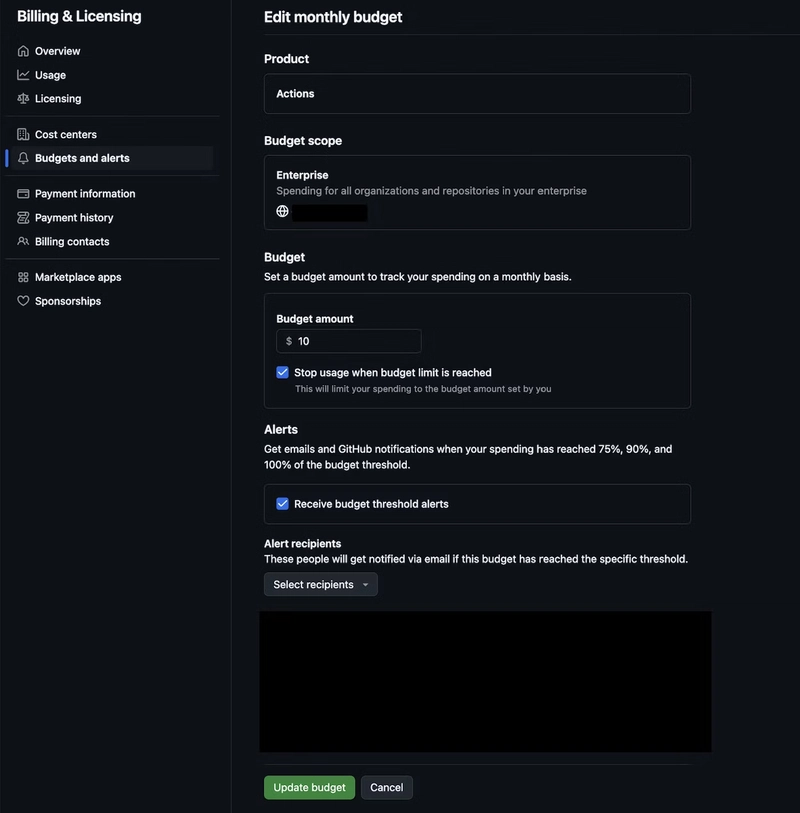
Step 1: Set a Budget
Navigate to
https://github.com/enterprises/<enterprise-name>/billing
Then go to Budgets and alerts > Actions, and set a budget.
Step 2: Create an Arm runner
Go to
https://github.com/organizations/<organization-name>/settings/actions/runners
and click New GitHub-hosted runner.
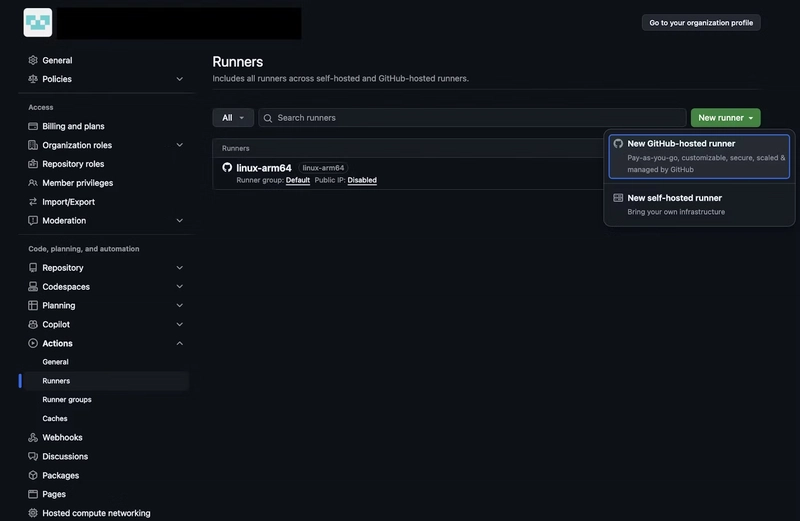
Fill in the Name, Platform, Image, and Size, then save.
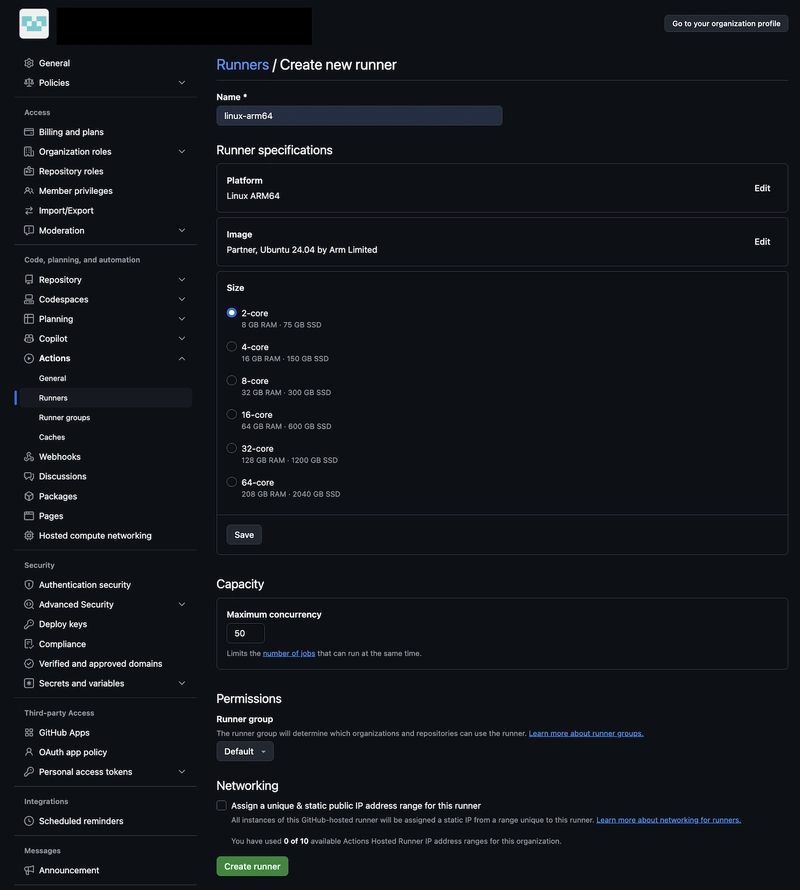
Note: The Name you assign here will be used in the runs-on field of your workflow.
Step 3: Update Workflow and ECS Task Definition
Update the workflow like so:
jobs:
  build-and-push:
    runs-on: 'linux-arm64'
And don’t forget to update the ECS task definition to include:
"runtimePlatform": {
  "operatingSystemFamily": "LINUX",
  "cpuArchitecture": "ARM64"
}
With that, both GitHub Actions and ECS are now fully ARM-ready.
Gotcha: Larger runners don’t qualify for free minutes
My tasks ran smoothly on ARM. No QEMU, faster builds, lower runtime costs... or so I thought.
But here's the kicker: Larger runners are fully billable—even for public repos.

According to GitHub's documentation:
Included minutes cannot be used for larger runners. These runners will always be charged for, including in public repositories.
— About billing for GitHub Actions
So, if you use 20,000 minutes in a month, you’re looking at an extra $100.
In contrast, the amount saved by switching Fargate Spot from x86 to ARM was... $0.7/month.
Conclusion: Faster builds, but $99 in the red
I was expecting faster builds and reduced ECS costs. What I got was a massive increase in CI costs.
| Item | Monthly Cost |
|---|---|
| GitHub Actions Larger Runner (20,000 min) | $100 |
| Fargate Spot ARM cost savings | -$0.7 |
| Net Difference | +$99.3 |
Key Takeaways:
- Switching Fargate Spot to ARM is definitely worth considering.
- But using GitHub Actions Larger runners may lead to unexpected costs.
- Always check the billing details when using new CI features.
- Read the docs. Seriously.


Top comments (0)
Some comments may only be visible to logged-in visitors. Sign in to view all comments.