


After the last edition, which I loved a lot btw let's do it again this month too.

𝗧𝗵𝗲𝗺𝗲: Deepdark Material Theme
𝗙𝗼𝗻𝘁: Dank Mono
𝗣𝗲𝗮𝗸𝗰𝗼𝗮𝗸 𝘁𝗵𝗲𝗺𝗲: #f22e60 colour code
So tell me what's your current VSCode theme and font look like? I'm Curious. Also, share your 3 personal favourite VSCode plugins.


Latest comments (75)
Theme: Dark+(default dark)
Font: Operator Mono
Font Size: 13
Here's mine :)

Theme: Mirage by tristanremy
Font: FiraCode Nerd Font
File Icon Theme: Helium Icon Theme by Helgard Richard Ferreira
I dont use VScode. I use outdated Brackets.io With Dark Theme
Custom Theme: Hyper Dimension
Font: Operator Mono
Theme: Omni
Font Family: Fira code (with font ligatures active) , 15
Icons: material-icon-theme
*Rip and Tear plays in the background
Theme: Nightcall (my own theme 🤪)
Font Family: Dank Mono
Icons: material-icon-theme
Product Icons: fluent-icons
Fave Plugins: Footsteps, Indent-Rainbow, Tailwind CSS IntelliSense
Theme: Gruvbox Dark Medium
Font Family: Fira Code, 14
icons: material-icon-theme
I really like to hide and show parts of the UI with shortcuts, I think it's very clean.
Theme: Super One Dark (have made a couple minor tweaks to that theme)
Font: Menlo, Monaco, 'Courier New', monospace. 12 point.
Icons: vscode-icons (marketplace.visualstudio.com/items...)
Picking 3 favourite plugins is like trying to pick your 3 favourite children. I love all 62 I currently have installed. :)
Don't mind the code:
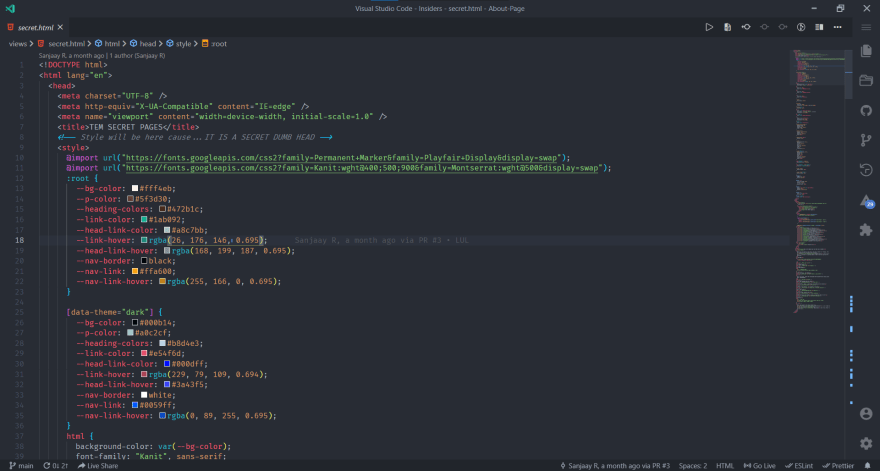
Theme: One Dark Pro
Font-Family: Fira Code
Icons: Material Icon Theme - Philipp Kief
Product Icon: Material Product Icons - Philipp Kief
Recommended MUST HAVE extensions:
Code Spell Checker
Error Lens
Project Manager
P.S. Philipp Kief is AWESOME with icons!
P.S.P.S. The blue marking on the scroll bar is blue because it is a spell check error and it is shown brightly because of the Error Lens extension.