


Hey Everyone! So I made an (Unofficial) DEV.to widget / profile-card which you can use in your websites and blogs (You just have to copy-paste 2 lines of code :D).
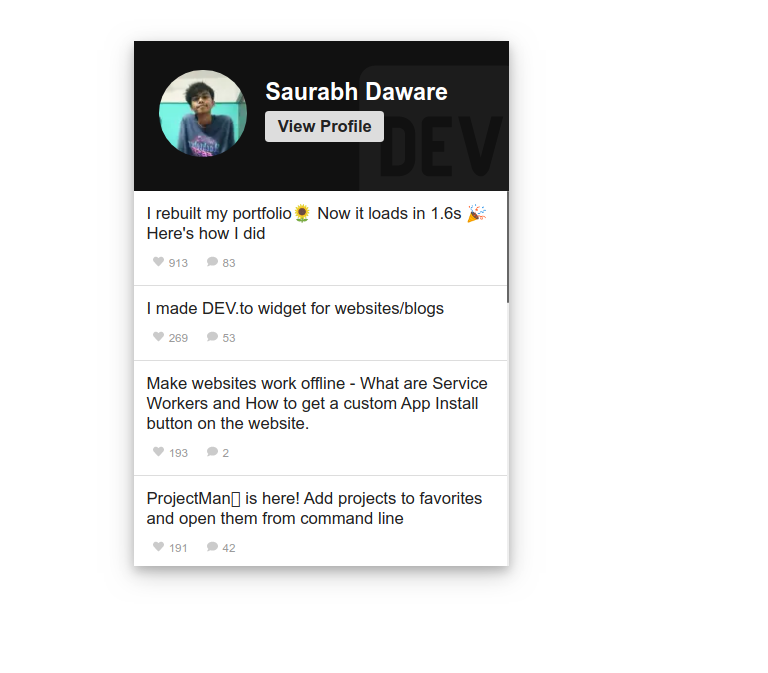
Here's how it looks like
Usage ( JUST 2 LINES OF CODE :D )
    <dev-widget data-username="saurabhdaware"></dev-widget>

    <!-- Place script tag before the end of the body tag -->
    <script src="https://unpkg.com/dev-widget@^1/dist/card.component.min.mjs" type="module"></script>
And BOOM that's it! Just put your dev.to username in data-username attribute and you will get your profile card :D
If you want to install it as ES6 module (Mostly used in frameworks)
npm install --save dev-widget
and import at the top of your file
import 'dev-widget'
Then you can use
<dev-widget data-username="saurabhdaware"></dev-widget>
There are some other attributes like data-width, data-limit You can checkout full documentation on my GitHub:
 saurabhdaware
/
DEV-widget
saurabhdaware
/
DEV-widget
Unofficial Widget/profile card for https://dev.to/
DEV widget


GUI to Generate Card: https://dev-widget.netlify.app/create
Codepen: https://codepen.io/saurabhdaware/pen/NWWbOvv
Unofficial Widget / profile card for dev.to.
You can use it in your website/blog and show off your DEV.to articles 🌻
Installation and Usage
- Through script tag
    <dev-widget data-username="saurabhdaware"></dev-widget>

    <!-- Place script tag before the end of the body tag -->
    <script src="https://unpkg.com/dev-widget@^1/dist/card.component.min.mjs" type="module"></script>
- As NPM module
This can be used in React, Vue and almost any other frontend framework
npm install --save dev-widget
Inside your framework component
import 'dev-widget'
Attributes Guide
| attributes | description | default |
|---|---|---|
| data-username | Your DEV.to Username | |
| data-width | Width of the card | 300px |
| data-contentheight | Height of the Aricles Container | 300px |
| data-theme |
Theme of the card (dark, ocean, pink, cobalt2, default) |
default |
| data-name (optional) | Name to display on card | Will |
Do ⭐ the repository 🦄
Also, for the hacktoberfest, if anyone wants to contribute to this project, I would love to help. You can checkout CONTRIBUTING.md for contribution guidelines.
GitHub: https://github.com/saurabhdaware/DEV-widget
NPM: https://npmjs.org/package/dev-widget
Codepen: https://codepen.io/saurabhdaware/pen/NWWbOvv


Oldest comments (55)
I will use this on my blog, thanks
so cool! thank you :D
Love the idea, well done 😊
Thank you so much 🦄
Looks very neat!
Thank you :)
Cool stuff Saurabh!
Thank you so much 🌻
Looks great, thank you!
Thank you Paula :D
This is so beautifully done. I’m super impressed.
Thank you so much ben🌻 means a lot 🦄🦄
Will this create any significant impact on DEV API consumption?
Amazing dude! A+ for Web Components implementation. Loved how you split the css into a separate module. Very impressive.
Thank youuu 🕺🌻
This is great. Nit: Promote healthy web practices and add sub-resource integrity (SRI) via the
integrityattribute on your example.developer.mozilla.org/en-US/docs/W...
You can grab your hash from unpkg via the
metaquery parameter:https://unpkg.com/dev-widget@1.0.1/dist/card.component.mjs?metaOh I didn't know about this thank you so much! I'll check it out
Came here to say that too — bravo!
Oh thank you! I've added integity hash to my codepen demo. Not really sure how I can get that hash before publishing so that I can set in readme (Apparently that hash changed from 1.0.1 to 1.0.2)
Yup, the hash will change for each version of the script pushed to the CDN.
Cool 🤩
Thank you Prafulla :D
great
Thank you :D