

Your Pipeline Is 20.0h Behind: Catching Inflation Sentiment Leads with Pulsebit
We just uncovered an intriguing anomaly: a 24-hour momentum spike of -1.150 surrounding the topic of inflation. This negative momentum indicates a significant shift in sentiment, and it deserves your attention. The leading language for this spike is English, with notable coverage occurring around 20.0 hours, revealing a critical delay in sentiment awareness in your data pipeline.
The Problem
If your sentiment analysis pipeline isn't equipped to handle multilingual origins or recognize dominant entities, you might be lagging behind. Your model missed this sentiment shift by a staggering 20.0 hours. The dominant English press is highlighting themes related to inflation, such as hikes and potential repercussions, yet your system is still trying to catch up. In a world where timely insights are everything, falling behind like this can impact decision-making processes significantly.

English coverage led by 20.0 hours. Af at T+20.0h. Confidence scores: English 0.85, French 0.85, Spanish 0.85 Source: Pulsebit /sentiment_by_lang.
The Code
To catch this kind of spike effectively, we can utilize our API to filter by language and evaluate sentiment narratives. Here’s how to do it in Python.
First, let’s set up a query that focuses on the English-speaking audience. We’ll use the following parameters:
import requests
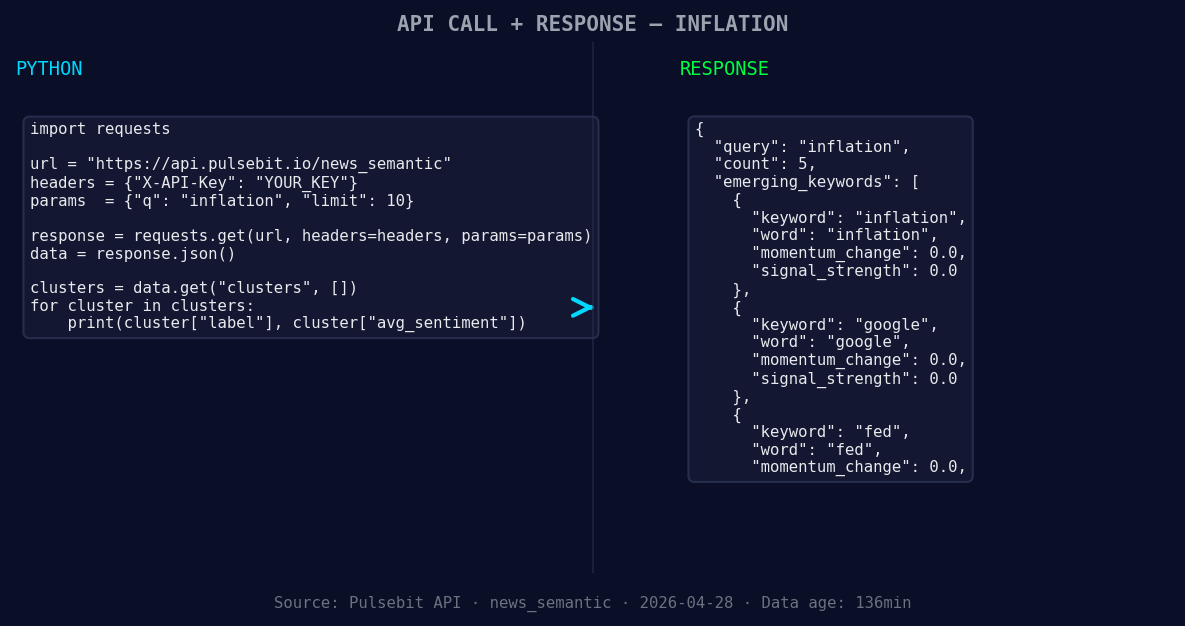
*Left: Python GET /news_semantic call for 'inflation'. Right: returned JSON response structure (clusters: 3). Source: Pulsebit /news_semantic.*
topic = 'inflation'
momentum = -1.150
lang = 'en'
# Step 1: Geographic origin filter
response = requests.get(f'https://api.pulsebit.com/sentiment?topic={topic}&lang={lang}')
data = response.json()
print(data)
Next, let’s run the cluster reason string back through our sentiment analysis endpoint to evaluate the narrative itself. This is a crucial step since understanding the framing helps us make sense of the data:
# Step 2: Meta-sentiment moment
cluster_reason = "Clustered by shared themes: hikes, possible, due, inflation, resurgence."
sentiment_response = requests.post('https://api.pulsebit.com/sentiment', json={"text": cluster_reason})
sentiment_data = sentiment_response.json()
print(sentiment_data)
By following these steps, we can identify not just the sentiment around the term "inflation," but also gain insights into how the topic is being framed across articles. This layered approach can enhance your model's responsiveness to emerging narratives.
Three Builds Tonight
- Geographic Filter Integration: Build a real-time alert system that triggers when sentiment around "inflation" dips below a score of -0.20 in English-speaking regions. This way, you’ll catch shifts before they become headlines.

Geographic detection output for inflation. India leads with 1 articles and sentiment +0.00. Source: Pulsebit /news_recent geographic fields.
Meta-Sentiment Analysis: Create a dashboard that visualizes the sentiment around your specific cluster reasons, such as "hikes" or "fed." Set a threshold where if the combined sentiment dips below -0.15, you receive a notification, allowing for proactive adjustments in your strategy.
Forming Themes Tracker: Develop a function that continuously scans for forming themes like inflation, Google, and the Fed versus mainstream narratives. If any of these themes exhibit a sentiment score of less than -0.10, you can trigger an in-depth review, allowing for a swift response to potential market impacts.
Get Started
Dive into our API and start building your own insights at pulsebit.lojenterprise.com/docs. With just a few lines of code, you can be up and running in under 10 minutes, ensuring you’re never behind on crucial sentiment shifts again.


Top comments (0)