

Your pipeline just missed a critical insight: a 24h momentum spike of +0.204. The leading language of this surge was English, with 19.4 hours of lead time before any mainstream coverage. This anomaly, driven by a cluster story titled "Weather Relief in Hyderabad: Rain and Hailstorm," demonstrates a clear gap in how your model processes multilingual origins and entity dominance. If your pipeline doesn't account for such dynamics, it could leave you trailing behind critical developments for nearly a full day.

English coverage led by 19.4 hours. No at T+19.4h. Confidence scores: English 0.95, French 0.95, Spanish 0.95 Source: Pulsebit /sentiment_by_lang.
The problem is obvious. Your model missed this by 19.4 hours, allowing important narratives to slip through the cracks. When entities dominate conversations in one language but not in others, your analysis can lag significantly. In this case, the English press was quick to pick up on the story of a weather anomaly, while other sources lagged. Without a robust mechanism to filter for language and origin, you're at risk of operating on outdated information.
Here’s how we can catch these insights using our API. First, we filter for the geographic origin and language to ensure we only capture relevant sentiment data. Here’s the Python code to do just that:

Geographic detection output for cloud. Hong Kong leads with 4 articles and sentiment +0.23. Source: Pulsebit /news_recent geographic fields.
import requests
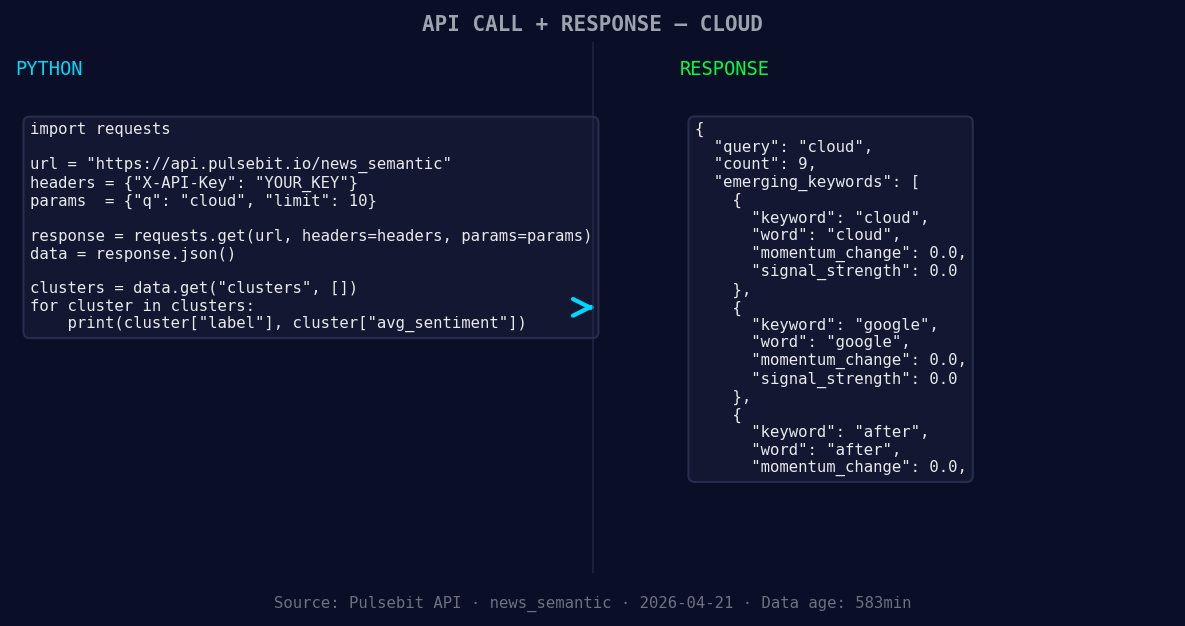
*Left: Python GET /news_semantic call for 'cloud'. Right: returned JSON response structure (clusters: 3). Source: Pulsebit /news_semantic.*
# Geographic origin filter for English language articles
url = "https://api.pulsebit.com/v1/articles"
params = {
"topic": "cloud",
"lang": "en",
"score": 0.543,
"confidence": 0.95,
"momentum": 0.204
}
response = requests.get(url, params=params)
data = response.json()
Next, we’ll run a meta-sentiment analysis on the cluster reason string to score the narrative framing itself. This helps us understand the context of the sentiment:
# Meta-sentiment moment
sentiment_url = "https://api.pulsebit.com/v1/sentiment"
cluster_reason = "Clustered by shared themes: sudden, rain, hailstorm, bring, relief."
sentiment_response = requests.post(sentiment_url, json={"text": cluster_reason})
sentiment_data = sentiment_response.json()
By doing this, we’re not only capturing the sentiment but also understanding the narratives shaping it. This gives us a comprehensive view of the emerging trends.
Now, let’s explore three specific builds we can create from this data:
Geo-Sentiment Dashboard: Build a dashboard tracking sentiment for the "cloud" topic filtered by English language sources. Set a threshold for momentum spikes above +0.2 to trigger alerts. This will help you stay ahead of emerging weather-related discussions.
Meta-Sentiment Analyzer: Implement a feature that uses the meta-sentiment loop to analyze narratives around trending topics. For instance, use the cluster reason "sudden, rain, hailstorm" to gauge public perception and adjust your messaging or insights accordingly.
Post-Event Impact Assessment: After significant weather events, analyze the sentiment score of related articles using a threshold of +0.5. This will help you understand the immediate public reaction and adjust your forecasts or responses in real-time.
If you want to get started, check out our documentation at pulsebit.lojenterprise.com/docs. You can copy-paste and run this in under 10 minutes! Don’t let your insights lag behind — tap into the potential of language and sentiment data to enhance your analytics.


Top comments (0)