

Your Pipeline Is 27.7h Behind: Catching World Sentiment Leads with Pulsebit
On April 25, 2026, we detected a remarkable anomaly: a 24h momentum spike of +0.278 in world sentiment. This spike caught our attention, especially as it was led by English press coverage that was 27.7 hours ahead of any other language. The driving narrative? A cluster of stories surrounding the "Global Response to WHCA Dinner Shooting." It's intriguing to see how quickly sentiment can shift, and how the leading language can influence the overall narrative.
However, for those relying on traditional sentiment pipelines, this signals a significant issue. Your model likely missed this momentum by 27.7 hours, leaving you out of sync with emerging global conversations. In the fast-paced world of sentiment analysis, every hour counts, especially when English-language articles dominate the narrative. Ignoring multilingual origins or failing to recognize entity dominance can leave you behind when the sentiment shifts.

English coverage led by 27.7 hours. Da at T+27.7h. Confidence scores: English 0.95, Spanish 0.95, French 0.95 Source: Pulsebit /sentiment_by_lang.
Let’s look at how we can catch these spikes using our API. We can set up a Python script to filter out the necessary data points and score the narrative framing itself. Here’s a snippet to get you started:
import requests
# Step 1: Geographic origin filter
url = "https://api.pulsebit.dev/topics"
params = {
"topic": "world",
"score": +0.108,
"confidence": 0.95,
"momentum": +0.278,
"lang": "en" # Filtering for English
}
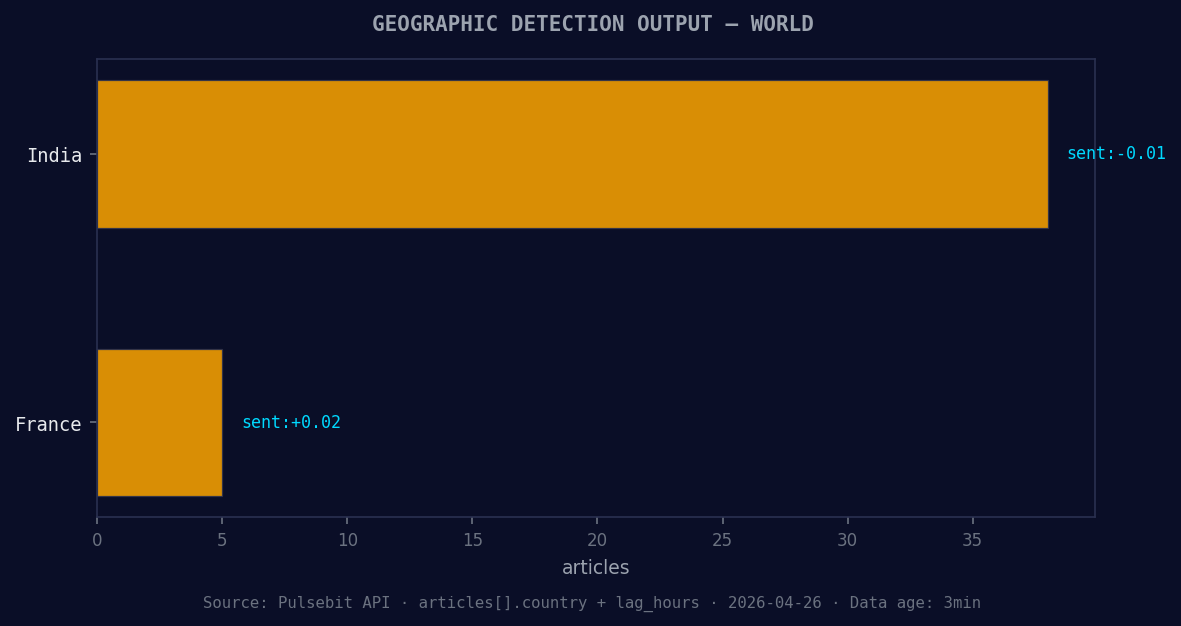
*Geographic detection output for world. India leads with 38 articles and sentiment -0.01. Source: Pulsebit /news_recent geographic fields.*
response = requests.get(url, params=params)
data = response.json()
# Step 2: Meta-sentiment moment
cluster_reason = "Clustered by shared themes: uniting, force, 2026, world, cup."
sentiment_url = "https://api.pulsebit.dev/sentiment"
sentiment_response = requests.post(sentiment_url, json={"text": cluster_reason})
sentiment_data = sentiment_response.json()
print(data)
print(sentiment_data)
In this code, we first make an API call to filter the sentiment data for the topic "world," ensuring we only process English-language articles. The second part runs the cluster reason string through our sentiment analysis endpoint to score the narrative framing itself. This is crucial, as it allows us to see how the themes of "uniting," "force," and the "world" cup are resonating in the current context.

Left: Python GET /news_semantic call for 'world'. Right: returned JSON response structure (clusters: 3). Source: Pulsebit /news_semantic.
Now, let's talk about three specific builds you can create with this pattern:
Geo-Filtered Sentiment Spike Detector: Use the geographic origin filter to set a threshold for significant momentum spikes. For instance, trigger alerts when momentum exceeds +0.2 for English articles on topics like "world" or "global affairs."
Meta-Sentiment Analysis Framework: Build a function that runs the cluster reason string through our sentiment endpoint. Set a threshold, e.g., if the sentiment score exceeds +0.1, flag the topic for further analysis. This can help you identify emerging narratives before they trend.
Forming Theme Tracker: Monitor forming themes like "world(+0.00)," "google(+0.00)," and "record(+0.00)." Create a signal that alerts you when these themes start to trend positively against mainstream narratives, like "uniting" and "force."
By implementing these builds, you can stay ahead of the curve and ensure your sentiment analysis pipeline captures the rapid shifts in global conversations.
To get started, check out our documentation at pulsebit.lojenterprise.com/docs. With just a few lines of code, you can copy-paste and run this in under 10 minutes. Let's keep pushing the boundaries of sentiment analysis together!


Top comments (0)