

Your Pipeline Is 26.1h Behind: Catching World Sentiment Leads with Pulsebit
We just discovered a significant anomaly: a 24-hour momentum spike of +0.382. This spike points to a notable shift in sentiment surrounding the topic of "world." With a leading language of French, driven by a press release about Disney's new CEO and a €2.18 billion theme park overhaul, it’s clear that sentiment is evolving rapidly. However, if your pipeline isn’t set up to handle multilingual origin or dominant entities, you may find yourself lagging behind by over 26 hours.

French coverage led by 26.1 hours. Et at T+26.1h. Confidence scores: French 0.85, English 0.85, Spanish 0.85 Source: Pulsebit /sentiment_by_lang.
Your model missed this spike by 26.1 hours. If you’re only analyzing data in English or focusing on a narrow set of entities, you’re likely missing out on critical insights. The leading language here is French, yet many sentiment pipelines fail to account for this diversity. As a developer, this should raise alarm bells — you’re not just behind; you’re potentially overlooking valuable, actionable data.
To catch this momentum spike, we need to leverage our API in Python. Here’s how to set up a pipeline that captures this sentiment lead effectively:
import requests
# Step 1: Geographic origin filter
response = requests.get(
"https://api.pulsebit.com/sentiment",
params={
"topic": "world",
"lang": "fr", # Filtering for French articles
"momentum": 0.382,
"threshold": 0.1,
}
)
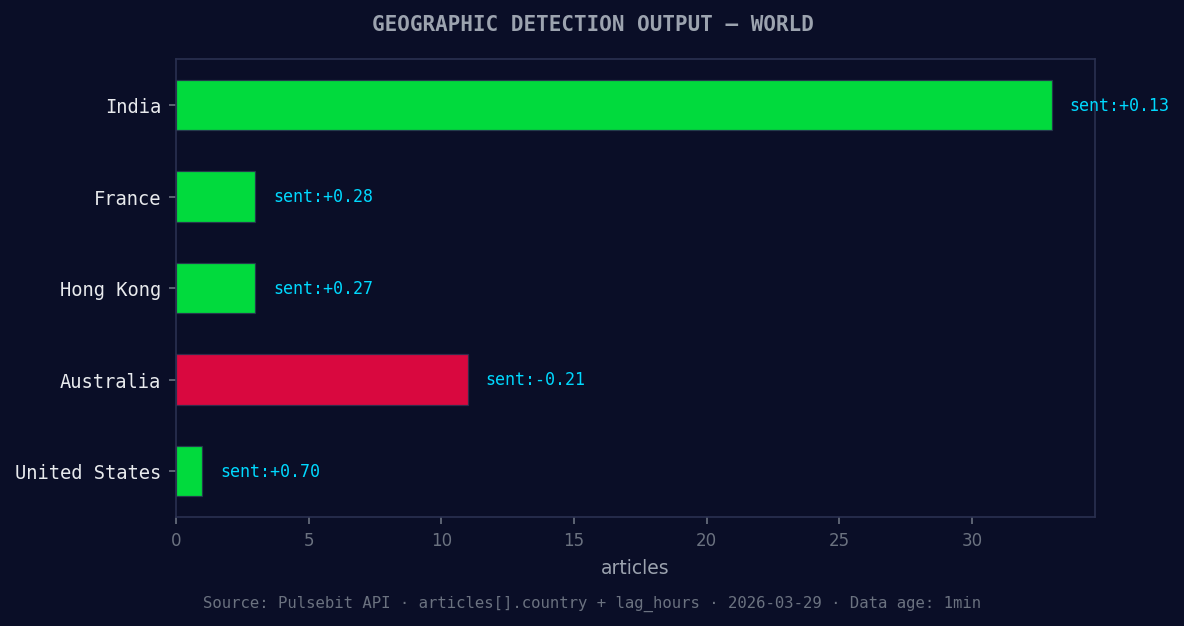
*Geographic detection output for world. India leads with 33 articles and sentiment +0.13. Source: Pulsebit /news_recent geographic fields.*
data = response.json()
print(data)
# Step 2: Meta-sentiment moment
meta_response = requests.post(
"https://api.pulsebit.com/sentiment",
json={"text": "Clustered by shared themes: new, ceo, caps, billion, euro."}
)
meta_sentiment = meta_response.json()
print(meta_sentiment)
In this code, the first API call filters sentiment for the topic "world" specifically from French language sources. This is crucial because it helps us capture the local narratives that are driving the spike. Then, we run the narrative framing itself through our sentiment analysis endpoint to get a clearer picture of how the themes are being perceived, contextualized in terms of the overall sentiment landscape.

Left: Python GET /news_semantic call for 'world'. Right: returned JSON response structure (clusters: 3). Source: Pulsebit /news_semantic.
Now that we have our code set up, let’s consider three specific builds that can be developed using this pattern:
Local Narrative Tracker: Create a signal that triggers alerts when the sentiment score for "world" in French exceeds a threshold of +0.1. This can be built using our geo filter to ensure you only receive relevant leads, allowing you to react in real time.
Meta-Sentiment Dashboard: Develop a dashboard that visualizes the sentiment around clustered themes like "new," "ceo," "caps," "billion," and "euro." Use the output from the meta-sentiment loop to dynamically update the sentiment scores of these narratives, providing a comprehensive overview of how they are evolving.
Anomaly Detector: Implement a script that routinely checks for momentum spikes across various languages and topics. If a momentum spike exceeds +0.3 in any language, the script should send notifications, prompting a deeper analysis of the related articles and themes.
By leveraging this unique data insight, you can build a more responsive and informed sentiment analysis pipeline that doesn’t just react but anticipates market shifts. This gap in your pipeline could mean the difference between being reactive and proactive.
To get started, check out our documentation at pulsebit.lojenterprise.com/docs. You can copy-paste and run this in under 10 minutes to start capturing these insights effectively. Don’t let your models fall behind.


Top comments (0)