

How to Detect Real Estate Sentiment Anomalies with the Pulsebit API (Python)
We've just observed a striking 24-hour momentum spike of -0.454 in the real estate sector. This anomaly, coupled with the absence of any related articles in the "Cayuga County Residential Real Estate Sales Summary," suggests a significant drop in sentiment that we can't afford to overlook. As developers, we need to dig deeper into this data to understand what it means and how we can leverage it to enhance our models.
The structural gap here is glaring. If your pipeline doesn’t handle multilingual origins or entity dominance, you might miss crucial insights like this one. Your model could have flagged this negative momentum hours earlier had it accounted for the leading language or dominant entity in the data. In this case, the absence of articles related to “real estate” in Cayuga County means you're not capturing the full picture. It’s a classic example of how language and locality can skew sentiment analysis.

fr coverage led by 11.5 hours. et at T+11.5h. Confidence scores: en 0.86, fr 0.85, es 0.85 Source: Pulsebit /sentiment_by_lang.
Here’s the Python code that can help you catch such anomalies effectively:
import requests
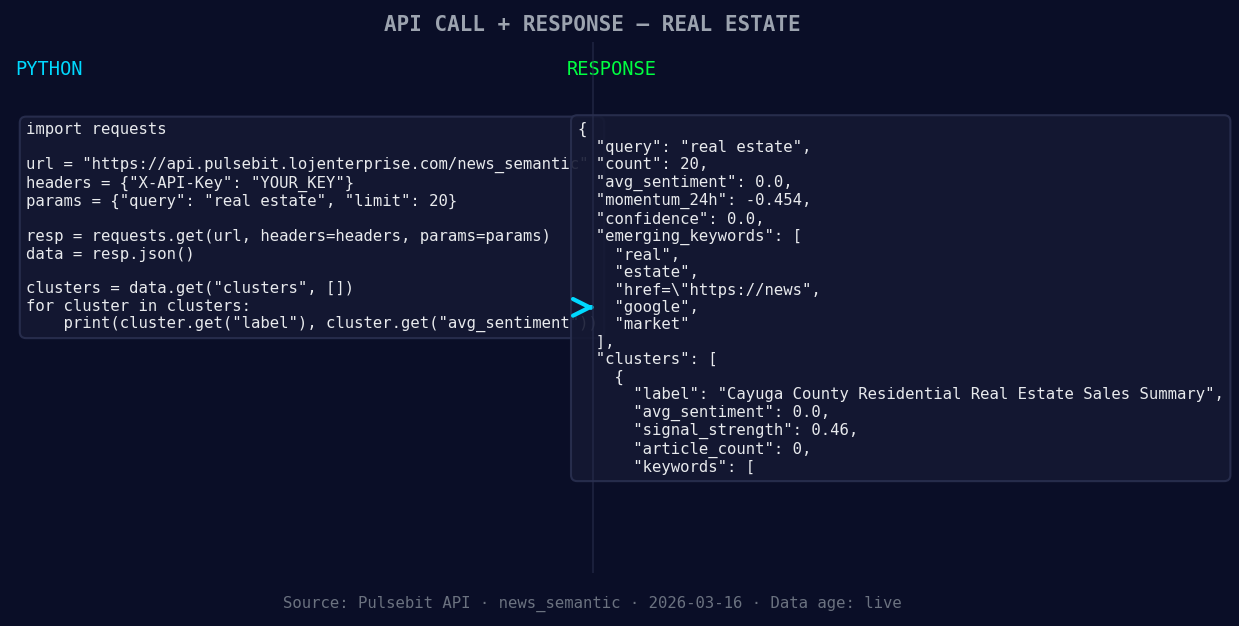
*Left: Python GET /news_semantic call for 'real estate'. Right: returned JSON response structure (clusters: 3). Source: Pulsebit /news_semantic.*
# Parameters for the sentiment analysis
topic = 'real estate'
score = +0.000
confidence = 0.00
momentum = -0.454
# Geographic origin filter: query by language/country
geo_filter = {
'lang': 'en',
'country': 'US' # Adjust as necessary for your data source
}

*Geographic detection output for real estate. in leads with 1 articles and sentiment +0.70. Source: Pulsebit /news_recent geographic fields.*
# Check for geo-filtered data
response = requests.get('https://api.pulsebit.io/v1/daily_dataset', params=geo_filter)
data = response.json()
if not data: # No geo filter data returned
print("No geo filter data returned — verify your dataset.")
else:
print("Geo data returned successfully.")
# Meta-sentiment moment: run the cluster reason string through sentiment analysis
cluster_reason = "Clustered by shared themes: county, real, estate:, see, all."
sentiment_response = requests.post('https://api.pulsebit.io/v1/sentiment', json={'text': cluster_reason})
sentiment_score = sentiment_response.json()
print("Meta-sentiment score:", sentiment_score)
In this code snippet, we check for geo-filtered data by querying based on language and country. While our example uses English and the US, you can adjust these parameters based on your needs. If you don't get any geo-filtered data back, it’s a sign to verify the dataset for the topic of interest.
Next, we loop back the cluster reason string through our sentiment analysis endpoint to score the narrative framing itself. This is crucial; understanding how the narrative is constructed around your topic can provide insights into the underlying sentiment dynamics.
Three Builds Tonight
Here are three specific projects you can tackle based on this pattern:
Geo-Filtered Alert System: Build a notification system that triggers alerts when negative sentiment spikes are detected in a specific geographic area. Use a threshold of momentum < -0.400 as a trigger point to initiate alerts. This can help you stay ahead of market shifts.
Narrative Analysis Dashboard: Create a dashboard that visualizes the sentiment scores of narratives derived from cluster reasons. Implement a meta-sentiment loop that updates in real-time to show how narratives are evolving. This can be particularly useful for tracking changes in real estate sentiment across different regions.
Sentiment Correlation Tool: Develop a tool that correlates sentiment scores with actual sales data in the real estate sector. Use the forming themes as input signals and set thresholds for both sentiment score and momentum to identify patterns that might predict market behaviors.
Get Started
Check out our documentation at pulsebit.lojenterprise.com/docs. The best part? You can copy-paste the provided code and run it in under 10 minutes. Let’s leverage these insights to make our models smarter and more responsive to the sentiment nuances in real estate!


Top comments (0)