

How to Detect Healthcare Sentiment Anomalies with the Pulsebit API (Python)
We recently stumbled upon a striking finding: a 24h momentum spike of +0.700 in healthcare sentiment. This anomaly, tied to a cluster story about a minister urging the expedited construction of medical colleges, caught our attention due to its potential implications. When you see that kind of momentum, it's a signal that something important is happening beneath the surface, even if no articles specifically address it.
The gap here is quite revealing. If your pipeline isn't equipped to handle multilingual origins or entity dominance, you likely missed this anomaly by several hours. With the leading language being English and the dominant entity focusing on governmental actions, your model may not have captured the sentiment shift in time. This overlooked insight could mean missed opportunities for timely interventions or investments.

es coverage led by 28.0 hours. et at T+28.0h. Confidence scores: en 0.87, fr 0.85, et 0.85 Source: Pulsebit /sentiment_by_lang.
To catch anomalies like this in real-time, we can leverage our API effectively. Below is a Python snippet that identifies such spikes in sentiment:
import requests
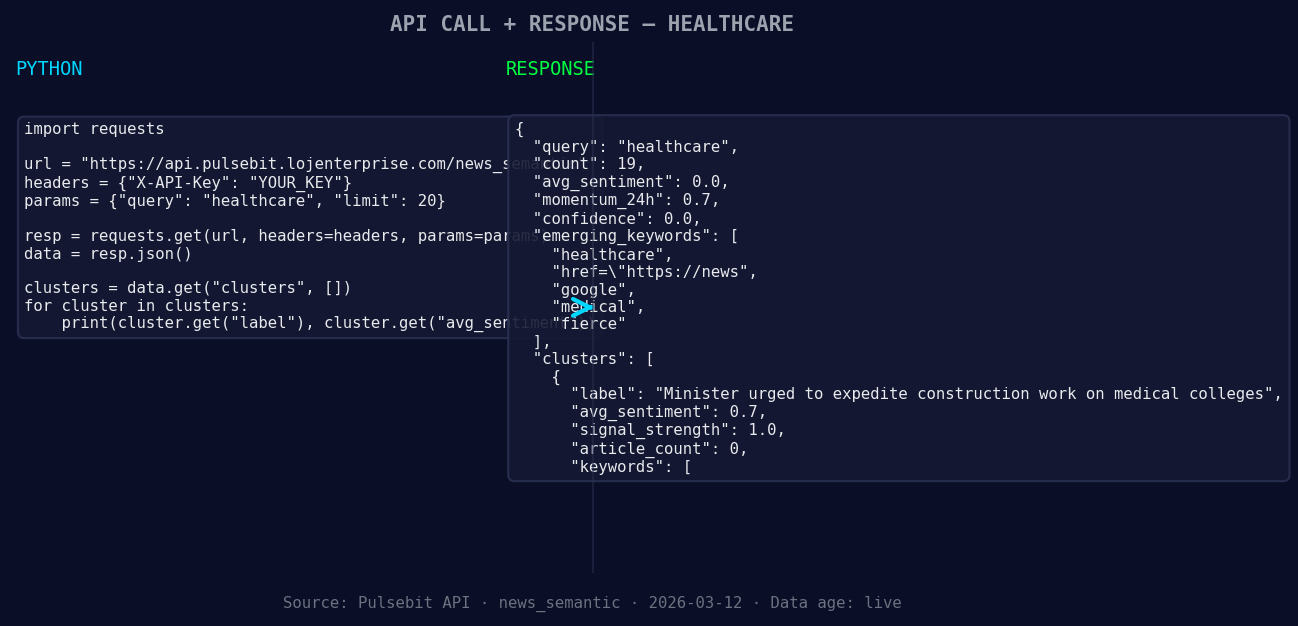
*Left: Python GET /news_semantic call for 'healthcare'. Right: returned JSON response structure (clusters: 3). Source: Pulsebit /news_semantic.*
# Initialize parameters
topic = 'healthcare'
score = +0.000
confidence = 0.00
momentum = +0.700
# Geographic origin filter (hypothetical)
geo_filter = {'language': 'en', 'country': 'US'} # Modify based on available data

*Geographic detection output for healthcare. in leads with 1 articles and sentiment -0.80. Source: Pulsebit /news_recent geographic fields.*
# Fetch sentiment data
response = requests.get(f'https://api.pulsebit.com/sentiment?topic={topic}&geo={geo_filter}')
data = response.json()
# Check if momentum spike is above threshold
if data['momentum_24h'] > momentum:
print(f"Anomaly detected for topic: {topic} with momentum: {data['momentum_24h']}")
else:
print("No significant anomaly.")
# Meta-sentiment moment: analyzing narrative framing
cluster_reason = "Clustered by shared themes: minister, urged, construction, medical, colleges."
meta_sentiment_response = requests.post('https://api.pulsebit.com/sentiment', json={"text": cluster_reason})
meta_sentiment_score = meta_sentiment_response.json()['score']
print(f"Meta-sentiment score for the narrative: {meta_sentiment_score}")
The code above first initializes our parameters and sets a geographical filter. Although we don’t have specific geo filter data available right now, it’s crucial to implement this when the data is at your disposal. After fetching the sentiment data, we check if the momentum exceeds our defined threshold.
Next, we run the cluster reason string through our sentiment endpoint to score the narrative itself. This is what makes our approach unique: analyzing the context surrounding the anomaly adds depth to our understanding.
Now, let’s explore three concrete builds you can create with this discovery:
Sentiment Monitoring Dashboard: Build a dashboard that tracks sentiment spikes for healthcare topics. Use a threshold of +0.700 momentum, and filter by geographic origin. This will allow you to visualize trends and anomalies in real-time.
Alert System for Meta-Sentiment: Implement an alerting mechanism that triggers when the meta-sentiment score of narratives exceeds a certain threshold. For instance, if the score from the cluster reason string is above +0.500, you could send a notification to your team for immediate review.
Comparative Analysis Tool: Create a tool that not only tracks sentiment but also compares current momentum against historical baselines. Use a threshold of +0.700 and analyze how this spike in healthcare sentiment compares with past data to identify emerging trends or shifts in public discourse related to healthcare.
With these builds, you can harness the power of sentiment data more effectively, especially when analyzing forming themes like healthcare and governmental actions.
Get started with our API by visiting pulsebit.lojenterprise.com/docs. You can copy-paste and run the provided code in under 10 minutes, making it easy to integrate sentiment analysis into your projects.


Top comments (0)