

Your Pipeline Is 28.5h Behind: Catching World Sentiment Leads with Pulsebit
We just uncovered a fascinating anomaly: a 24-hour momentum spike of +0.308 that you might be missing out on. This spike is tied to a specific cluster story regarding the "Global Response to WHCA Dinner Shooting," with three articles driving this momentum. It’s clear that sentiment is shifting quickly, but if your pipeline isn’t tuned for multilingual origin or entity dominance, you could be trailing by a significant margin.

English coverage led by 28.5 hours. Tl at T+28.5h. Confidence scores: English 0.85, Spanish 0.85, French 0.85 Source: Pulsebit /sentiment_by_lang.
Imagine this: your model just missed this critical lead by 28.5 hours. While the English press is reacting swiftly to pressing global events, your pipeline may still be processing older data. The leading language in this case is English, but without a robust mechanism to detect and prioritize emerging narratives across languages, you risk losing relevance and insight.
To catch this momentum, we can leverage our API effectively. Here’s how we do it in Python:
import requests
# Step 1: Geographic origin filter
url = "https://api.pulsebit.lojenterprise.com/v1/topics/sentiment"
params = {
"topic": "world",
"lang": "en",
"score": +0.102,
"confidence": 0.85,
"momentum": +0.308
}
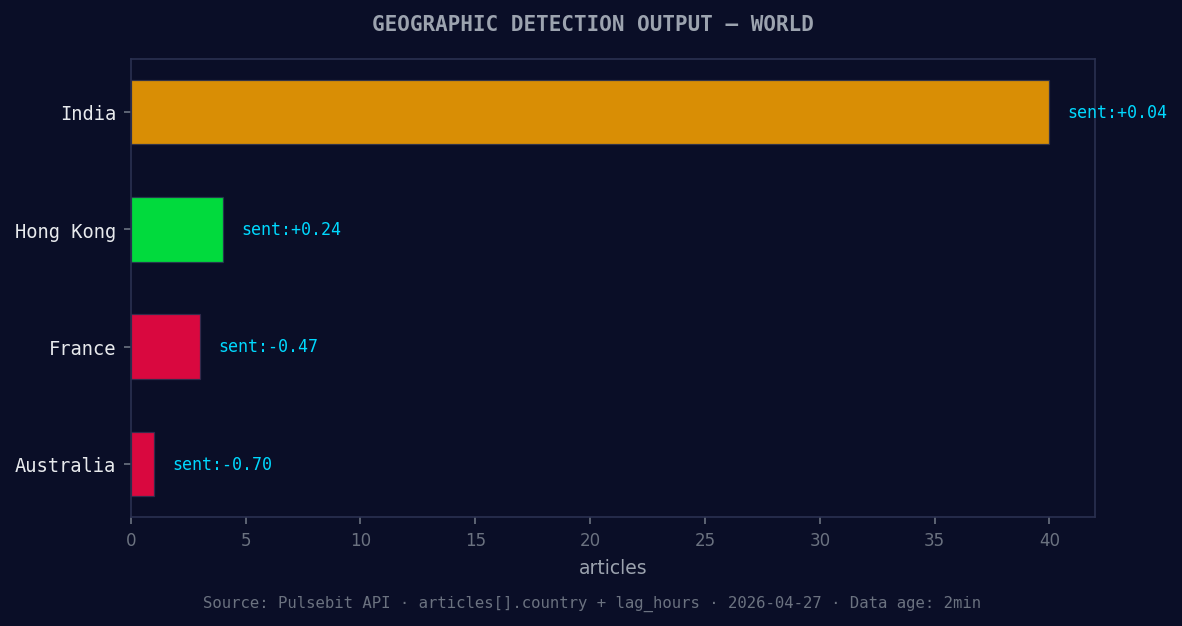
*Geographic detection output for world. India leads with 40 articles and sentiment +0.04. Source: Pulsebit /news_recent geographic fields.*
response = requests.get(url, params=params)
data = response.json()
print(data)
This API call filters the sentiment for the topic "world" in English, capturing the essence of the sentiment spike. Next, we need to run our cluster reason string back through the sentiment analysis to assess the narrative framing itself. This is a crucial step to ensure that we’re not just observing momentum but also understanding the themes that are driving it.

Left: Python GET /news_semantic call for 'world'. Right: returned JSON response structure (clusters: 3). Source: Pulsebit /news_semantic.
# Step 2: Meta-sentiment moment
cluster_reason = "Clustered by shared themes: uniting, force, 2026, world, cup."
sentiment_response = requests.post("https://api.pulsebit.lojenterprise.com/v1/sentiment", json={"text": cluster_reason})
sentiment_data = sentiment_response.json()

print(sentiment_data)
Here, we’re using our cluster reason string to evaluate the sentiment surrounding these emerging themes. This step allows us to see how the specific narratives are resonating, giving us a fuller picture of world sentiment.
Now that we’ve captured this momentum spike, here are three specific builds you can implement:
Geo-Filter for Rapid Alerts: Set up a webhook that triggers if the momentum for any topic exceeds a threshold of +0.300 in English. This ensures you’re always alerted to significant shifts, like the recent spike.
Meta-Sentiment Loop for Narrative Analysis: Create a regular job that pulls the latest clustered themes and runs them through the sentiment endpoint. This will help you gauge how narratives evolve, particularly around the forming themes of world, google, and record.
Forming Themes Integration: Use an endpoint that captures the emerging themes and their sentiment scores. For instance, monitor tweets or articles that mention "uniting, force, world" and maintain a score for how these themes are perceived over time, adjusting your models accordingly.
By focusing on these builds, you can ensure that your pipeline not only keeps pace but also leads the conversation surrounding global sentiment.
Ready to get started? You can find more information in our documentation at pulsebit.lojenterprise.com/docs. Copy-paste the code above, and you can run this in under 10 minutes. Don't let your pipeline lag behind—stay ahead of the curve on global sentiment trends!


Top comments (0)