

Your Pipeline Is 22.5h Behind: Catching World Sentiment Leads with Pulsebit
We recently discovered a striking anomaly: a 24h momentum spike of +0.684 in global discussions around the topic of "world." This spike is particularly interesting as it coincides with a cluster of articles detailing a humanoid robot breaking a half marathon world record in Beijing. The sheer volume and positivity of sentiment surrounding this event reveal a significant shift in public discourse, one that your current pipeline might be missing.
In a world where sentiment analysis is crucial, the structural gap in pipelines that fail to account for multilingual origins or entity dominance is glaring. If your model doesn’t accommodate these nuances, you might find yourself lagging behind by a staggering 22.5 hours. This is particularly evident when English press coverage leads discussions while other languages are slower to pick up on the same themes. In this case, your model missed the momentum spike driven by English-language articles focusing on the groundbreaking robot achievement.

English coverage led by 22.5 hours. German at T+22.5h. Confidence scores: English 0.80, Spanish 0.80, French 0.80 Source: Pulsebit /sentiment_by_lang.
To catch this momentum spike, we can utilize our API effectively. Let's start with Python code that retrieves relevant English-language articles and scores the sentiment around our identified cluster. Here’s how you can do it:
import requests
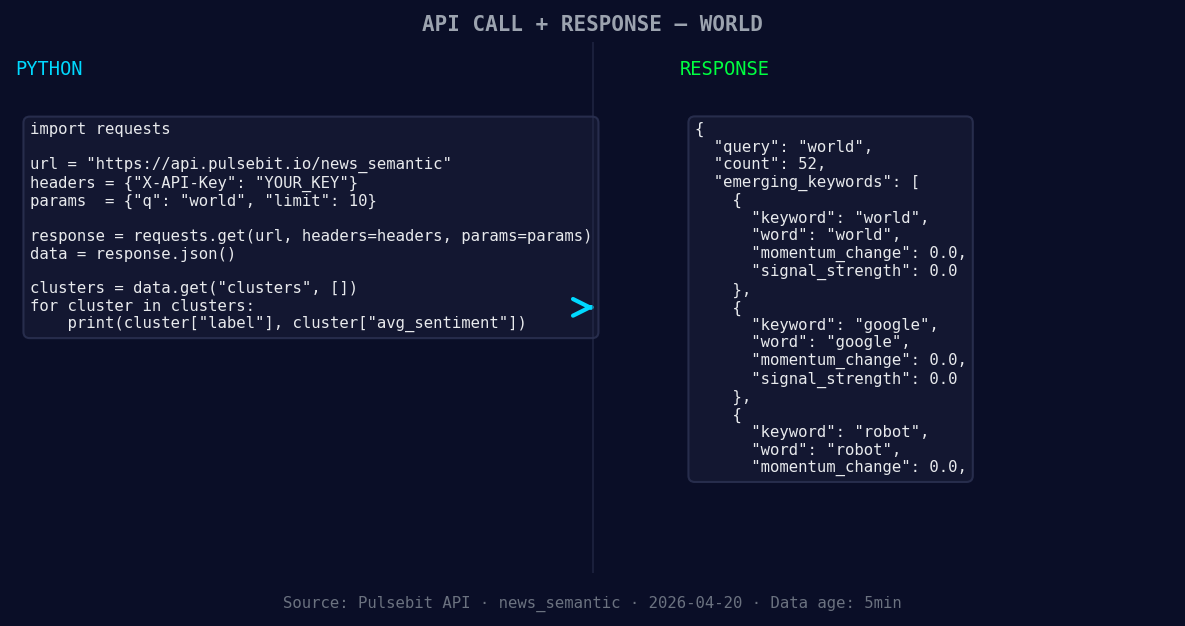
*Left: Python GET /news_semantic call for 'world'. Right: returned JSON response structure (clusters: 3). Source: Pulsebit /news_semantic.*
# Step 1: Geographic origin filter, querying English language articles
topic = 'world'
momentum = +0.684
score = +0.015
confidence = 0.80
response = requests.get('https://api.pulsebit.com/articles', params={
'topic': topic,
'lang': 'en',
'momentum': momentum
})
articles = response.json()
print(articles) # Process articles as needed
Now that we've gathered the articles, we need to analyze the meta-sentiment of the narrative around the clustered themes. Here’s how we do that:
# Step 2: Running the cluster reason string through POST /sentiment
cluster_reason = "Clustered by shared themes: administration, warms, imf, world, bank."
sentiment_response = requests.post('https://api.pulsebit.com/sentiment', json={
    'text': cluster_reason
})

sentiment_analysis = sentiment_response.json()
print(sentiment_analysis)  # Output the sentiment analysis
With these snippets, we can pinpoint and analyze the emerging themes driving the conversation around the humanoid robot, while also keeping our pipeline agile to catch future anomalies.
Here are three specific builds you can implement based on this pattern:
- Geographic Origin Filter: Use the geographic filter by tweaking the parameters to focus on areas with significant English-language media coverage about "world." You can set a threshold for momentum spikes above +0.5, allowing you to catch growing discussions before they peak.

Geographic detection output for world. India leads with 9 articles and sentiment +0.10. Source: Pulsebit /news_recent geographic fields.
Meta-Sentiment Loop: Implement a continuous loop that feeds back the cluster reason into the sentiment analysis, capturing evolving narratives. For example, track phrases like "robot," "world," and "record," scoring them against mainstream discussions involving "administration," "warms," and "IMF." Set a threshold where the sentiment score exceeds +0.1 to flag significant shifts.
Forming Themes Tracker: Create an endpoint that continuously monitors forming themes such as "world(+0.00)," "google(+0.00)," and "robot(+0.00)." Use these signals to trigger alerts or generate reports when they deviate from the norm, providing a proactive approach to sentiment analysis.
These builds will enhance your ability to stay ahead in capturing sentiment dynamics, especially as they evolve in a multilingual context.
To get started, check out our documentation at pulsebit.lojenterprise.com/docs. You can copy-paste and run these snippets in under 10 minutes. Happy coding!


Top comments (0)