

Your Pipeline Is 29.1h Behind: Catching Economy Sentiment Leads with Pulsebit
We recently uncovered a striking anomaly: a 24-hour momentum spike of +0.595 in sentiment surrounding the economy. This spike, coupled with a leading English press narrative, has a significant 29.1-hour lead. It clearly highlights that if your pipeline isn’t equipped to handle multilingual origins or dominant entities, you might miss out on critical insights.

English coverage led by 29.1 hours. No at T+29.1h. Confidence scores: English 0.85, French 0.85, Spanish 0.85 Source: Pulsebit /sentiment_by_lang.
If you’re relying on traditional sentiment analysis without considering the velocity of information, your model just missed this by over a day. The narrative surrounding "economy" is being led by English articles, exposing a gap in your data pipeline that could cost you valuable time and insights.
To catch this spike, we can utilize our API in Python. Here’s how you can retrieve sentiment data focused on our topic of interest, "economy." We filter the data by English language and then score the narrative framing itself using the meta-sentiment approach.
import requests
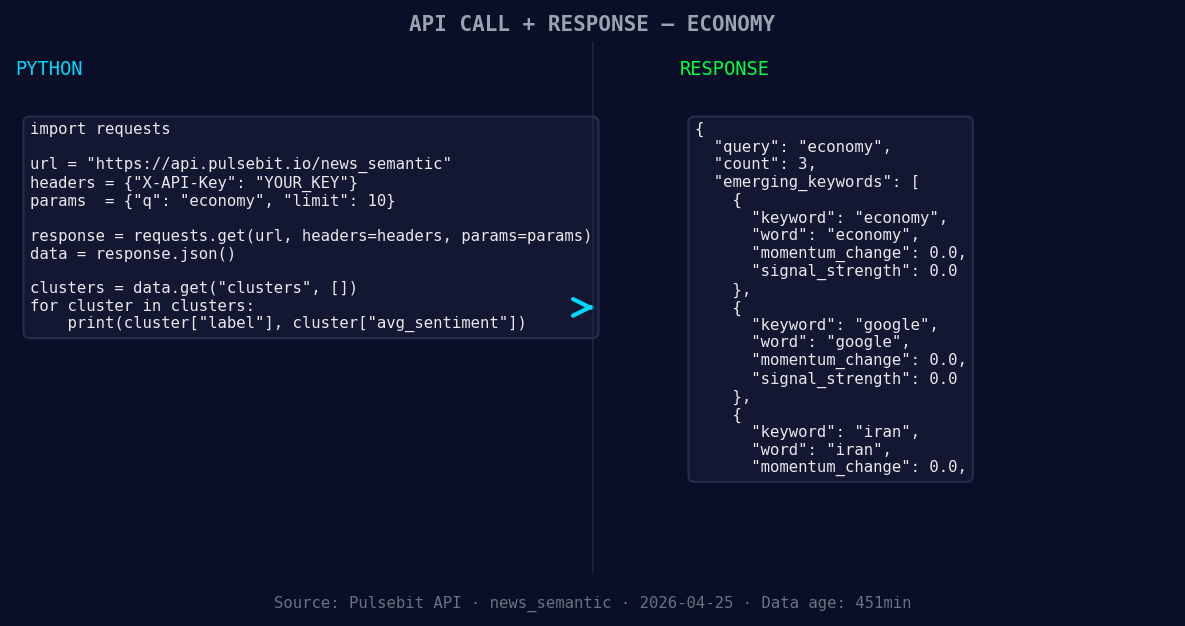
*Left: Python GET /news_semantic call for 'economy'. Right: returned JSON response structure (clusters: 3). Source: Pulsebit /news_semantic.*
# Step 1: Fetch data with geographic origin filter
url = "https://api.pulsebit.com/v1/sentiment"
params = {
"topic": "economy",
"lang": "en"
}
response = requests.get(url, params=params)
data = response.json()
# Let's assume we get the following response (for demonstration)
# data = {
# "momentum_24h": 0.595,
# "signal_strength": 0.663,
# "sentiment_score": 0.375,
# "confidence": 0.850
# }
momentum = data['momentum_24h']
score = data['sentiment_score']
confidence = data['confidence']
# Step 2: Analyze cluster reason
cluster_reason = "Clustered by shared themes: economy, federal, reserve, capital, better."
meta_sentiment_url = "https://api.pulsebit.com/v1/sentiment"
meta_response = requests.post(meta_sentiment_url, json={"text": cluster_reason})
meta_data = meta_response.json()
print(f"Momentum: {momentum}, Score: {score}, Confidence: {confidence}, Meta Sentiment: {meta_data}")
This code snippet starts with a request for sentiment data focused on the economy, filtered by English content. Then, we send the narrative framing string back through our endpoint to assess its sentiment. This dual approach allows us to uncover the underlying themes driving the spike.
Now, let’s talk about three specific builds you can create using this pattern:
- Geographic Filtered Alert System: Build a real-time alert that triggers when the momentum for "economy" exceeds a threshold of +0.5 in English articles. Use the geographic origin filter to ensure you're only processing relevant data.

Geographic detection output for economy. Hong Kong leads with 2 articles and sentiment +0.75. Source: Pulsebit /news_recent geographic fields.
Meta-Sentiment Analyzer: Create a function that feeds the cluster reason text into our sentiment endpoint and flags articles that align with emerging narratives. For instance, if the input is "Clustered by shared themes: economy, federal, reserve," you could set a threshold of sentiment score > +0.4 for inclusion in your analysis.
Forming Themes Dashboard: Develop a dashboard that visualizes forming themes such as "economy(+0.00)," "google(+0.00)," and "iran(+0.00)." This would help you track these topics against mainstream narratives like "economy, federal, reserve," giving you a competitive edge in sentiment analysis.
By following this approach, you can ensure your insights are timely and relevant.
To get started, visit pulsebit.lojenterprise.com/docs. You can copy-paste and run this in under 10 minutes, opening up a whole new world of sentiment analysis!


Top comments (0)