

Your model just missed an important signal: a 24h momentum spike of +0.315 for the finance sector. This anomaly, driven by a notable shift in sentiment towards LTM (NSEI:LTM), suggests that something significant is happening beneath the surface. As sentiment trends evolve, being able to catch these shifts in real-time can make a substantial difference in your analysis and decisions.
But here's the catch: your pipeline is likely lagging by 21.2 hours. That’s the time difference from when the English press started leading the narrative to when your model picked up on it. If you’re not accommodating multilingual origins or dominant entities, you risk missing out on crucial information. With the leading language being English at a 0.0-hour lag, there’s a clear gap in your framework that could be costing you insights.

English coverage led by 21.2 hours. Id at T+21.2h. Confidence scores: English 0.85, French 0.85, Spanish 0.85 Source: Pulsebit /sentiment_by_lang.
To help you bridge this gap, let’s dive into some Python code that leverages our API to capture this momentum. We’ll filter by language, ensuring we only analyze English content, and then we’ll score the narrative framing using the cluster reason string.
import requests
# Step 1: Query for the momentum spike in finance
url = "https://api.pulsebit.com/v1/sentiment"
params = {
"topic": "finance",
"momentum": "+0.315",
"score": "+0.105",
"confidence": 0.85,
"lang": "en" # Geographic origin filter
}
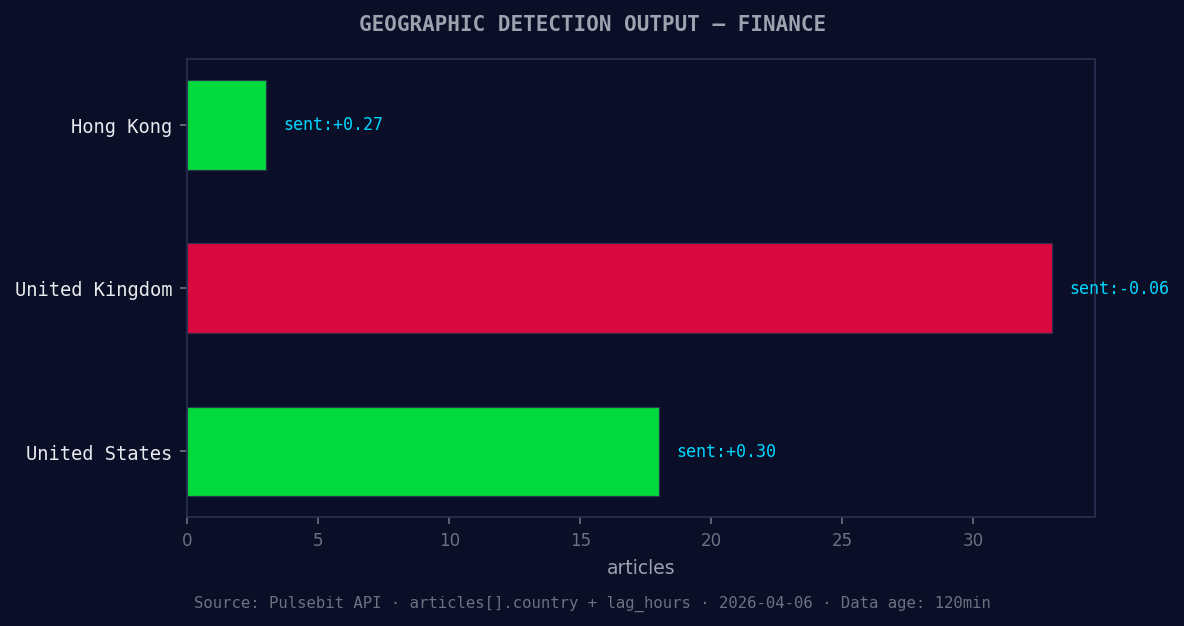
*Geographic detection output for finance. Hong Kong leads with 3 articles and sentiment +0.27. Source: Pulsebit /news_recent geographic fields.*
response = requests.get(url, params=params)
data = response.json()
# Output the response
print("Sentiment Data:", data)
Now we’ll run the narrative framing through our sentiment analysis endpoint. This will help us understand how the themes are resonating across the narrative landscape.
# Step 2: Analyze the cluster reason string
narrative_string = "Clustered by shared themes: ltm, (nsei:ltm), investment, story, shifting."
sentiment_analysis_url = "https://api.pulsebit.com/v1/sentiment/analyze"
payload = {
    "text": narrative_string
}

sentiment_response = requests.post(sentiment_analysis_url, json=payload)
narrative_sentiment = sentiment_response.json()

# Output the narrative sentiment analysis
print("Narrative Sentiment Data:", narrative_sentiment)
With this code, you can catch the evolving narratives in finance and leverage them for your insights. Here are three specific builds we can implement using this momentum spike:
- Geo-Filtered Spike Detector: Set a threshold of momentum at +0.250 and filter results by English sources to quickly identify significant events in finance. Use the geo filter in your API call to ensure you’re only processing relevant content.

Left: Python GET /news_semantic call for 'finance'. Right: returned JSON response structure (clusters: 3). Source: Pulsebit /news_semantic.
Meta-Sentiment Loop: Create a function that inputs the cluster reason string every hour and checks for emerging themes. Set a score threshold of +0.100 to identify narratives that could indicate a market shift. This allows you to refine your understanding of the context behind the momentum.
Forming Theme Tracker: Monitor clusters with forming signals like finance(+0.00), google(+0.00), and yahoo(+0.00). If the sentiment score for these themes is above your set threshold, trigger an alert for potential investment opportunities. This will ensure you’re tuned into the noise versus the signal.
For developers eager to get started, we encourage you to explore our documentation at pulsebit.lojenterprise.com/docs. You can copy-paste the provided code and run it in under 10 minutes to start capitalizing on these insights.


Top comments (0)