

Your pipeline just missed a critical anomaly: a 24h momentum spike of +0.185. This sharp increase in sentiment around the topic of fashion suggests a significant shift in public opinion that you need to capture. The leading language driving this sentiment is English, with a noteworthy 29.3-hour lag compared to Dutch, which is sitting at 0.0 hours. This lag indicates that your current model may not be adequately addressing multilingual sources and the dominance of specific entities, ultimately leaving you behind the curve.

English coverage led by 29.3 hours. Nl at T+29.3h. Confidence scores: English 0.90, Spanish 0.90, French 0.90 Source: Pulsebit /sentiment_by_lang.
Imagine your model is designed to analyze sentiment in real-time, yet it missed a critical shift by over 29 hours. You could be catching trends in the fashion industry, but without the ability to recognize the influence of leading languages or dominant narratives, you risk falling behind. In this case, the narrative centers around the ongoing complexities stemming from the Iran war, impacting suppliers and the fast fashion industry. If you’re not capturing this, you’re missing the pulse of a rapidly changing environment that could inform your strategies.
To catch this spike effectively, we can use our API. Here's how we can code it in Python:
import requests
# Set the parameters for the geographic origin filter
url = "https://api.pulsebit.lojenterprise.com/v1/sentiment"
params = {
"topic": "fashion",
"lang": "en",
"score": +0.050,
"confidence": 0.90,
"momentum": +0.185
}
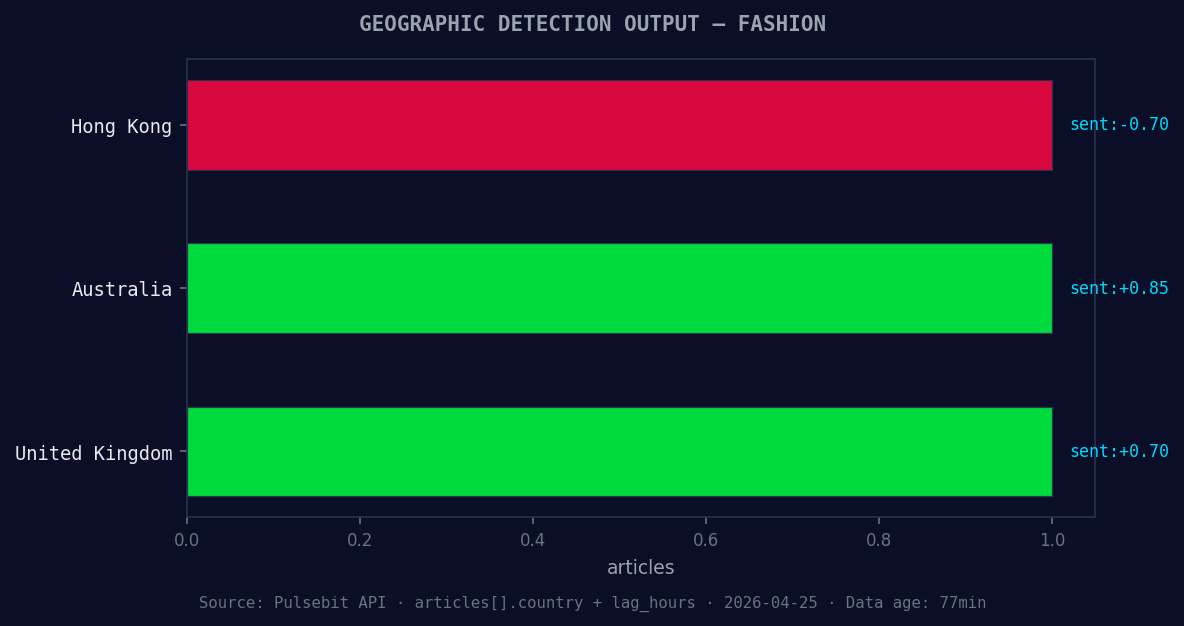
*Geographic detection output for fashion. Hong Kong leads with 1 articles and sentiment -0.70. Source: Pulsebit /news_recent geographic fields.*
# Make the API call to get sentiment data
response = requests.get(url, params=params)
data = response.json()
print(data)

Left: Python GET /news_semantic call for 'fashion'. Right: returned JSON response structure (clusters: 3). Source: Pulsebit /news_semantic.
Next, we’ll take a deep dive into the narrative framing around this spike by leveraging the meta-sentiment moment. By scoring the cluster reason string, we can better understand the dynamics at play. Here’s how to do it:
# Defining the cluster reason string
cluster_reason = "Clustered by shared themes: polyester, iran, war, suppliers, raise."

# Making a POST request for sentiment analysis
response_meta = requests.post(url, json={"text": cluster_reason})
meta_sentiment_data = response_meta.json()
print(meta_sentiment_data)
Here we’re capturing not just the momentum spike but also the underlying themes that drive it. This dual approach allows us to understand not just the 'what' but also the 'why' behind the sentiment shifts.
Once you have this foundational analysis, you can build on it with three specific implementations:
Geographic Sentiment Filter: Use the geographic origin filter to ensure you're capturing sentiment trends from diverse regions. Specifically, set a threshold for positive sentiment in the fashion sector—say, above +0.050.
Meta-Sentiment Loop: Implement a loop that continuously scores the cluster reason strings. This will allow you to dynamically adjust your models based on emerging narratives. For example, if the sentiment around “polyester” shifts significantly, adjust your risk models accordingly.
Theme Correlation Tracking: Create an endpoint that tracks the correlation between forming themes like fashion and mainstream narratives around polyester, Iran, and war. Set a sensitivity threshold where deviations beyond a certain score (e.g., +0.100) trigger alerts for further investigation.
By integrating these three builds, you’ll not only catch trends faster but also understand the complex narratives that drive them. As we wrap this up, we encourage you to explore our documentation to get started with your own implementations: pulsebit.lojenterprise.com/docs. You can copy-paste and run this code in under 10 minutes, and start catching sentiment trends before they become mainstream.


Top comments (0)