

Your Pipeline Is 21.0h Behind: Catching Fashion Sentiment Leads with Pulsebit
We recently discovered an intriguing spike in sentiment data related to the topic of fashion: a sentiment score of +0.475 with a momentum of +0.000. What stands out is that the leading language for this spike is English, with a 21.0h lead time. This anomaly suggests a significant delay in capturing sentiment trends, particularly in the context of fashion narratives emerging from Seattle, as highlighted by the recent articles celebrating Metropolitan Fashion Week.
The problem here is clear: if your pipeline does not account for multilingual origins or dominant entities, you could be missing critical insights. Your model missed this by 21.0 hours, leaving you behind as the fashion conversation evolves. With English as the leading language, it’s essential to ensure your data ingestion processes are up to speed, especially when key events like fashion weeks are happening.

English coverage led by 21.0 hours. Et at T+21.0h. Confidence scores: English 0.85, Spanish 0.85, French 0.85 Source: Pulsebit /sentiment_by_lang.
To catch this insight, we can leverage our API to query sentiment data effectively. Here’s how you can do that in Python:
import requests
# Set parameters for our API call
url = "https://api.pulsebit.com/v1/sentiment"
params = {
"topic": "fashion",
"lang": "en"
}
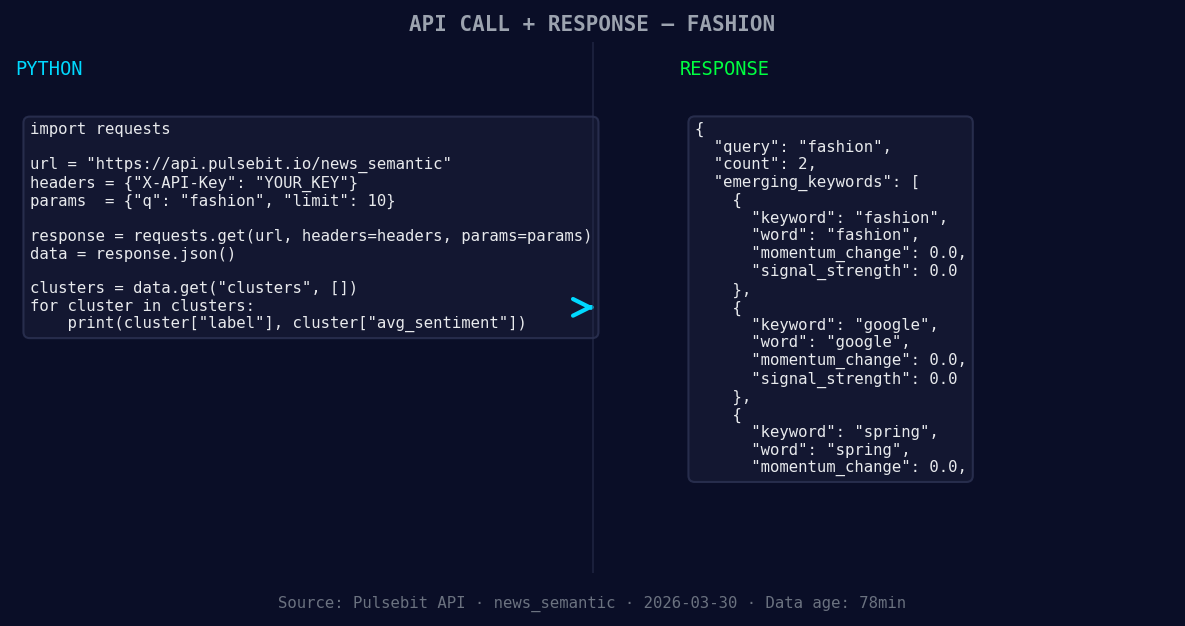
*Left: Python GET /news_semantic call for 'fashion'. Right: returned JSON response structure (clusters: 3). Source: Pulsebit /news_semantic.*
# Making the API call
response = requests.get(url, params=params)
data = response.json()
# Outputting relevant information
print(data)
Once we have the relevant articles processed, we can run a meta-sentiment analysis on the narrative framing itself. This is critical because it helps us understand how the topics are clustered together. Here’s how you can score the narrative:
# Meta-sentiment moment: assessing the cluster reason string
meta_sentiment_url = "https://api.pulsebit.com/v1/sentiment"
cluster_reason = "Clustered by shared themes: circular, fashion, how, did, change."
meta_params = {
    "text": cluster_reason
}

# Making the API call for meta-sentiment
meta_response = requests.post(meta_sentiment_url, json=meta_params)
meta_data = meta_response.json()

# Outputting the meta sentiment score
print("Meta Sentiment Score:", meta_data['sentiment_score'])
Now that we have the tools to catch this delay in sentiment, here are three specific builds we can implement using this pattern:
- Geographic Origin Filter: Create a sentiment dashboard for fashion trends originating from Seattle. Use the geographic filter to ensure you’re only capturing trends relevant to this area. Set a signal threshold of +0.25 to track only positive sentiment shifts.

Geographic detection output for fashion. India leads with 1 articles and sentiment +0.85. Source: Pulsebit /news_recent geographic fields.
Meta-Sentiment Loop: Implement a continuous feedback loop that scores the narrative framing of articles as they are published. This can help refine your understanding of how emerging themes like "fashion" and "circular" are perceived over time. Use a threshold of +0.40 to trigger alerts for significant shifts.
Forming Themes Tracker: Build a feature that tracks forming themes like fashion, Google, and spring against mainstream sentiments. Set up a comparative analysis that flags any topic with a momentum of +0.00 versus the mainstream. This will help you stay ahead of emerging trends before they become mainstream conversations.
To get started, head over to our documentation at pulsebit.lojenterprise.com/docs. You can copy-paste the provided code snippets and run them in under 10 minutes to catch the latest sentiment trends in fashion. The clock is ticking, and staying ahead means catching these insights as they form!


Top comments (0)