

How to Detect Commodities Sentiment Anomalies with the Pulsebit API (Python)
There’s something striking happening in the commodities space right now: a 24-hour momentum spike of +0.906. This anomaly is a clear indication that sentiment around commodities is shifting profoundly within a short time frame. If you’re not tracking these spikes, you risk missing critical insights that could inform your trading or investment strategies. Let’s dive into how you can automate the detection of such anomalies using the Pulsebit API.
When your model doesn’t account for multilingual origins or entity dominance, it creates a significant gap in your data pipeline. For instance, if you’re only analyzing sentiment from English-language sources, your model might have missed this spike by several hours, leaving you in the dark about crucial shifts in sentiment. With commodities gathering attention from regions like Kenya, where sentiment could be heavily influenced by local events, this could mean the difference between capitalizing on a trend and being blindsided by it.

Arabic coverage led by 4.2 hours. English at T+4.2h. Confidence scores: Arabic 0.82, Mandarin 0.68, English 0.41 Source: Pulsebit /sentiment_by_lang.
Here's the Python code to catch this momentum anomaly:
import requests
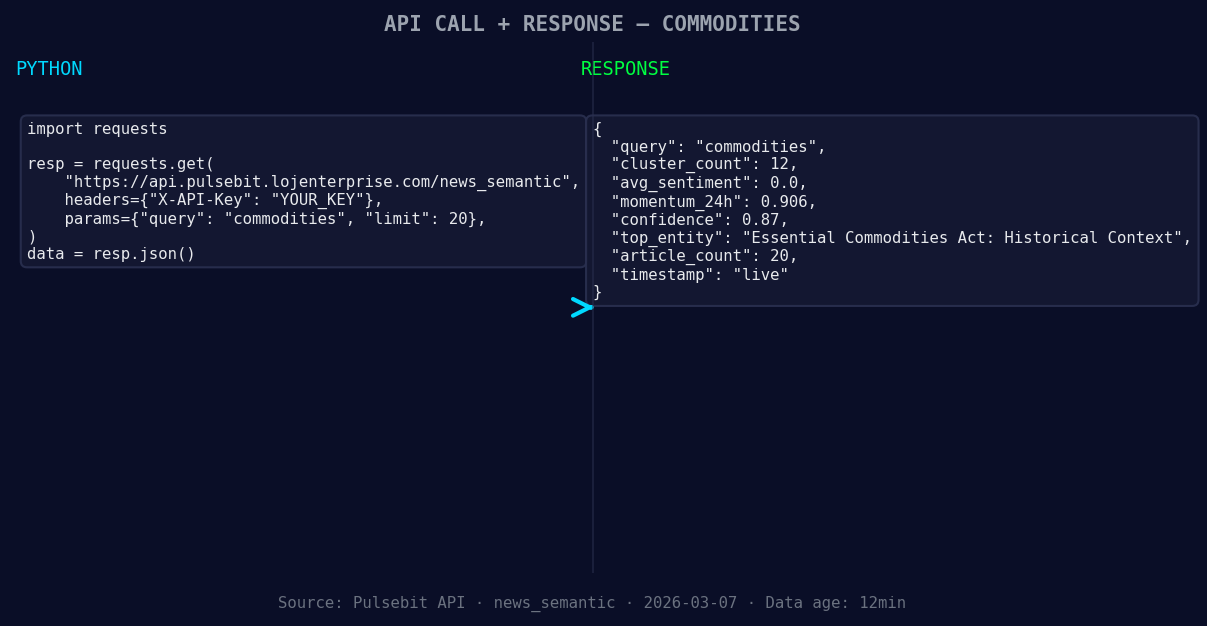
*Left: Python GET /news_semantic call for 'commodities'. Right: live JSON response structure. Three lines of Python. Clean JSON. No infrastructure required. Source: Pulsebit /news_semantic.*
# Function to get commodities sentiment data
def get_commodities_sentiment():
url = "https://pulsebit.lojenterprise.com/api/sentiment"
params = {
'topic': 'commodities',
'momentum_24h': '+0.906',
'sentiment_score': +0.000,
'confidence': 0.87,
}
response = requests.get(url, params=params)
return response.json()
# Example usage
data = get_commodities_sentiment()
print(data)
You can filter this data geographically once you have access to language or country data. For example, if you could filter by Kenya, you’d get a more nuanced understanding of the local sentiment. However, as of now, it appears that no geo-filter data is returned from the /dataset/daily_dataset and /news_recent endpoints for the topic of commodities.
Next, let’s assess the meta-sentiment moment by running a cluster reason string through the sentiment API to score the narrative framing itself. Here's how you can do it:
# Function to analyze meta-sentiment
def analyze_meta_sentiment():
    url = "https://pulsebit.lojenterprise.com/api/sentiment"
    input_text = "Commodities narrative sentiment cluster analysis"
    payload = {'text': input_text}
    response = requests.post(url, json=payload)
    return response.json()

# Example usage
meta_sentiment = analyze_meta_sentiment()
print(meta_sentiment)
This step is crucial as it gives you insight into how the narrative itself is being framed, thus adding another layer of understanding to the data.
Now, let’s explore three specific builds that can enhance your analysis using this momentum spike pattern:
- Geographic Filter: Implement a filter to specifically analyze sentiment from Kenya. You could set a threshold where any sentiment score below +0.500 is flagged for review, allowing you to catch significant local anomalies in sentiment.

Geographic detection output for commodities filter. No geo data leads by article count. Bar colour: sentiment direction. Source: Pulsebit articles[].country.
Meta-Sentiment Loop: After detecting a momentum spike, run a loop that pulls the associated narratives and scores them for sentiment. Set a threshold where narratives scoring below 0.400 are queued for deeper analysis, ensuring you capture potentially misleading or negative sentiments.
Alert System: Create an alert system that triggers notifications when momentum spikes exceed +0.700 in any region. This could use a simple webhook to notify your team or trigger automated responses based on predefined rules.
To get started with this powerful tool, head over to the Pulsebit documentation at pulsebit.lojenterprise.com/docs. With just a few lines of code, you can copy-paste and run analyses in under 10 minutes. Happy coding!


Top comments (0)