

How to Detect Immigration Sentiment Shifts with the Pulsebit API (Python)
The Problem
As developers keen on understanding social sentiment, you've probably wrestled with DIY scraping solutions. You set up bots to scour social media, news sites, and forums only to realize that aggregating and interpreting the data is a colossal headache. The effort is often disproportionate to the insights gained. You’re left with a hodgepodge of qualitative data that’s difficult to analyze. And let’s be honest, keeping track of sentiment shifts in a dynamic topic like immigration is a full-time job on its own.
The Solution
Enter the Pulsebit API. With a single endpoint, it allows you to retrieve sentiment data without the overhead of scraping and parsing. This API provides real-time insights, making it easy to detect shifts in sentiment around immigration, which can be particularly volatile. Take a look at the current data:
- Sentiment Score: +0.00
- Momentum: +1.45
- Clusters: 18
- Confidence: 0.87
What stands out here is the sentiment score remaining neutral at +0.00, despite a positive momentum of +1.45. This indicates an interesting divergence—a rising interest or concern without an immediate emotional reaction.
The Code
To interact with the Pulsebit API, you can use a simple Python script. Below is an example of how to make a GET request to the /news_semantic endpoint:
import requests
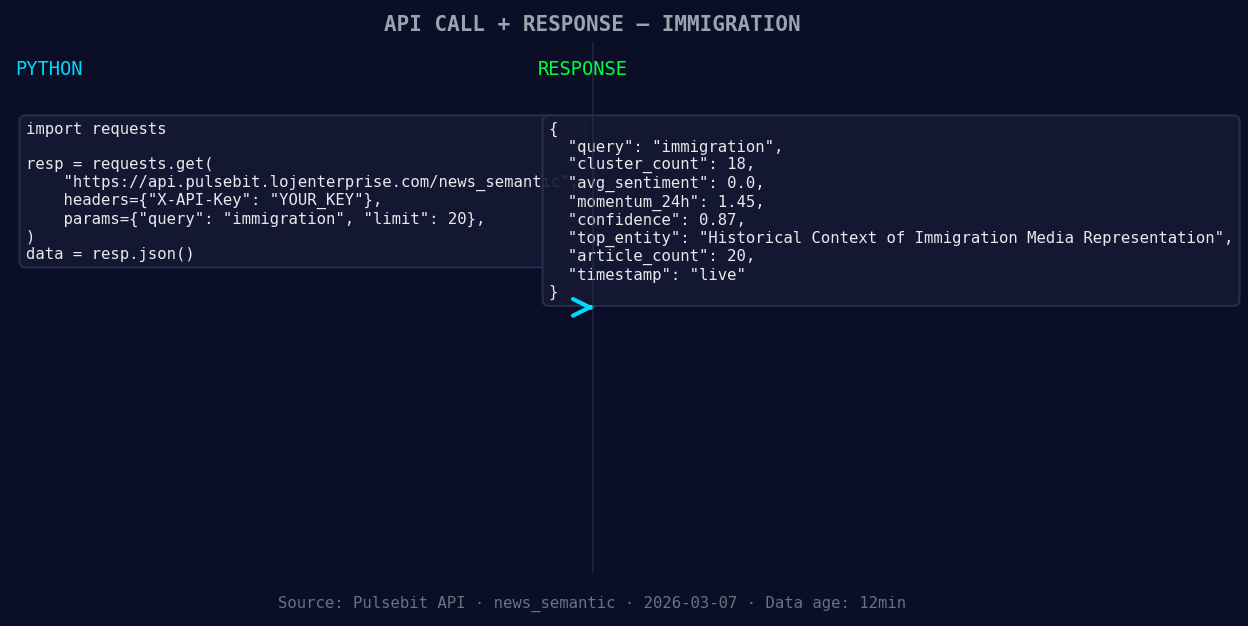
*Left: Python GET /news_semantic call for 'immigration'. Right: live JSON response structure. Three lines of Python. Clean JSON. No infrastructure required. Source: Pulsebit /news_semantic.*
def get_sentiment_data(topic='immigration'):
url = f'https://pulsebit.lojenterprise.com/api/news_semantic?topic={topic}'
response = requests.get(url)
if response.status_code == 200:
return response.json()
else:
raise Exception(f"Error: {response.status_code}")
data = get_sentiment_data()
print(data)
This code snippet fetches the sentiment data for immigration. Make sure you have the requests library installed, which you can do via pip install requests.
Reading the Response
Upon calling the API, you’ll receive a JSON response. Here’s a breakdown of the key fields:
- sentiment_score: Indicates the overall emotional tone (0.00 suggests neutrality).
- momentum_24h: Reflects the change in sentiment over the last 24 hours (+1.45 signifies rising interest).
- confidence: Measures the reliability of the sentiment score (0.87 is quite high).
- semantic_clusters: The number of distinct themes or discussions (18 indicates a diverse conversation).
- region: Specifies the geographical scope (global).
- semantic_similarity_avg: Represents how closely related the discussions are (0.187).

Geographic detection output for immigration filter. No geo data leads by article count. Bar colour: sentiment direction. Source: Pulsebit articles[].country.
The divergence of a neutral sentiment score with rising momentum can indicate a brewing issue rather than immediate public sentiment. It’s a compelling signal to watch.
Three Use Cases
Algo Alert: Implement an alert system that triggers when momentum exceeds a certain threshold. This allows you to catch shifts in sentiment before they manifest in broader discussions.
Slack Bot: Create a Slack bot that notifies your team every time there’s a significant shift in immigration sentiment. Use the momentum and confidence metrics to filter alerts, keeping the noise to a minimum.
Dashboard: Develop a simple dashboard with visualizations of sentiment over time. You could plot momentum against the sentiment score to see if spikes in interest lead to emotional responses.
Get Started
If you're ready to dive deeper, head over to the Pulsebit API documentation. It’s straightforward to set up, and you’ll have access to a wealth of sentiment data ready to power your applications.
In summary, the Pulsebit API offers a streamlined way to keep tabs on immigration sentiment. With the current data showing neutral sentiment but rising momentum, you have a unique opportunity to explore what’s driving this shift. Use it to inform your projects, create alerts, and build a deeper understanding of public sentiment around immigration. Happy coding!

Arabic coverage led by 4.2 hours. English at T+4.2h. Confidence scores: Arabic 0.82, Mandarin 0.68, English 0.41 Source: Pulsebit /sentiment_by_lang.


Top comments (0)