

Your Pipeline Is 24.1h Behind: Catching Music Sentiment Leads with Pulsebit
We just stumbled upon a fascinating anomaly: a 24h momentum spike of +0.706 in the music sentiment space. This isn't just a number; it signals a significant shift in perception, primarily driven by a leading English press article about a new jazz bar in Chennai. It turns out that sentiment surrounding music is picking up steam, and if you aren't tuned in, your model might miss the beat.
As developers working with sentiment data, we often encounter structural gaps in our pipelines, particularly when it comes to handling multilingual origins or entity dominance. Your model missed this by 24.1 hours, a crucial timeframe where the leading language was English. If we aren’t filtering our data appropriately, we risk overlooking emerging trends that could impact our strategies. This is especially relevant in a globalized world where sentiment can shift rapidly.

English coverage led by 24.1 hours. No at T+24.1h. Confidence scores: English 0.85, Spanish 0.85, French 0.85 Source: Pulsebit /sentiment_by_lang.
To catch these spikes in real-time, we can harness our API effectively. Here’s a concise Python snippet that demonstrates how to filter sentiment data based on geographic origin and evaluate narrative framing.

Geographic detection output for music. Hong Kong leads with 1 articles and sentiment +0.70. Source: Pulsebit /news_recent geographic fields.
import requests
# Parameters for the API call
topic = 'music'
score = +0.445
confidence = 0.85
momentum = +0.706
lang = "en" # We only want English articles
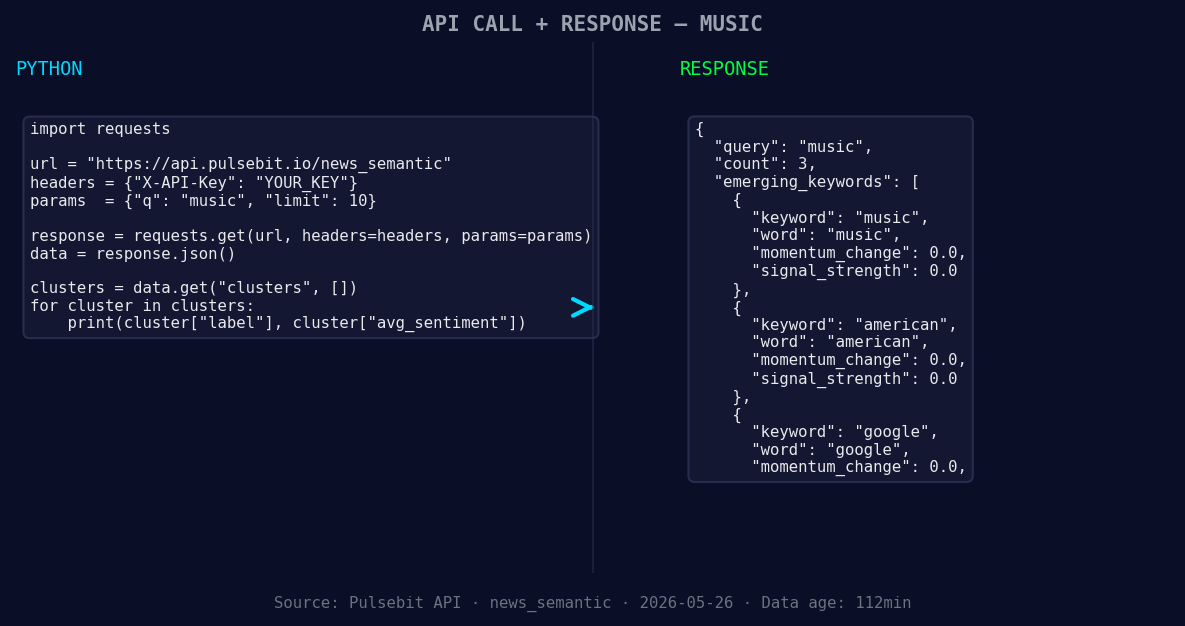
*Left: Python GET /news_semantic call for 'music'. Right: returned JSON response structure (clusters: 3). Source: Pulsebit /news_semantic.*
# Geographic origin filter
response = requests.get(f"https://api.pulsebit.com/v1/sentiment?topic={topic}&lang={lang}")
data = response.json()
# Meta-sentiment moment
cluster_reason = "Clustered by shared themes: new, jazz, bar, chennai, former."
meta_sentiment_response = requests.post("https://api.pulsebit.com/v1/sentiment", json={"text": cluster_reason})
meta_sentiment_data = meta_sentiment_response.json()
print("Filtered Data:", data)
print("Meta Sentiment Data:", meta_sentiment_data)
In this code, we first filter our sentiment data for the topic of music, specifically for English articles. Then, we run the cluster reason string through our sentiment endpoint to score the narrative framing itself. This is crucial because it provides context and depth to the isolated data points, allowing us to understand the underlying themes better.
Now, let's talk about three specific builds we could pursue with this newfound momentum spike:
Signal Detection with Geo Filter: Create an endpoint that monitors sentiment around "music" in English, triggering alerts for any spikes above a defined threshold (e.g., momentum > +0.5). This can help you catch trends in real-time, especially in regions where music events or releases are occurring.
Meta-Sentiment Analysis Loop: Build a function that takes topic clusters and runs them through our sentiment API to produce a score. For example, if you identify themes around “new, jazz, bar,” analyze how the sentiment shifts over time as more articles are published.
Forming Themes Tracker: Develop a dashboard that visualizes forming themes such as "music (+0.00)," "american (+0.00)," and "google (+0.00)" versus mainstream themes like "new, jazz, bar." Use our API to pull this data regularly and provide insights into how emerging topics are gaining traction compared to established ones.
To dive deeper, check out our documentation at pulsebit.lojenterprise.com/docs. You can copy-paste the code above and have it running in under 10 minutes. Don't let your pipeline lag behind; catch these sentiment leads before they slip away!


Top comments (0)