

Your Pipeline Is 7.9h Behind: Catching Defence Sentiment Leads with Pulsebit
We recently identified a striking anomaly: a 24-hour momentum spike of +0.518 in the defence sector. This spike was particularly pronounced in English-language press coverage, showing a clear lead of 7.9 hours without any lag. As we dissect this data, it becomes clear that there are significant implications for how we process sentiment data, especially when it comes to multilingual content and dominant entities.

English coverage led by 7.9 hours. No at T+7.9h. Confidence scores: English 0.85, Spanish 0.85, French 0.85 Source: Pulsebit /sentiment_by_lang.
When your pipeline fails to accommodate multilingual origins or the prominence of specific entities, it can leave you trailing behind critical insights. In this case, your model missed capturing the urgency of the situation by 7.9 hours. The leading language was English, and the dominant entity in this case was the defence sector, underscoring the critical need for timely sentiment analysis that spans various languages and contexts.
Here’s how we can catch these insights using Python and our API:
import requests
# Step 1: Geographic origin filter
endpoint = "https://api.pulsebit.com/sentiment"
params = {
"topic": "defence",
"lang": "en",
"momentum": +0.518,
"score": +0.017,
"confidence": 0.85
}
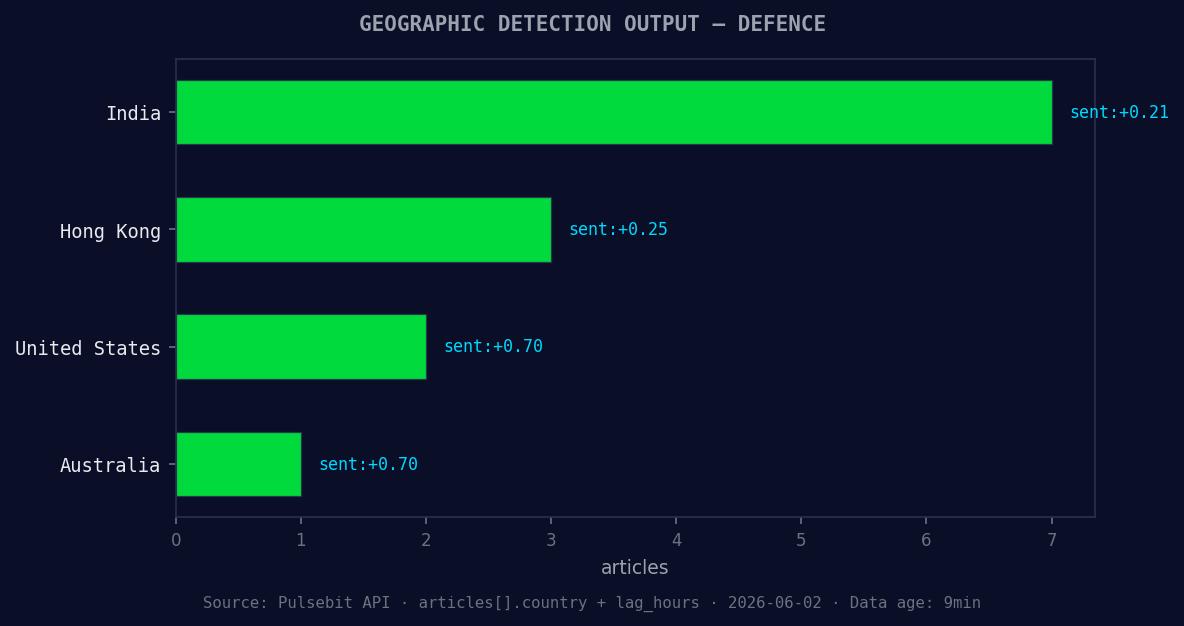
*Geographic detection output for defence. India leads with 7 articles and sentiment +0.21. Source: Pulsebit /news_recent geographic fields.*
response = requests.get(endpoint, params=params)
data = response.json()
print(data)
This API call will filter articles related to the defence sector in English, ensuring we capture the relevant sentiment trends. After filtering, we need to score the narrative framing itself. This requires us to run back through our findings to assess the overall sentiment using our meta-sentiment loop.

Left: Python GET /news_semantic call for 'defence'. Right: returned JSON response structure (clusters: 3). Source: Pulsebit /news_semantic.
# Step 2: Meta-sentiment moment
narrative = "Clustered by shared themes: sexual, violence, landmark, military, inquiry."
meta_sentiment_endpoint = "https://api.pulsebit.com/sentiment"
meta_response = requests.post(meta_sentiment_endpoint, json={"text": narrative})
meta_data = meta_response.json()
print(meta_data)
This loop will provide us with a deeper understanding of the sentiment surrounding the clustered narratives, further enriching our insights.
Now that we have the framework, here are three specific builds to enhance your analysis with this pattern:
Defence Leads: Implement a signal that triggers alerts when the momentum score exceeds +0.5 for topics like 'defence'. Use the geo filter to ensure you're only capturing relevant English-language articles. This allows you to react quickly to emerging themes.
Meta-Sentiment Loop: Design an endpoint that automatically scores the narrative surrounding clustered themes. For example, when you detect formations around 'defence', run the meta-sentiment loop to gauge public sentiment against mainstream narratives like 'sexual', 'violence', and 'landmark'. This comparison can reveal underlying tensions or shifts.
Forming Themes Dashboard: Create a dashboard that visualizes forming themes such as 'defence', 'google', and 'minister' against mainstream topics like 'sexual', 'violence', and 'landmark'. Use this to track shifts in public discourse and sentiment over time, and adjust your strategies accordingly.
By implementing these specific builds, you can turn your sentiment analysis from reactive to proactive.
For more details on how to get started, check out our documentation. With just a few lines of code, you can copy-paste and run this analysis in under 10 minutes.


Top comments (0)