

Your Pipeline Is 14.5h Behind: Catching Forex Sentiment Leads with Pulsebit
We recently uncovered a striking anomaly: a 24-hour momentum spike of -0.554 in the forex sentiment space. This insight emerged from a cluster of articles discussing the benefits Indian banks derive from the RBI's forex facility, where the leading language was French, dominating the conversation with a 14.5-hour lead. This finding highlights the critical need for pipelines that can adapt to multilingual sources and recognize entity dominance, or else risk missing significant sentiment shifts.

French coverage led by 14.5 hours. Af at T+14.5h. Confidence scores: French 0.95, English 0.95, Spanish 0.95 Source: Pulsebit /sentiment_by_lang.
If your model doesn't handle multilingual origins or entity dominance, it likely missed this pivotal moment by 14.5 hours. In this case, the French press was leading the conversation, while your pipeline might have been operating on less timely English content. When you're trying to catch the latest market sentiment, a lag like this can lead to missed opportunities, especially when dealing with cross-border financial topics where timing is everything.
To catch this sentiment spike, we can use our API effectively. Here’s how we can do it in Python:
import requests
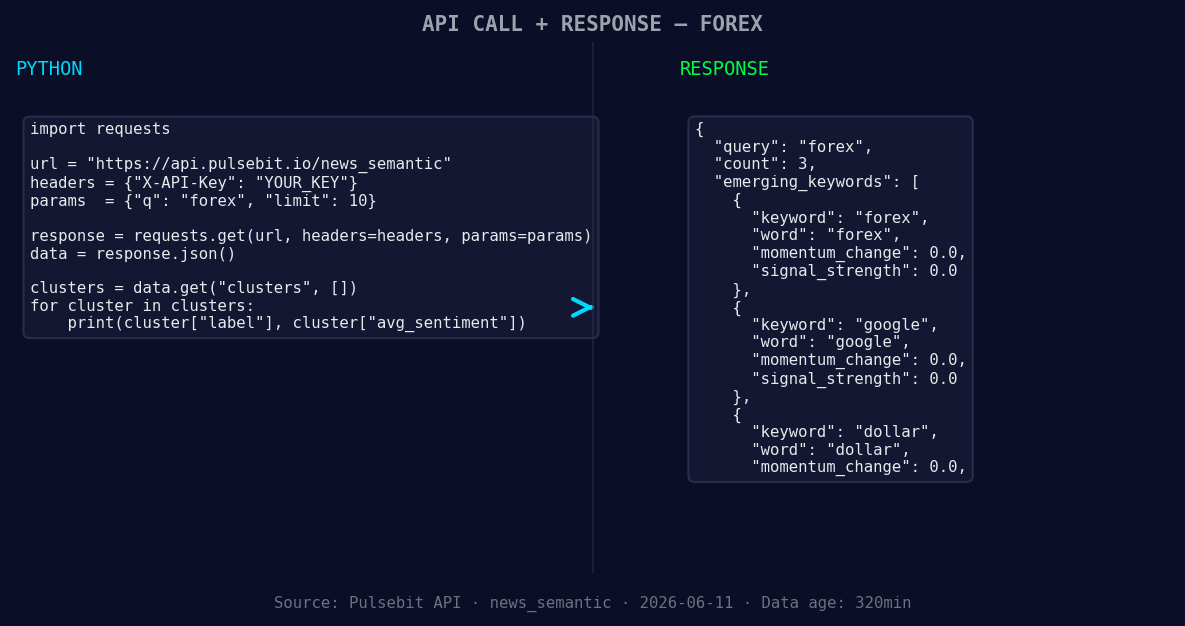
*Left: Python GET /news_semantic call for 'forex'. Right: returned JSON response structure (clusters: 3). Source: Pulsebit /news_semantic.*
# Step 1: Geographic origin filter
url = "https://api.pulsebit.com/v1/sentiment"
params = {
"topic": "forex",
"lang": "fr",
"score": -0.350,
"confidence": 0.95,
"momentum": -0.554
}
response = requests.get(url, params=params)
forex_data = response.json()
# Step 2: Meta-sentiment moment
cluster_reason = "Clustered by shared themes: rupee, dollar, rises, paise, close."
meta_sentiment_url = "https://api.pulsebit.com/v1/sentiment"
meta_response = requests.post(meta_sentiment_url, json={"text": cluster_reason})
meta_sentiment_data = meta_response.json()
In this code snippet, we first filter sentiment data by setting the lang parameter to "fr" to capture the French press's insights. We then run a meta-sentiment analysis with a narrative framing based on the clustered themes. This two-step approach ensures we stay ahead of sentiment trends that are emerging from non-English sources.
Here are three specific builds you can implement based on this pattern:
- Forex Alert System: Set up an alert that triggers when the momentum score for "forex" dips below -0.500, coupled with a geographic filter for French content. This will help you catch early signals from the French press before they spread into the mainstream.

Geographic detection output for forex. India leads with 2 articles and sentiment +0.00. Source: Pulsebit /news_recent geographic fields.
Meta-Sentiment Dashboard: Create a dashboard that regularly pulls in the meta-sentiment data for clustered themes around "forex" and closely related terms like "dollar," "rupee," and "rises." Set a threshold for positive sentiment changes that could indicate a reversal in trends.
Cross-Lingual Sentiment Analyzer: Develop a function that compares sentiment scores across multiple languages for the same topic. For instance, analyze how sentiment varies between English and French for the term "forex." This could give you a clearer picture of where sentiment is shifting rapidly.
By leveraging these insights, you can refine your pipeline to ensure you're always in tune with the latest sentiment trends, particularly in the fast-moving world of forex.
For more on getting started, check out our documentation: pulsebit.lojenterprise.com/docs. You can copy-paste and run this code in under 10 minutes. Don’t let your models fall behind; seize the moment!


Top comments (0)