

Your pipeline just missed a significant anomaly: a 24h momentum spike of +0.494 around climate sentiment. This isn’t just a blip; it indicates a rising discourse that’s gaining traction, particularly led by English press coverage that peaked at an 8.5-hour lead time. The conversation is centered on a proposed Maryland building code, with concern from climate groups—one article is already capturing this sentiment. If you’re relying solely on mainstream narratives, your model is lagging behind, and frankly, that’s a gap we need to address.
The problem here is clear: if your pipeline doesn’t effectively incorporate multilingual origins or recognize dominant entities, you’re bound to miss emerging trends like this one. Your model missed this spike by 8.5 hours, which is a lifetime in the fast-paced world of sentiment analysis. The leading language in this situation is English, and failing to tailor your analysis to capture these nuances means you’re not just a step behind; you’re potentially overlooking critical shifts in public sentiment.

English coverage led by 8.5 hours. No at T+8.5h. Confidence scores: English 0.85, Spanish 0.85, Sv 0.85 Source: Pulsebit /sentiment_by_lang.
Here’s how we can catch this momentum using our API. We’ll utilize a geographic origin filter to focus on English language content, ensuring we’re aligned with the right audience. Below is the Python code to query the relevant data:

Geographic detection output for climate. India leads with 12 articles and sentiment +0.21. Source: Pulsebit /news_recent geographic fields.
import requests
# Setting parameters for the API call
params = {
"topic": "climate",
"score": +0.000,
"confidence": 0.85,
"momentum": +0.494,
"lang": "en"
}
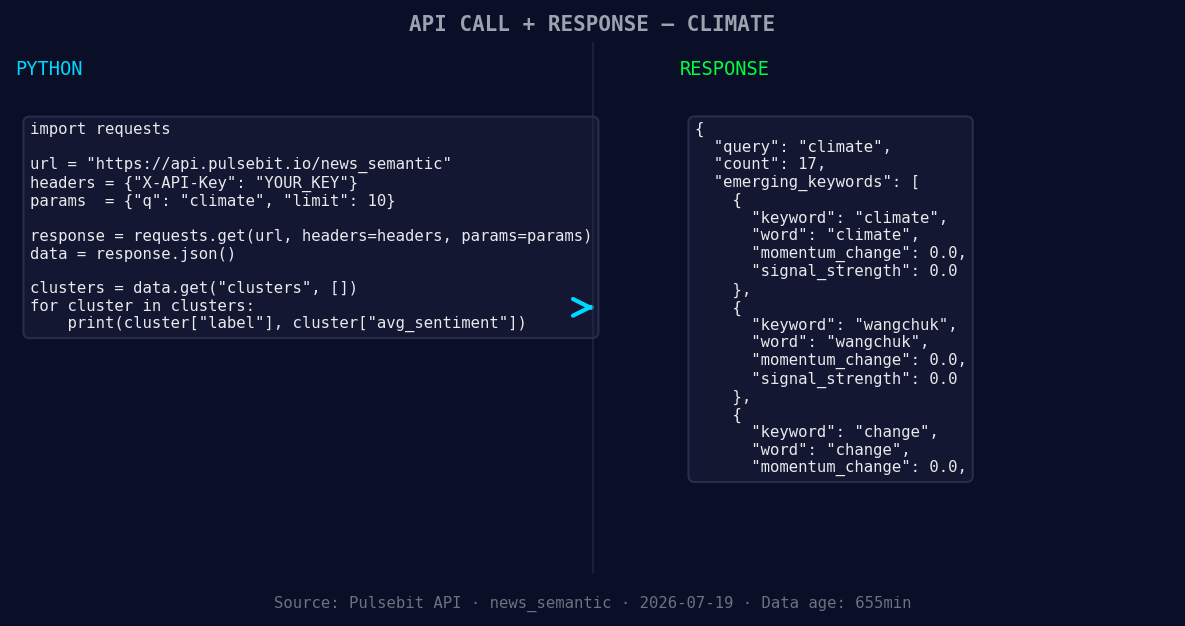
*Left: Python GET /news_semantic call for 'climate'. Right: returned JSON response structure (clusters: 3). Source: Pulsebit /news_semantic.*
# Making the API call
response = requests.get("https://api.pulsebit.com/v1/sentiment", params=params)
data = response.json()
print(data)
Next, we’ll run the cluster reason string back through our sentiment scoring endpoint. This meta-sentiment moment allows us to understand how the framing of the narrative affects its reception. Here’s how to do that:
meta_sentiment_input = "Clustered by shared themes: groups, concerned, proposed, maryland, building."
meta_response = requests.post("https://api.pulsebit.com/v1/sentiment", json={"text": meta_sentiment_input})
meta_data = meta_response.json()
print(meta_data)
With these two steps, you’ll be well-equipped to catch the nuances of sentiment shifts and adapt your models accordingly.
Now, let’s talk about three specific builds we can implement with this pattern. First, you can enhance your pipeline by setting a threshold for momentum spikes, say +0.300, and filter for geographic origins in your queries. This will help you catch emerging trends that are relevant to specific regions or languages.
Secondly, we recommend employing the meta-sentiment loop to analyze the framing of narratives. By scoring these narrative clusters, you can better understand the underlying sentiments that are shaping public discourse. For instance, you could set a threshold of sentiment scores that fall below zero to flag potentially negative narratives.
Lastly, you can track the forming themes such as "climate," "wangchuk," and "change" against mainstream keywords like "groups," "concerned," and "proposed." This will allow you to build a dynamic alert system that notifies you when these themes start to gain traction.
If you’re ready to dig deeper into this, check out our documentation at pulsebit.lojenterprise.com/docs. Within ten minutes, you can copy, paste, and run this code to start uncovering powerful insights in your sentiment analysis.


Top comments (0)