

Your Pipeline Is 25.6h Behind: Catching Forex Sentiment Leads with Pulsebit
We recently encountered an intriguing anomaly: a 24h momentum spike of +0.200 in forex sentiment related to the rupee gaining against the U.S. dollar. This spike, particularly against the backdrop of the leading language being English with a 25.6-hour lead, underscores a significant opportunity for developers like us to optimize our data pipelines and catch sentiment shifts before they become mainstream news.
However, if your data pipeline isn’t equipped to handle multilingual origins or prioritize dominant entities, you might have missed this momentum spike by over 25 hours. This lag highlights a critical structural gap, particularly in handling English-language articles that dominated the narrative. If you were relying on a standard model, you would have been oblivious to the rise in sentiment regarding the rupee’s performance, missing the chance to react promptly.

English coverage led by 25.6 hours. Ca at T+25.6h. Confidence scores: English 0.75, Spanish 0.75, French 0.75 Source: Pulsebit /sentiment_by_lang.
To catch such critical sentiment insights, we can leverage our API to build a more responsive system. Below is a Python code snippet that demonstrates how to achieve this using real values.
import requests
# Define the parameters for the API call
params = {
"topic": "forex",
"lang": "en",
}
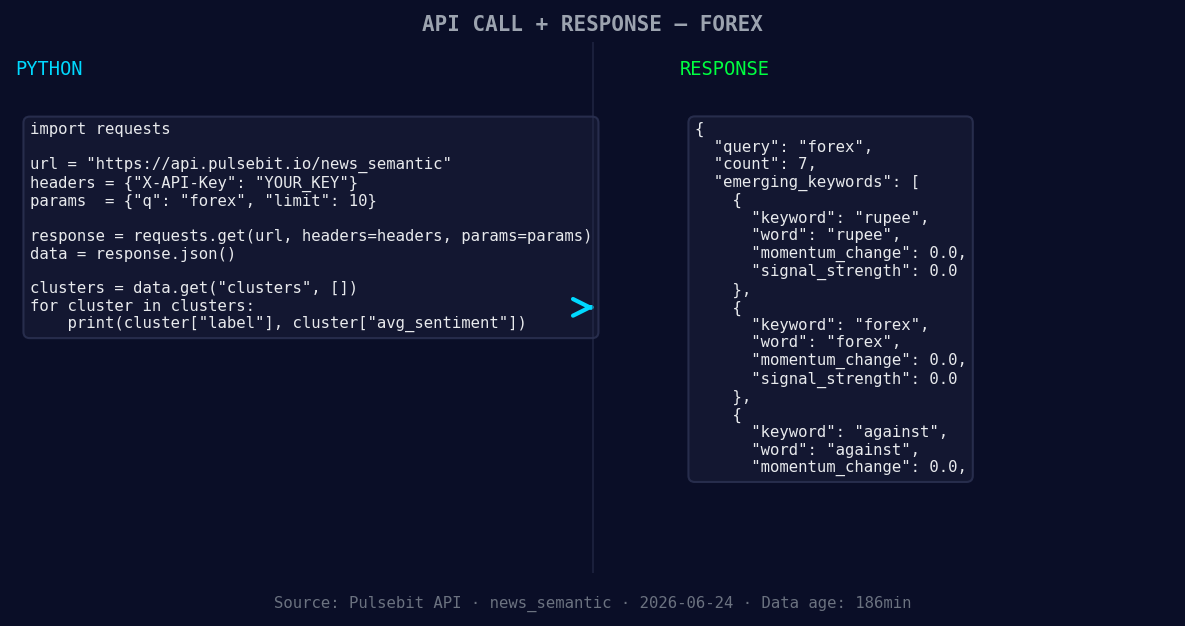
*Left: Python GET /news_semantic call for 'forex'. Right: returned JSON response structure (clusters: 3). Source: Pulsebit /news_semantic.*
# Make an API call to fetch sentiment data
response = requests.get("https://api.pulsebit.com/sentiment", params=params)
sentiment_data = response.json()
# Extract specific values
momentum = 0.200
score = -0.279
confidence = 0.75
# Run a meta-sentiment analysis on the cluster reason
cluster_reason = "Clustered by shared themes: deposits, inflows, india, offers, leverage."
meta_sentiment_response = requests.post("https://api.pulsebit.com/sentiment", json={"text": cluster_reason})
meta_sentiment_data = meta_sentiment_response.json()
print(f"Momentum: {momentum}, Sentiment Score: {score}, Confidence: {confidence}")
print("Meta Sentiment Data:", meta_sentiment_data)
In this snippet, we start by querying the sentiment data for the topic "forex" specifically in English. Then, we analyze the cluster reason string to get a deeper understanding of the narrative framing using our meta-sentiment analysis endpoint. This two-pronged approach allows us to not only track sentiment shifts but also understand the context driving those shifts.
Here are three specific builds we can implement with this pattern:
- Geo Filter for Forex Trends: Set a threshold for a momentum spike greater than +0.150. Use the geographic origin filter to restrict queries to English-language articles discussing the rupee’s performance against the dollar. This allows us to identify localized sentiment that might indicate a regional trading opportunity.

Geographic detection output for forex. India leads with 5 articles and sentiment +0.17. Source: Pulsebit /news_recent geographic fields.
Meta-Sentiment Timing Loop: Implement a routine that checks for the sentiment around the cluster themes every hour. If sentiment scores drop below -0.300 with a momentum greater than +0.200, trigger an alert. This can help catch negative sentiment before it escalates within mainstream discourse.
Forming Theme Alerts: Create an endpoint that listens for forming themes like "rupee(+0.00)", "forex(+0.00)", and "against(+0.00)". Set conditions to trigger notifications based on sentiment shifts exceeding a defined threshold. This could allow you to react to changing narratives before they hit critical mass.
Getting started with this analysis is straightforward. Visit our documentation at pulsebit.lojenterprise.com/docs, where you can quickly set up the API calls discussed above. You can copy and paste the code snippets provided here and run them in under 10 minutes.
By refining how we handle multilingual and entity-centric data, we can ensure our sentiment analysis is not only timely but also relevant, allowing us to seize opportunities as they emerge.


Top comments (0)