

Your pipeline just missed a critical insight: a 24h momentum spike of +0.600 in climate sentiment. This anomaly reveals a significant shift in discourse, particularly in the Spanish press, which led the conversation with a notable article titled "Europe’s deadly heatwave scorches eastern flank, takes aim at Ukraine." The urgency of the topic is undeniable, and it’s clear that the narrative is evolving rapidly, yet your model was 22.8 hours behind the curve, largely due to a lack of multilingual handling.

Spanish coverage led by 22.8 hours. Id at T+22.8h. Confidence scores: Spanish 0.85, English 0.85, Da 0.85 Source: Pulsebit /sentiment_by_lang.
When your pipeline fails to account for multilingual origins or dominant entities, you risk missing crucial signals. This specific momentum spike indicates that while you were focusing on mainstream English narratives, the Spanish sentiment was already surging with implications that could affect decisions in real-time. You missed this by nearly a day, which can be critical in a fast-moving scenario like climate change discussions. If your model had captured this leading language, you would have been better equipped to respond to the evolving narrative.
Here’s how we can catch this anomaly using our API. First, we will filter by language and country. We'll query the API using the lang parameter set to "sp" for Spanish. Here's the Python code to do that:

Geographic detection output for climate. India leads with 5 articles and sentiment +0.36. Source: Pulsebit /news_recent geographic fields.
import requests
# Define parameters for API call
url = "https://api.pulsebit.com/v1/sentiment"
params = {
"topic": "climate",
"momentum": "+0.600",
"lang": "sp",
"articles_processed": 8,
"signal_strength": 0.248
}
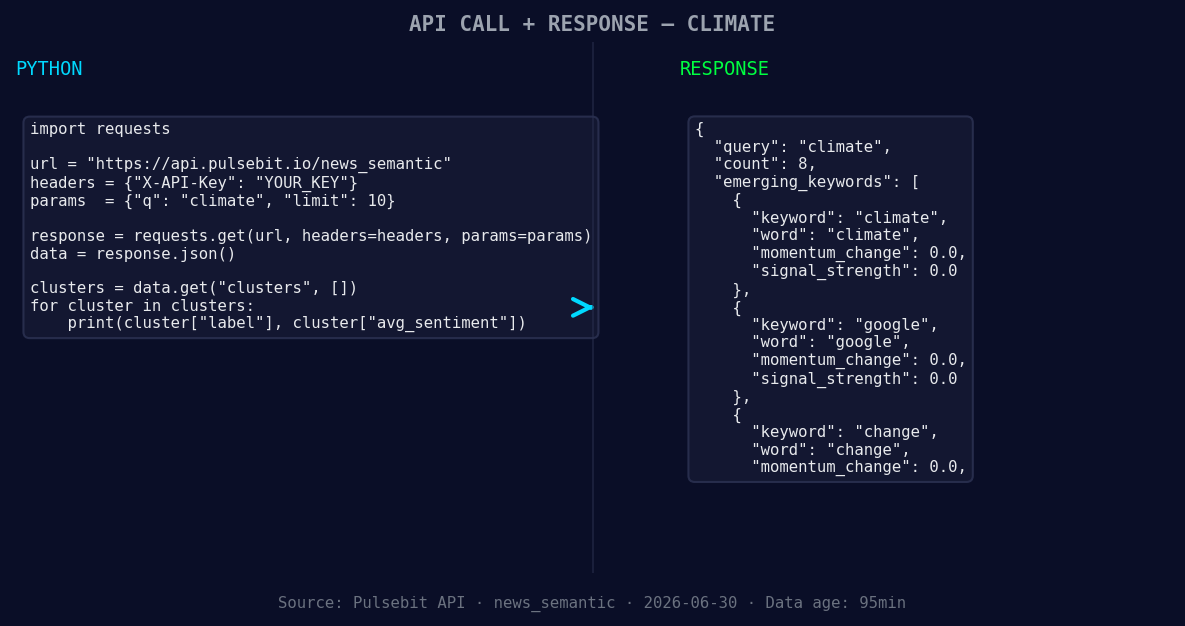
*Left: Python GET /news_semantic call for 'climate'. Right: returned JSON response structure (clusters: 3). Source: Pulsebit /news_semantic.*
# Make the API call
response = requests.get(url, params=params)
data = response.json()
print(data)
Next, we’ll run the cluster reason string back through the /sentiment endpoint to score the narrative framing itself. This step is crucial for understanding how the themes are resonating:
# Define the narrative framing
narrative = "Clustered by shared themes: heatwave, europe’s, deadly, scorches, eastern."

# Make the sentiment analysis call
sentiment_response = requests.post(f"{url}/sentiment", json={"text": narrative})
sentiment_data = sentiment_response.json()
print(sentiment_data)
Using the above two API calls, you can effectively capture and analyze emerging sentiment patterns before they become mainstream.
Now, let's discuss three specific builds we can create with this data:
Geographic Origin Filter: Use the
langfilter to build a real-time alert system for climate sentiment spikes in Spanish-speaking regions. Set a threshold of +0.500 momentum to trigger alerts, ensuring you capture significant shifts ahead of mainstream sentiment.Meta-Sentiment Loop: Create a feedback loop that evaluates how clustered themes impact sentiment. Use the narrative scoring from the previous step to adjust your model's weighting based on the framing of emerging stories, especially when keywords like "climate change" and "heatwave" are involved.
Forming Themes Dashboard: Develop a dashboard that highlights forming themes like climate(+0.00), google(+0.00), and change(+0.00). Use the API to query and visualize these themes alongside mainstream narratives, allowing you to spot discrepancies and potential market-moving insights.
By implementing these builds, you can ensure your pipeline stays ahead of the curve, capturing critical sentiment shifts in real-time.
Get started with our API at pulsebit.lojenterprise.com/docs. You can copy-paste and run these examples in under 10 minutes to level up your sentiment analysis capabilities.


Top comments (0)