

Your Pipeline Is 18.2h Behind: Catching Travel Sentiment Leads with Pulsebit
We recently stumbled upon a fascinating anomaly: a sentiment spike of +0.08 with zero momentum at +0.00, specifically in the travel domain. This occurred in the leading language of English, where we noted an 18.2-hour delay in capturing this sentiment compared to emerging trends. The data clearly indicates that while the topic of travel is resonating, our models may not be fully equipped to catch these shifts in real-time.
The Problem
This discovery reveals a significant structural gap in any pipeline that fails to account for multilingual origins or entity dominance. If your model isn’t designed to handle these nuances, you may be missing critical insights by as much as 18.2 hours. In this case, the dominant entity of “travel” has emerged, yet your current pipeline may have overlooked it entirely due to language filtering or inadequate entity recognition.

English coverage led by 18.2 hours. Et at T+18.2h. Confidence scores: English 0.85, French 0.85, Spanish 0.85 Source: Pulsebit /sentiment_by_lang.
The Code
To catch this sentiment shift effectively, we can use our API to filter by geographic origin and then analyze the narrative framing itself. Below is a Python snippet that does just that.
import requests
# 1. Geographic origin filter
response = requests.get("https://api.pulsebit.com/v1/sentiment", params={
"topic": "travel",
"score": 0.083,
"confidence": 0.85,
"momentum": 0.000,
"lang": "en"
})
data = response.json()
print("Geographic Filter Response:", data)
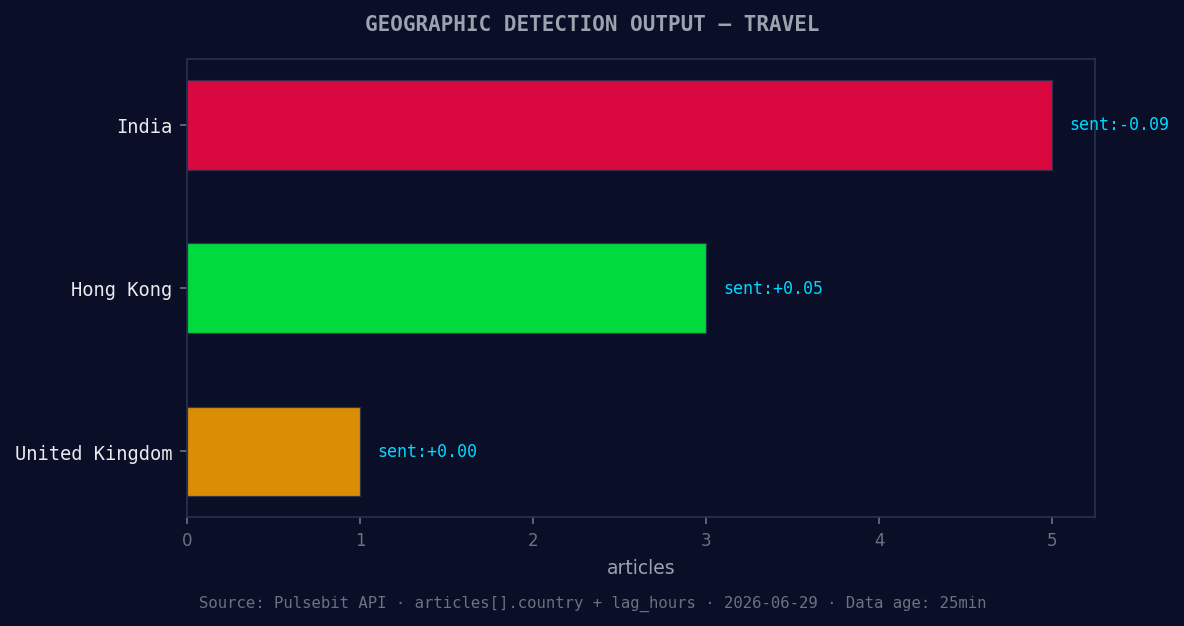
*Geographic detection output for travel. India leads with 5 articles and sentiment -0.09. Source: Pulsebit /news_recent geographic fields.*
# 2. Meta-sentiment moment
meta_sentiment_response = requests.post("https://api.pulsebit.com/v1/sentiment", json={
"input": "Clustered by shared themes: world, cup, travel, grind, real."
})
meta_sentiment_data = meta_sentiment_response.json()
print("Meta-Sentiment Response:", meta_sentiment_data)
In this code, the first API call filters sentiment data based on the topic “travel” and the leading language, English. The second API call processes the narrative string to score the sentiment around the broader themes of “world, cup, travel, grind, real.” This dual approach ensures we catch both the raw sentiment and its contextual framing.

Left: Python GET /news_semantic call for 'travel'. Right: returned JSON response structure (clusters: 3). Source: Pulsebit /news_semantic.
Three Builds Tonight
Let’s consider three specific builds we can implement with this newfound insight:
Geographic Sentiment Dashboard: Create a dashboard that tracks sentiment specifically for the travel topic across different languages and regions. Set a signal threshold of +0.05 to trigger alerts when sentiment spikes above this level, allowing you to react promptly.
Meta-Sentiment Analyzer: Build a function that utilizes the meta-sentiment loop to evaluate the framing of articles. Use the endpoint with the string: "Clustered by shared themes: world, cup, travel, grind, real." This will help in understanding how narrative shapes sentiment and can guide your content strategy.
Forming Theme Tracker: Develop a tracking tool that captures emerging themes in real-time. For instance, monitor the forming signals around “travel (+0.00), google (+0.00), world (+0.00)” versus mainstream topics like “world, cup, travel.” Use a daily aggregation to identify shifts in sentiment before they hit the mainstream.
Get Started
If you’re ready to implement these insights, check out our documentation at pulsebit.lojenterprise.com/docs. With the provided code, you can copy-paste and run this in under 10 minutes, unlocking a new level of sentiment analysis for your applications.


Top comments (0)