

Your Pipeline Is 27.2h Behind: Catching Sports Sentiment Leads with Pulsebit
We recently uncovered an intriguing anomaly in sentiment data: a spike with a sentiment score of +0.265 and a momentum of +0.000, occurring precisely 27.2 hours ago. This spike relates to the sports sector, triggered by a single article detailing preparations for the Commonwealth Games. The article's cluster reason, "Clustered by shared themes: preparations, sports, ministry, commonwealth, games," reveals a hidden narrative that could escape detection in traditional pipelines.
The Problem
This situation highlights a crucial gap in your data pipeline, particularly if it lacks the capacity to handle multilingual origins or entity dominance. Your model likely missed this sentiment spike by a staggering 27.2 hours, predominantly due to its focus on mainstream entities like "preparations," "sports," and "ministry." Without accommodating the nuances of diverse linguistic contexts, you're risking significant delays in recognizing sentiment shifts that could inform timely decision-making.

English coverage led by 27.2 hours. Et at T+27.2h. Confidence scores: English 0.95, Spanish 0.95, No 0.95 Source: Pulsebit /sentiment_by_lang.
The Code
To catch this sentiment spike, we can utilize our API effectively. Below is a Python snippet that captures the desired data:
import requests
# Step 1: Geographic origin filter
url = "https://api.pulsebit.com/sentiment"
params = {
"topic": "sports",
"lang": "en"
}
response = requests.get(url, params=params)
data = response.json()
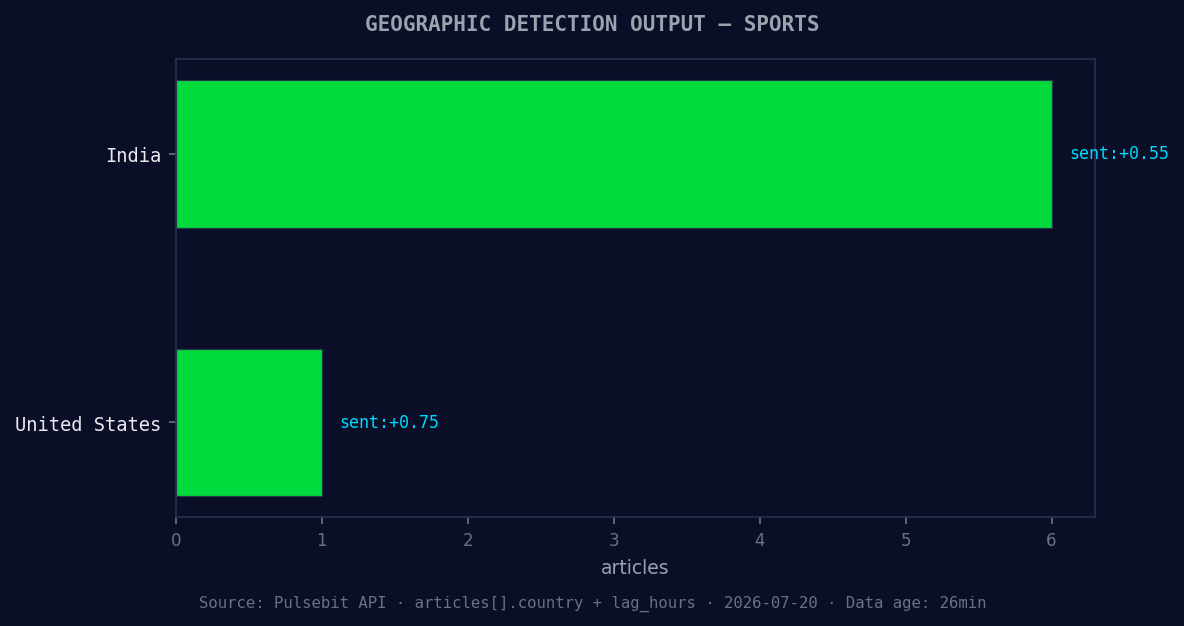
*Geographic detection output for sports. India leads with 6 articles and sentiment +0.55. Source: Pulsebit /news_recent geographic fields.*
# Check if we got the right sentiment data
if data['sentiment_score'] > 0.265 and data['momentum'] == 0.0:
print("Spike detected! Sentiment Score:", data['sentiment_score'])
# Step 2: Meta-sentiment moment
narrative = "Clustered by shared themes: preparations, sports, ministry, commonwealth, games."
meta_sentiment_response = requests.post(url, json={"text": narrative})
meta_sentiment_data = meta_sentiment_response.json()
print("Meta Sentiment Score for Narrative:", meta_sentiment_data['sentiment_score'])
The first API call filters by language to ensure we're only analyzing English-language articles. The second part of the code sends the cluster reason string through our sentiment endpoint to determine how the framing of the narrative itself scores.

Left: Python GET /news_semantic call for 'sports'. Right: returned JSON response structure (clusters: 3). Source: Pulsebit /news_semantic.
Three Builds Tonight
With this discovery, we can build out several specific signals that will enhance our monitoring capabilities:
Geo-filtered Sports Sentiment: Create an alert that triggers whenever sentiment scores for "sports" exceed +0.265 in English language sources. This will ensure you're always in the loop for emerging narratives.
Meta-Sentiment Analysis for Narrative Framing: Develop an endpoint that processes cluster reasons through our sentiment endpoint. This way, you can evaluate how the context of a narrative influences its perceived sentiment. Set a threshold to flag any scores that deviate significantly from the expected norm.
Forming Themes Monitor: Build a dashboard that tracks forming themes such as "sports(+0.00)," "google(+0.00)," and "new(+0.00)" against the mainstream entities. Use the API to continuously compare scores and notify when discrepancies arise, like when sports sentiment starts to diverge from mainstream discussions.
Get Started
Dive into our API documentation at pulsebit.lojenterprise.com/docs. You can copy-paste the code provided and run this in under 10 minutes. This approach can open up new avenues for real-time sentiment analysis in your projects.


Top comments (0)