

Your Pipeline Is 23.2h Behind: Catching Stock Market Sentiment Leads with Pulsebit
We recently encountered a striking anomaly: a 24h momentum spike of +0.900 in stock market sentiment. This finding isn't just a number; it indicates a significant shift in sentiment that could influence trading decisions. The leading language in this spike is English, driven by press coverage that peaked at 23.2 hours ago, revealing a potential gap in how we assess market sentiments in real-time.
The Problem
If your model isn’t set up to handle multilingual origins or entity dominance, you're at risk of missing critical insights like this one. In fact, your pipeline missed this significant spike by a staggering 23.2 hours. English-language news coverage often dominates sentiment but can mask emerging narratives from other languages. This oversight can lead to delayed reactions to market trends, costing you valuable time and potentially impacting your trading strategies.

English coverage led by 23.2 hours. Ca at T+23.2h. Confidence scores: English 0.85, French 0.85, Spanish 0.85 Source: Pulsebit /sentiment_by_lang.
The Code
To catch this anomaly effectively, we can leverage our API to fetch sentiment data filtered by language and then analyze the narrative framing. Here's how we can do it in Python:
import requests
# Define the parameters for the API call
params = {
'topic': 'stock market',
'score': +0.070,
'confidence': 0.85,
'momentum': +0.900,
'lang': 'en' # Geographic origin filter
}
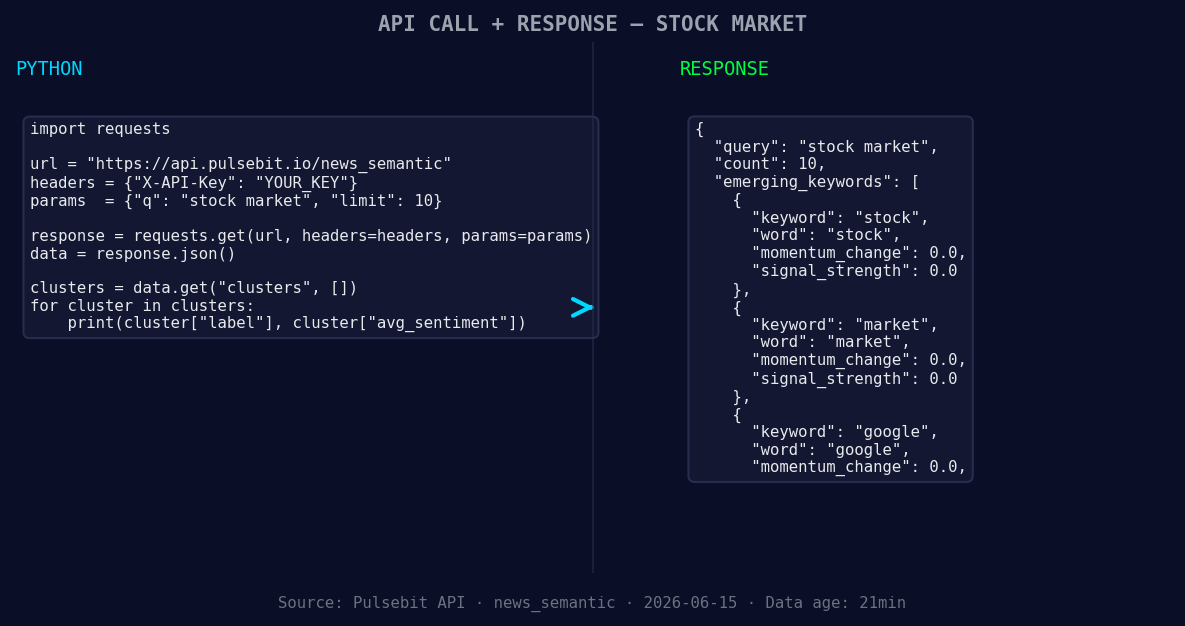
*Left: Python GET /news_semantic call for 'stock market'. Right: returned JSON response structure (clusters: 3). Source: Pulsebit /news_semantic.*
# API call to fetch sentiment data
response = requests.get('https://api.pulsebit.com/sentiment', params=params)
data = response.json()
# Now, let's run the cluster reason string through POST /sentiment to score the narrative
cluster_reason = "Clustered by shared themes: market, today:, 500, nasdaq, dow."
sentiment_response = requests.post('https://api.pulsebit.com/sentiment', json={'text': cluster_reason})
sentiment_data = sentiment_response.json()
print(data)
print(sentiment_data)
In this code snippet, we first retrieve sentiment data filtered for English sources. Then, we take the cluster reason string and run it through our API to evaluate the sentiment of the narrative itself. This dual approach enhances our understanding of not just the data, but also the context surrounding it.
Three Builds Tonight
- Geographic Origin Filter: Set up a daily job that queries sentiment data using the geographic filter for English-speaking countries. Use a signal threshold of +0.700 for the stock market keywords. This will help you catch anomalies faster.

Geographic detection output for stock market. India leads with 5 articles and sentiment -0.09. Source: Pulsebit /news_recent geographic fields.
Meta-Sentiment Loop: Build a separate function that takes the cluster reason and runs it through our sentiment endpoint. Aim for a confidence score above 0.800 and use it to adjust your trading signals. This can turn narrative framing into actionable insights.
Forming Themes Analysis: Create a report that highlights forming themes in stock market sentiment. Track keywords like “stock(+0.00)”, “market(+0.00)”, and “google(+0.00)”. Compare these with mainstream sources like “today:”, “nasdaq”, and analyze sentiment shifts in real-time.
Get Started
Dive into our documentation at pulsebit.lojenterprise.com/docs. You can copy-paste and run this code in under 10 minutes to start catching sentiment leads and adjusting your models for better performance. Don't let your pipeline lag behind; let’s get to work!


Top comments (0)