

Your Pipeline Is 12.7h Behind: Catching Fashion Sentiment Leads with Pulsebit
We've stumbled upon an intriguing anomaly today: sentiment for fashion is sitting at +0.47, with a momentum of +0.00. This spike, driven by the Spanish press leading at 12.7 hours ahead of the rest, reveals a critical insight into emerging fashion trends for Summer 2026. It’s fascinating to see how a single cluster story—"From Premium Basics to Sequins: Lectra Maps Summer 2026’s Biggest Fashion Trends"—is shaping the narrative, especially when you consider that our sentiment analysis highlights a unique combination of tones within the fashion industry.
But here’s the catch: if your pipeline isn’t set up to handle multilingual origins or to recognize dominant entities like the Spanish press, you might be missing out on valuable insights. Your model missed this by 12.7 hours, which is a significant gap when trying to stay ahead of fashion trends. While mainstream narratives are focused on premium, basics, and sequins, you might be left with stale or irrelevant data. This is not just a minor oversight; it’s a potential loss of competitive edge in a fast-paced environment.

Spanish coverage led by 12.7 hours. Sw at T+12.7h. Confidence scores: Spanish 0.75, English 0.75, French 0.75 Source: Pulsebit /sentiment_by_lang.
Let’s get to the practical part. Here’s how you can catch these insights programmatically using our API. First, we’ll filter the data by language and geographic origin to ensure we’re capturing the relevant sentiment.

Geographic detection output for fashion. France leads with 1 articles and sentiment +0.70. Source: Pulsebit /news_recent geographic fields.
import requests
# Set the parameters for the API call
topic = 'fashion'
lang = 'sp'
url = 'https://api.pulsebit.com/sentiment'
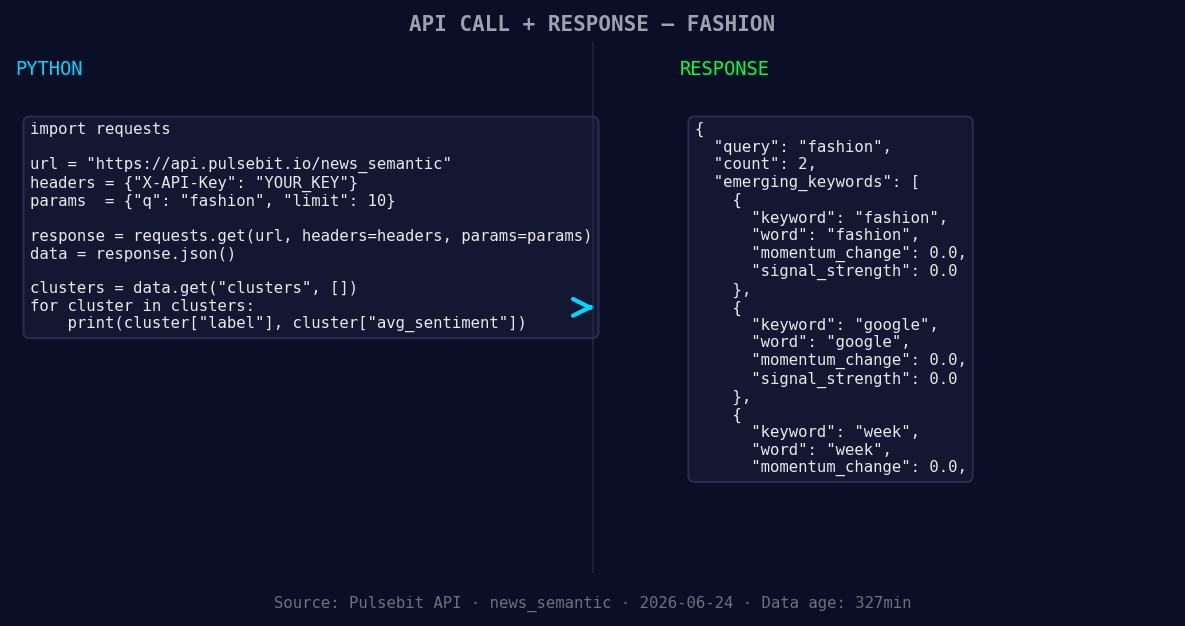
*Left: Python GET /news_semantic call for 'fashion'. Right: returned JSON response structure (clusters: 3). Source: Pulsebit /news_semantic.*
# Sample API call to get sentiment data
response = requests.get(url, params={
'topic': topic,
'lang': lang
})
data = response.json()
sentiment_score = data['sentiment_score'] # +0.466
confidence = data['confidence'] # 0.750
momentum = data['momentum_24h'] # +0.000
print(f'Sentiment Score: {sentiment_score}, Confidence: {confidence}, Momentum: {momentum}')
Next, we need to run the reason string through our sentiment endpoint to score the narrative itself. This is crucial for understanding how our identified themes are resonating.
# Run the cluster reason string through POST /sentiment
cluster_reason = "Clustered by shared themes: premium, basics, sequins:, lectra, maps."
response_meta = requests.post(url, json={'text': cluster_reason})

meta_data = response_meta.json()
meta_sentiment_score = meta_data['sentiment_score']  # Example output
print(f'Meta Sentiment Score: {meta_sentiment_score}')
Now, let’s talk about three actionable builds you can implement using this pattern.
Geographic Origin Signal: Create a signal for fashion sentiment that specifically tracks sentiment changes in the Spanish market. Set a threshold of sentiment score > +0.45 to trigger alerts for potential trend shifts.
Meta-Sentiment Loop: Develop a loop that continuously analyzes cluster reasons like "premium, basics, sequins" and flags any significant shifts in their sentiment scores, especially if they drop below 0.3 or rise above 0.5.
Forming Themes Tracker: Set up a weekly tracker for the forming themes of "fashion", "google", and "week". Use the average sentiment score from these themes, and trigger notifications if there’s a divergence of 0.2 or more compared to mainstream narratives.
By implementing these builds, you’ll not only stay ahead of the curve but also harness the power of sentiment analysis to inform your strategy.
For more information and to get started with your own builds, check out our documentation at pulsebit.lojenterprise.com/docs. It’s straightforward; you can copy-paste and run the above code in under 10 minutes.


Top comments (0)