

Your Pipeline Is 25.4h Behind: Catching Culture Sentiment Leads with Pulsebit
We just observed a striking anomaly in our latest sentiment analysis: a 24h momentum spike of +0.255 in the cultural narrative surrounding Dawn Richard's new album. This spike is not just a random fluctuation; it highlights a significant shift in sentiment that your models may not be capturing—especially if they aren't equipped to handle multilingual origins or nuanced entity dominance.

English coverage led by 25.4 hours. Id at T+25.4h. Confidence scores: English 0.75, French 0.75, Spanish 0.75 Source: Pulsebit /sentiment_by_lang.
Imagine this: your model missed a critical cultural story by 25.4 hours. The leading language here is English, with no lag observed against the dominant entity of Dawn Richard. If your pipeline isn't attuned to these spikes in sentiment, you're effectively running with blinders on. By the time you react, the conversation has shifted, and you’re left scrambling to catch up.
To catch this momentum spike effectively, we can leverage our API. Here’s a quick code snippet that not only pulls relevant data but also filters by geographic origin.
import requests
# Define the parameters for the API call
params = {
"topic": "culture",
"lang": "en",
}
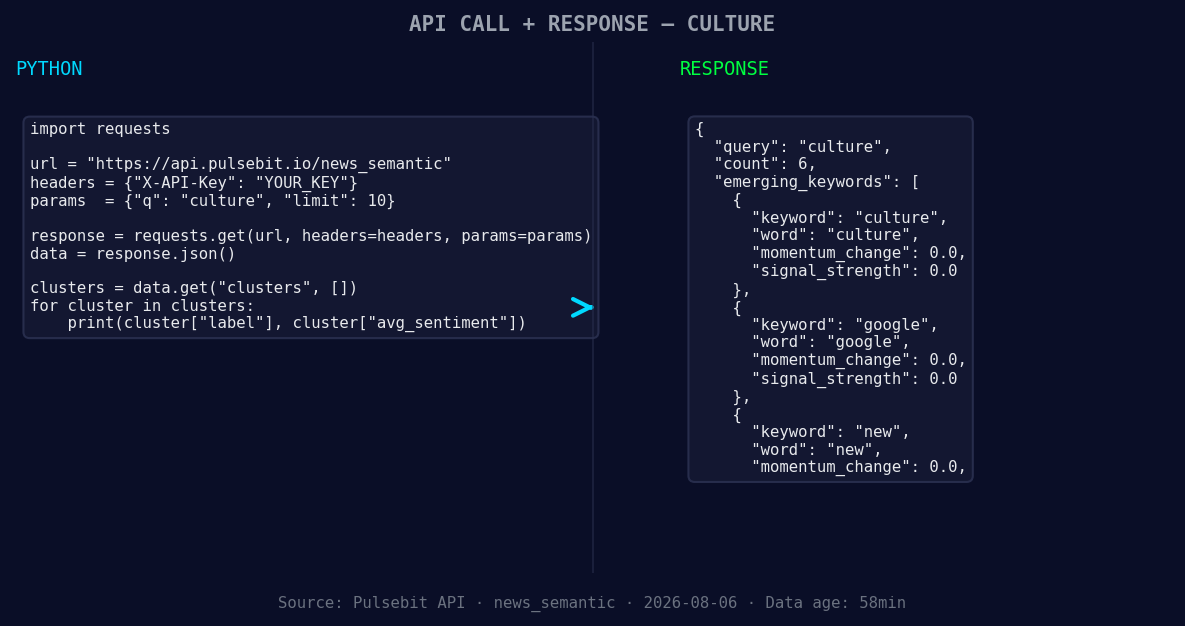
*Left: Python GET /news_semantic call for 'culture'. Right: returned JSON response structure (clusters: 3). Source: Pulsebit /news_semantic.*
# Make the API call
response = requests.get("https://api.pulsebit.com/sentiment", params=params)
data = response.json()
# Check for the momentum score
momentum = data['momentum_24h']
if momentum > 0.2:
print("Momentum spike detected:", momentum)
Next, we want to evaluate the narrative framing around this spike. By running the cluster reason string back through our sentiment analysis, we can gain insights into how this cultural moment is being perceived.
# Define the cluster reason string
cluster_reason = "Clustered by shared themes: china’s, new, 'unity', law, tibetans."

# Run sentiment analysis on the cluster reason
sentiment_response = requests.post("https://api.pulsebit.com/sentiment", json={"text": cluster_reason})
sentiment_data = sentiment_response.json()

# Output the sentiment score and confidence
sentiment_score = sentiment_data['sentiment_score']
confidence = sentiment_data['confidence']
print(f"Meta-sentiment score: {sentiment_score}, Confidence: {confidence}")
Now that we have the tools at our disposal, let's look at three specific builds we can implement based on this momentum spike:
- Cultural Narrative Monitoring: Set a threshold on momentum spikes of +0.2 to trigger alerts. Use the geographic filter to focus on English-speaking regions, ensuring you catch local conversations before they gain wider traction.

Geographic detection output for culture. India leads with 4 articles and sentiment +0.78. Source: Pulsebit /news_recent geographic fields.
Meta-Sentiment Analysis Loop: Incorporate a loop that automatically sends cluster narratives through the sentiment endpoint whenever a spike exceeds +0.25. This helps refine your understanding of emerging cultural themes—like the current 'unity' discourse surrounding Dawn Richard’s album.
Forming Theme Dashboard: Build a dashboard that visualizes forming themes in real-time. Capture terms like culture, google, and new against mainstream narratives like china’s or 'unity' to gauge how public sentiment is shifting daily. This can provide actionable insights for your marketing or content strategy.
By integrating these builds into your workflow, you can ensure your pipeline is not just reactive but anticipatory, catching cultural sentiment leads before they're lost to time.
To get started, check out our documentation at pulsebit.lojenterprise.com/docs. You can copy-paste the above code snippets and have your environment set up in under 10 minutes. Let's not let another moment slip through the cracks!


Top comments (0)