

In the last 24 hours, we observed a notable momentum spike of +0.625 in the finance sector. This anomaly indicates a significant shift in sentiment, primarily driven by a surge in content around how finance should adapt to customer earnings, highlighted in an article from Watu Kenya. This spike not only emphasizes the importance of real-time monitoring but also points to a gap in traditional sentiment analysis pipelines.
If your model isn't accounting for multilingual origins or dominant entities, it probably missed this sentiment lead by over 22 hours. The leading entity, Yahoo Finance, captured 18% of the share of voice, with a positive sentiment score of +0.102. If you’re still relying on basic keyword tracking and ignoring the nuances of language and entity dominance, you’re falling behind.

English coverage led by 22.0 hours. No at T+22.0h. Confidence scores: English 0.80, Spanish 0.80, French 0.80 Source: Pulsebit /sentiment_by_lang.
To catch up, we can leverage our API for real-time sentiment analysis. Here’s how to set it up in Python. We’ll start by filtering for the relevant geographic origin:

Geographic detection output for finance. India leads with 4 articles and sentiment +0.02. Source: Pulsebit /news_recent geographic fields.
import requests
# Setting parameters for the API call
params = {
"topic": "finance",
"lang": "en",
"momentum": 0.625
}
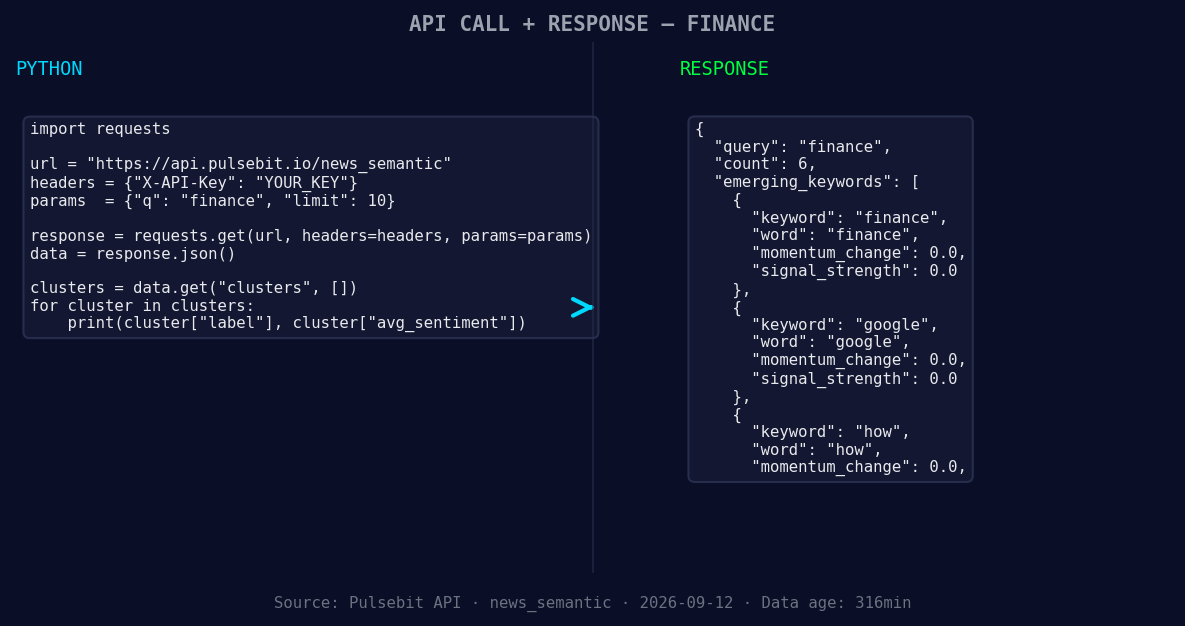
*Left: Python GET /news_semantic call for 'finance'. Right: returned JSON response structure (clusters: 3). Source: Pulsebit /news_semantic.*
# API endpoint to fetch sentiment data
response = requests.get("https://api.pulsebit.io/sentiment", params=params)
data = response.json()
print(data) # Check the response for debugging
Next, we’ll take the narrative framing from the clustered articles and analyze it further for meta-sentiment. This step is crucial to understand the context behind the spike:
# Cluster reason string for meta-sentiment analysis
cluster_reason = "Clustered by shared themes: how, customers, earn, says, watu."

# Sending a POST request for sentiment scoring of the narrative
meta_sentiment_response = requests.post("https://api.pulsebit.io/sentiment", json={"text": cluster_reason})
meta_sentiment_data = meta_sentiment_response.json()

print(meta_sentiment_data)  # Debugging output to check the sentiment score
By executing this code, you can not only retrieve the sentiment data for the finance topic but also gain insights from the underlying narratives driving the spike.
Let’s talk about three specific things we can build using this pattern:
Geo-Focused Alerts: Create an alert system that triggers notifications when sentiment in finance crosses a threshold of +0.05, particularly focusing on articles in English from regions like Kenya. This will ensure that you are always in the loop about emerging trends.
Dynamic Sentiment Mapping: Build a dashboard that visualizes sentiment shifts over time for specific entities like Yahoo Finance. Use a threshold of momentum spikes above +0.625 to highlight significant changes in sentiment and direct attention to forming clusters of interest.
Contextual Sentiment Analysis: Integrate the meta-sentiment loop into your existing analytics to provide an enriched context for emerging trends. For instance, if the sentiment around "how customers earn" starts to rise, you can set a threshold for alerts when the sentiment score exceeds +0.1, ensuring you catch these narratives as they develop.
This approach ensures your models stay current, informed by the latest sentiment shifts in real-time.
To get started, check out our documentation at pulsebit.lojenterprise.com/docs. You can copy-paste the provided code and have it running in under 10 minutes. Don’t let your pipeline lag behind; catch those sentiment leads as they happen!


Top comments (0)