

Your Pipeline Is 22.9h Behind: Catching Business Sentiment Leads with Pulsebit
We just uncovered a significant anomaly in our data: a 24h momentum spike of +0.350. This spike isn't just a minor fluctuation; it indicates a rising sentiment around business topics, particularly linked to the BRICS nations advocating for payment systems and local currency trading. With 12% share of voice attributed to Africa and a positive sentiment score of +0.428, we can see a noteworthy shift in discussions that could impact investment and partnership decisions.
But here's the catch: if your pipeline isn't set up to handle multilingual origin or recognize dominant entities, you're missing out. Your model could have missed this spike by a staggering 22.9 hours, led primarily by English press coverage. If you're working with sentiment data that doesn't account for these nuances, you're at risk of being several steps behind the curve.

English coverage led by 22.9 hours. Da at T+22.9h. Confidence scores: English 0.90, Spanish 0.90, Id 0.90 Source: Pulsebit /sentiment_by_lang.
Let’s dive into how we can programmatically catch this momentum spike using our API.
import requests
# Define our parameters
topic = 'business'
score = -0.700
confidence = 0.90
momentum = +0.350
language_filter = "en"
# Step 1: Geographic origin filter
response = requests.get(
f"https://api.pulsebit.com/v1/sentiment?topic={topic}&lang={language_filter}&momentum={momentum}&confidence={confidence}"
)
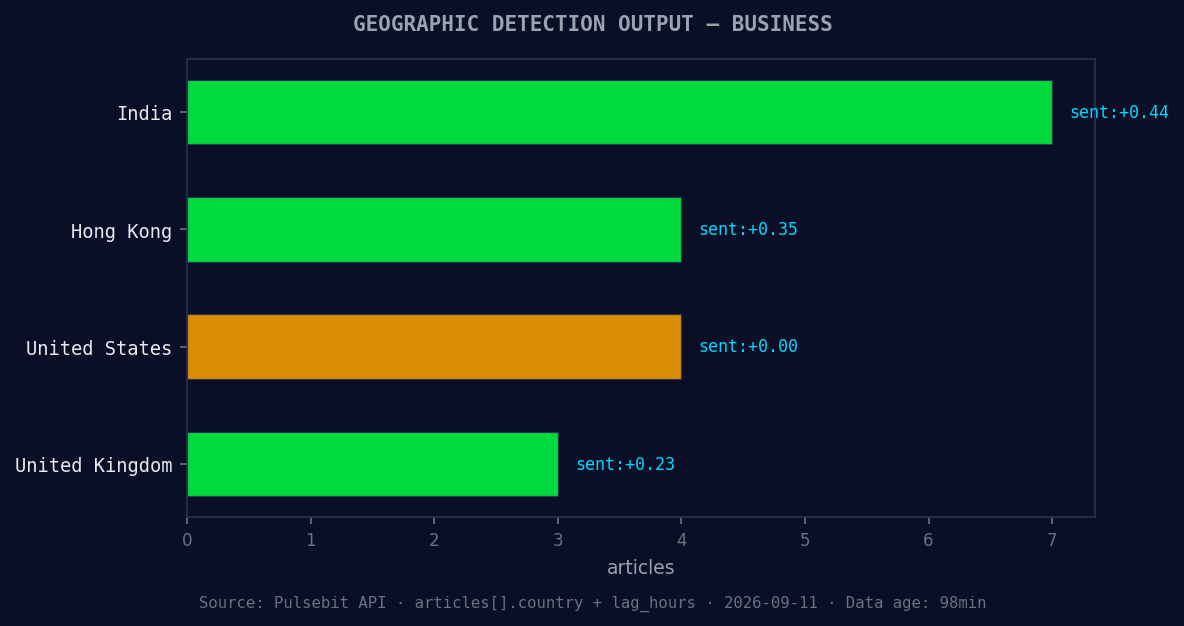
*Geographic detection output for business. India leads with 7 articles and sentiment +0.44. Source: Pulsebit /news_recent geographic fields.*
data = response.json()
# Step 2: Meta-sentiment moment
cluster_reason = "Clustered by shared themes: brics, business, forum, global, nations."
sentiment_response = requests.post(
"https://api.pulsebit.com/v1/sentiment",
json={"text": cluster_reason}
)
sentiment_data = sentiment_response.json()
print(data)
print(sentiment_data)
In the code above, we first filter our results by language and topic, capturing that significant spike in momentum. The API call to GET /sentiment allows us to focus exclusively on English-language articles that discuss business, while also leveraging the momentum and confidence parameters.

Left: Python GET /news_semantic call for 'business'. Right: returned JSON response structure (clusters: 3). Source: Pulsebit /news_semantic.
Next, we run the narrative framing through our sentiment analysis using the POST /sentiment endpoint, which helps us gauge the emotional context behind the cluster reason. This step is crucial for understanding the sentiment landscape surrounding the keywords like "BRICS," "business," and "global."
Now, what can we build with this newfound insight?
Sentiment Alert System: Build an alert system that triggers when momentum exceeds a threshold of +0.300 for specific topics. This could include a geo filter to focus on English-language outputs from Africa, ensuring you're capturing sentiment shifts that matter most to your regional stakeholders.
Meta-Sentiment Reports: Create a report generator that utilizes the meta-sentiment analysis we ran. Set a threshold where only narratives with a positive sentiment score above +0.300 are flagged for review, allowing your team to focus on the most promising business discussions.
Cluster Analysis Dashboard: Develop a dashboard that visualizes how different entities (like BRICS nations) relate to business sentiment over time. Use the
GET /sentimentendpoint to pull data and visualize forming themes such as "business," "growth," and "global" against mainstream narratives.
We invite you to explore these endpoints and build your own sentiment analysis tools. You can get started with our API documentation at pulsebit.lojenterprise.com/docs. With just a few lines of code, you can copy-paste and run this in under 10 minutes, ensuring you're not left behind in the fast-paced world of business sentiment analysis.


Top comments (0)