

Your Pipeline Is 27.9h Behind: Catching Business Sentiment Leads with Pulsebit
We recently observed a remarkable anomaly: a 24h momentum spike of +0.700 in business sentiment. This isn't just a random uptick; it represents a significant shift in sentiment that could offer insights into emerging trends. The leading language driving this spike was English, with an impressive 27.9-hour lead time, indicating that any model unaware of multilingual origin or entity dominance could easily miss this critical insight.

English coverage led by 27.9 hours. So at T+27.9h. Confidence scores: English 0.85, French 0.85, No 0.85 Source: Pulsebit /sentiment_by_lang.
How does this affect you? If your pipeline isn’t equipped to handle such nuances, your model missed this insight by almost 28 hours. You might be stuck with outdated sentiment based on earlier, less relevant news, while current developments pass you by. In this instance, the dominant entity was the English press, which is crucial for real-time sentiment analysis.
Let’s dive into some Python code to catch this spike effectively. We’ll focus on two key elements: filtering by geographic origin and scoring the narrative’s sentiment.
import requests
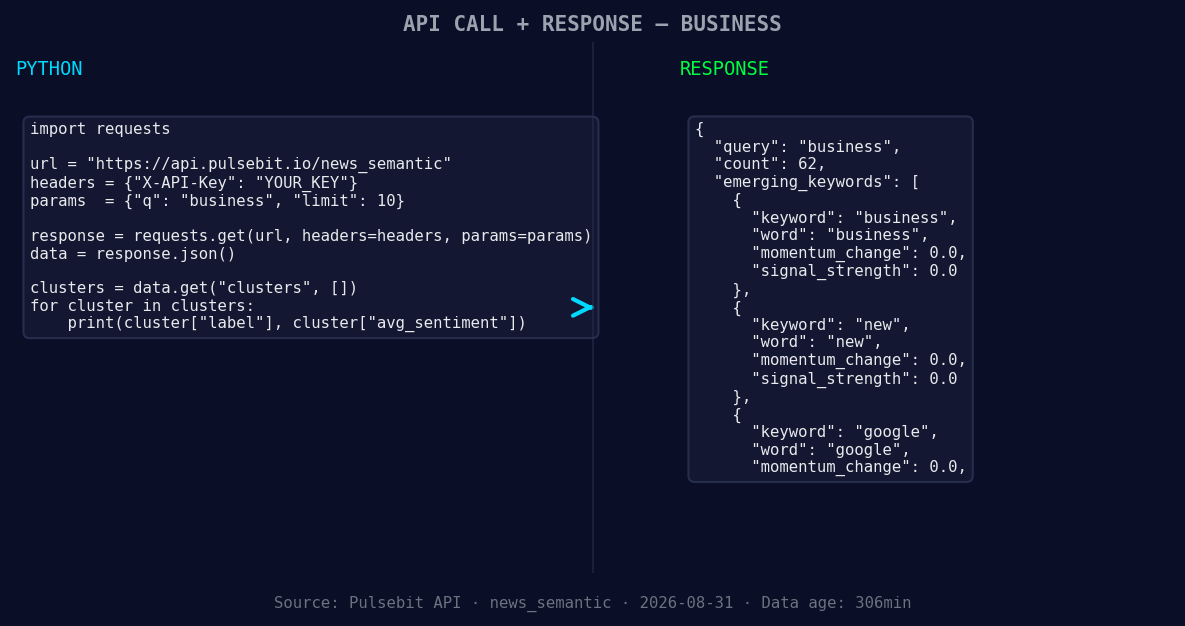
*Left: Python GET /news_semantic call for 'business'. Right: returned JSON response structure (clusters: 3). Source: Pulsebit /news_semantic.*
# Step 1: Geographic origin filter
url = "https://api.pulsebit.com/v1/sentiment"
params = {
"topic": "business",
"lang": "en", # Filter for English language
"momentum": 0.700,
"score": 0.005,
"confidence": 0.85
}
response = requests.get(url, params=params)
data = response.json()
print(data)
# Step 2: Meta-sentiment moment
cluster_reason = "Clustered by shared themes: college, football, field, into, farm."
sentiment_response = requests.post(url, json={"text": cluster_reason})
sentiment_data = sentiment_response.json()
print(sentiment_data)
In this code snippet, we first filter by the English language using our API. This ensures the data we analyze is relevant and timely. Next, we run the cluster reason string back through our sentiment endpoint, which allows us to understand how the themes around college, football, and farming are influencing sentiment. This dual approach ensures we capture both the momentum and the narrative framing.
Now that we have this powerful insight, here are three specific builds we can implement based on this pattern:
- Geographic Sentiment Dashboard: Create a dashboard that visualizes sentiment changes in real-time. Use a signal threshold of +0.700 as the alert for significant shifts in business sentiment. Filter data by country or region to ensure you capture local nuances.

Geographic detection output for business. India leads with 2 articles and sentiment +0.80. Source: Pulsebit /news_recent geographic fields.
Meta-Sentiment Analysis Tool: Build a tool that integrates the meta-sentiment loop. Whenever a significant cluster is identified, run the cluster reason through the sentiment endpoint. This will help you identify not just what is trending, but how the narratives are framing those trends, particularly with emerging themes like "business," "new," and "Google."
Anomaly Alert System: Develop a system that alerts you when momentum spikes exceed +0.700. Pair this with an analysis of forming themes, ensuring you are aware of shifts in sentiment around mainstream topics like college and football. This will help you stay ahead of the curve in a rapidly changing business landscape.
If you’re ready to get started, check out our documentation at pulsebit.lojenterprise.com/docs. With just a few copy-paste actions, you can have this code running in under 10 minutes, allowing you to catch leads in business sentiment before they become obvious to everyone else.


Top comments (0)